Question

Enforce pre-save validation of values in Assyst using destinations and ETM

  • Oct 15, 2026 10:22 PM UTC
  • 2 replies
  • 22 views

Forum|alt.badge.img+10

Hi!

I'm trying to understand whether I've interpreted the following wiki article correctly, particularly the section on exception handling and validation: External Messaging System: ExceptionHandling


My understanding is that it should be possible to implement validation of "allowed values" at attempted save of resources, actions, etc. by injecting validation from ETM:

  1. Configuring a Validation and Wait for Response destination which contains.
  2. Having an ETM destination channel listen on that validation queue.
  3. Returning a response from a Message Bus Response datamapper that contains a validation error such that the action then fails validation.

Is that interpretation correct?

My use case is an Action destination with a filter along these lines:
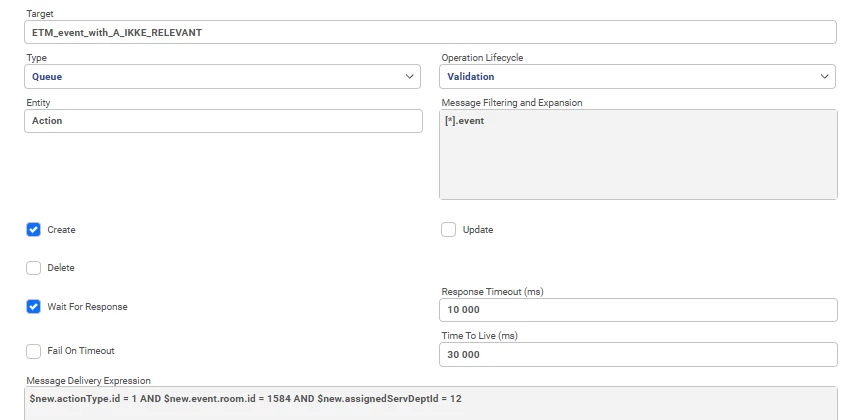
 

The destination itself is working as expected and ETM successfully receives the message. Where I'm struggling is understanding how the concepts described in the wiki map to the ETM datamapping.

Specifically, I want the channel to immediately respond to assyst as to fail validation and return an error to assyst, preventing the assignment from continuing. This would allow agents to be prompted to review and correct the event location before assigning the event to an on-site support department.

However, I can't seem to get the datamapping correct, and it feels like I'm missing something obvious in how the terminology used in the wiki article is intended to translate into ETM datamapping.

  • Should the validation error be returned in the response headers or in the response body?
  • What does the response need to look like for assyst to treat it as a validation failure?
  • Has anyone implemented this pattern using ETM Response datamappers who could provide an example?


Any guidance would be greatly appreciated.

2 replies

SGrant89
Hero (Employee)
Forum|alt.badge.img+7
  • Hero (Employee)
  • Oct 22, 2026 1:03 PM UTC

The AMQ Response Datamapper for the Channel needs to set the response header “validationError”, containing an XML String (Similar to the example in the wiki). Ensure that the Destination Channel Response settings are changed to “Wait for Import Completion”.

Unable to share screenshots currently, however an example of the AMQ response mapper could be:

  • variable - validationErrorString
    • This is where you set the XML String. If you have a version of ETM where you can enter a velocity expression, this is easiest.
    • eg. 
      <?xml version="1.0" encoding="UTF-8" standalone="yes"?>
      <validationError>
      <errors>
      <error>
      <field>shortCode</field>
      <message>Short Code is an invalid value</message>
      <rule>isInvalidShortCode</rule>
      </error>
      </errors>
      <message>Validation has failed</message>
      </validationError>
  • Response Headers
    • ({
      "validationError": variables.validationErrorString
      })
  • Body
    • I don’t believe this needs to have a specific value, so any String value should be fine. eg. “Validation response”

Forum|alt.badge.img+10

The AMQ Response Datamapper for the Channel needs to set the response header “validationError”, containing an XML String (Similar to the example in the wiki). Ensure that the Destination Channel Response settings are changed to “Wait for Import Completion”.

Unable to share screenshots currently, however an example of the AMQ response mapper could be:

  • variable - validationErrorString
    • This is where you set the XML String. If you have a version of ETM where you can enter a velocity expression, this is easiest.
    • eg. 
      <?xml version="1.0" encoding="UTF-8" standalone="yes"?>
      <validationError>
      <errors>
      <error>
      <field>shortCode</field>
      <message>Short Code is an invalid value</message>
      <rule>isInvalidShortCode</rule>
      </error>
      </errors>
      <message>Validation has failed</message>
      </validationError>
  • Response Headers
    • ({
      "validationError": variables.validationErrorString
      })
  • Body
    • I don’t believe this needs to have a specific value, so any String value should be fine. eg. “Validation response”

Thank you very much for the examples. I have been able to verify that this works.

Comparing my approach with the provided example helped me identify the issue i was having. The problem was in how I was constructing the response headers themselves, as I was attempting to build the XML directly in the Response Headers field and did not get the syntax correct. Using a separate variable field, with Velocity as the expression type to construct the XML, resolved the issue.


Since I was able to get this working, I thought it would be useful to document the final solution here in case it helps others facing a similar issue.

In my testing of the proposed datamapping, all i had to do was to modify the XML slightly. By adding a second <error> element, I was able to highlight both fields in the Event Logging form.

<?xml version="1.0" encoding="UTF-8" standalone="yes"?>
<validationError>
<errors>
<error>
<field>building</field>
<message>building is an invalid value</message>
<rule>isInvalidLocationForLocalSupport</rule>
</error>
<error>
<field>assignedServDept</field>
<message>assignedServDept highlight for invalid value</message>
<rule>isInvalidLocationRuleWithNoMatchingLabel</rule>
</error>
</errors>
<message>Validation has failed</message>
</validationError>

Combined with a label 

server.validation.errors.isInvalidLocationForLocalSupport

with the Value:

Validation rule {0} : Building can not be "Not relevant" when assigning events to Local Support

I was able to get what i needed:

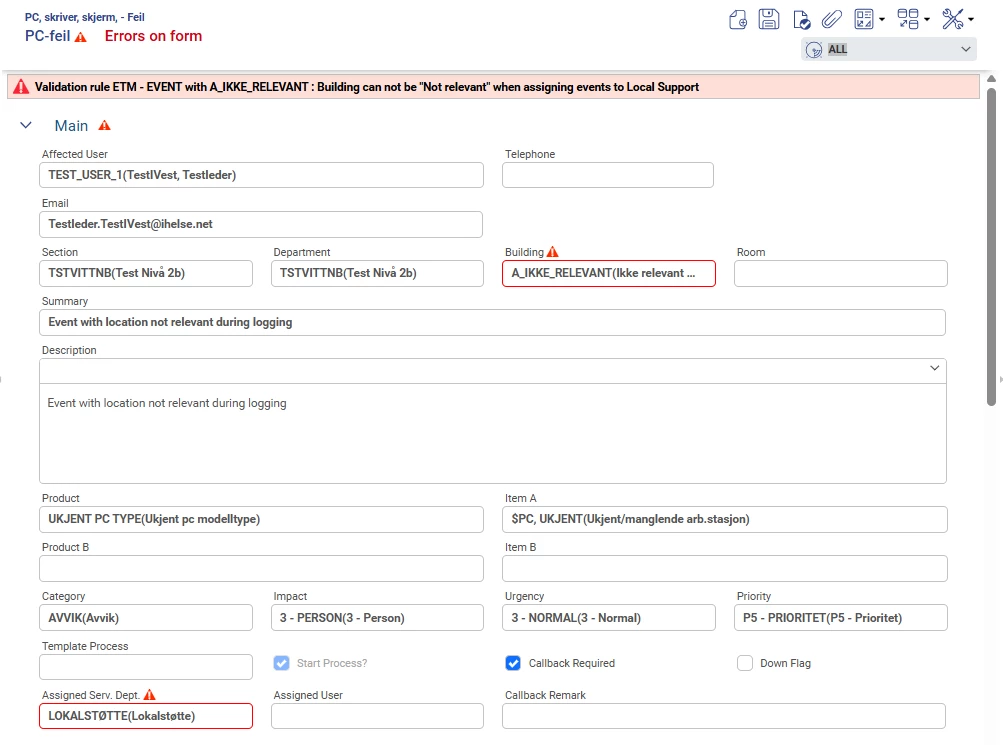
Validation highlighting during event logging
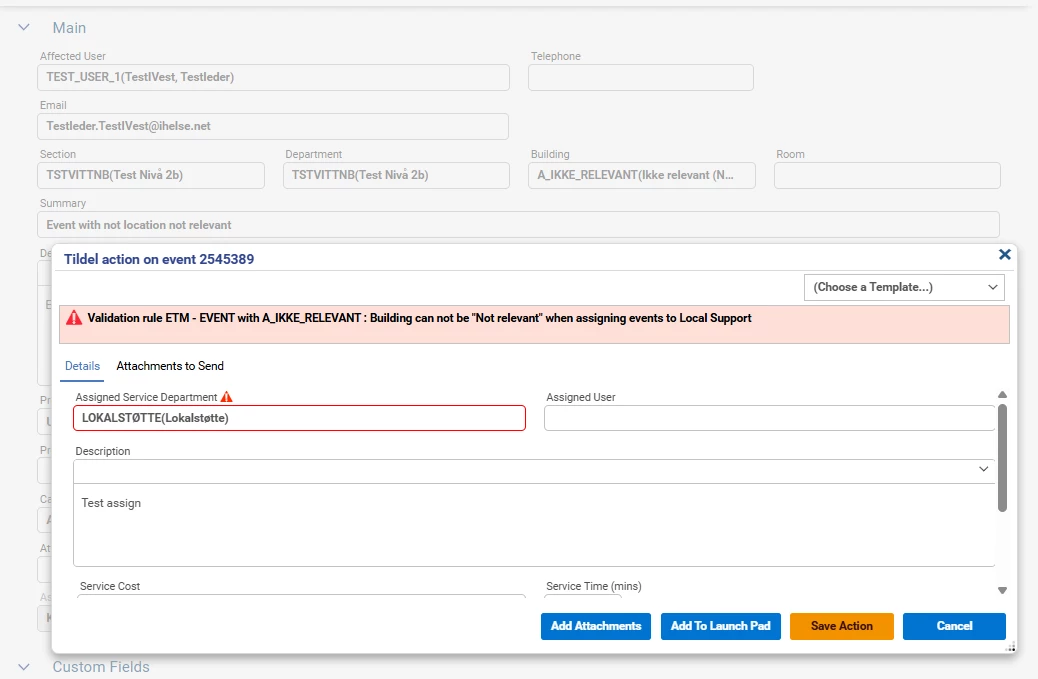
Validation highlighting during assignment

I'm assuming the difference in highlighting behaviour is because the building field is available in the Event Logging context, but not in the Assignment action context.


However, I have one remaining question. Is there any issue with using the same validation XML for both initial event creation and event assignment, even when some of the referenced fields are not available in the current context? Or would it be considered best practice to tailor the response so that Event Creation and Assignment return validation errors only for fields that are present in their respective contexts?

For example, when an assignment is being performed, if validation still return a validation error for the building field, even though that field is not visible within the Assignment action itself, is this simply ignored by assyst, or can referencing fields that are not present in the current context cause exceptions, unexpected behaviour, or other issues behind the scenes? On the surface it seems to work fine to include the extra fields but I’m not sure if this is intended behaviour.