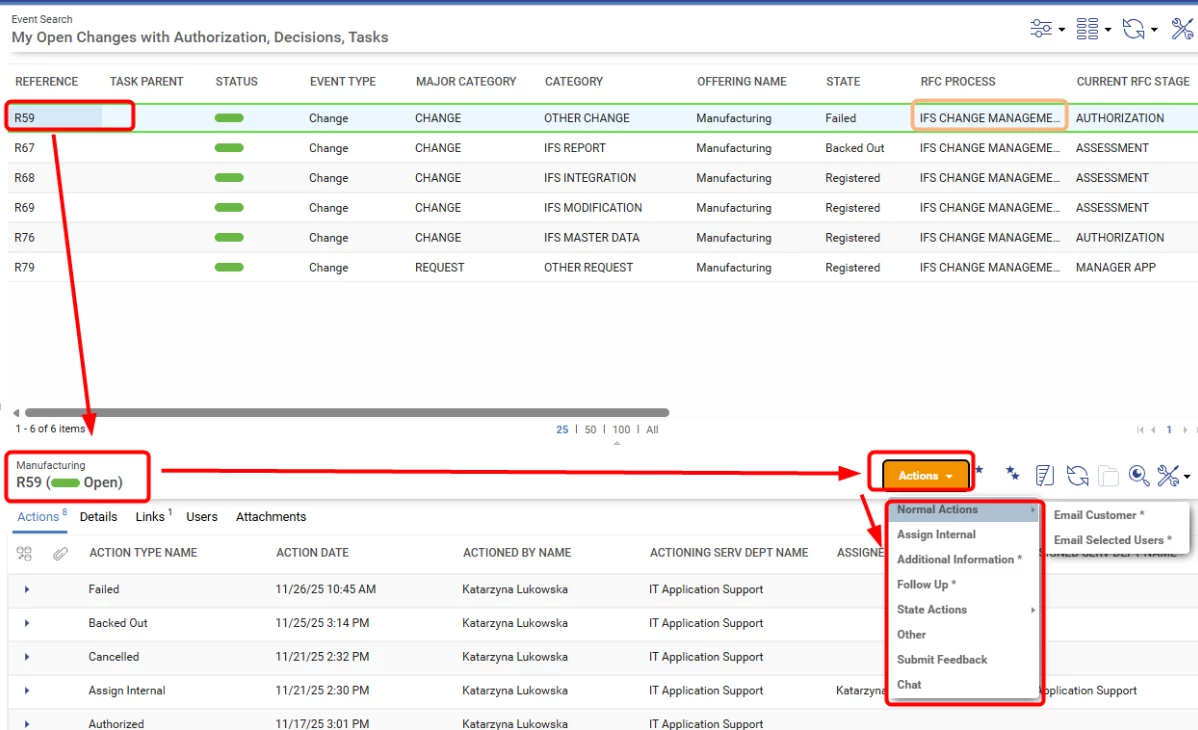
I'm building a workflow and while doing so, I was testing the process partially, meaning I built part of it and without providing the ending to the process I ran the test to see how the event and its details are created and populated. Unfortunately, as I did so without end of process, currently I am unable to close those event as action "Close" is not available in my actions list.
Could you help how to solve this and close those events? What is the Close action dependent on to allow user to close the event? What are the conditions for Closing the Event? And what are general conditions on the system actions whether they are available or not?
Thank you very much in advance for your help.
Best answer by KatarzynaPrae
Hello Richard!
Thank you so much for providing such an extensive suggestions! I have verified all of it and all of it are in place. But I did manage to find out how to fix my situation.
Will leave below solution, as maybe will be useful for others :)
My problem occurred due to lack of the Stage at the end of the designed process (when designing a process it is a condition to have at the last always a Stage). After removing this process, the Change/Incident kept it, but it was not available anymore in the Process Designer, so I was not able to make any change or continue with process.
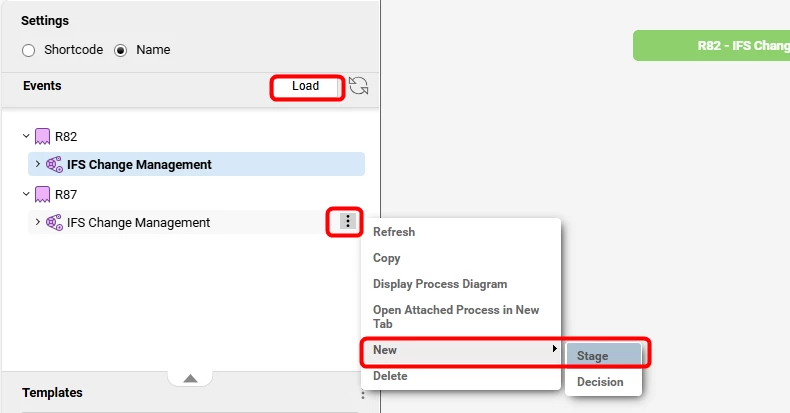
To solve it, I had to load a Change/Incident in the Process Designer and at the level of Change/Incident I was able to add a single Stage Action Type with system defined action of Closing the Event.
I’m no expert on this matter, but I believe I might be able to help point you in the right direction.
There are a few things that decide whether an assystUser can see or use an action in assyst. If an action can’t be performed because of privileges, service department action types, restrictions from the assigned supplier, ect., it simply won’t show up in the Actions list.
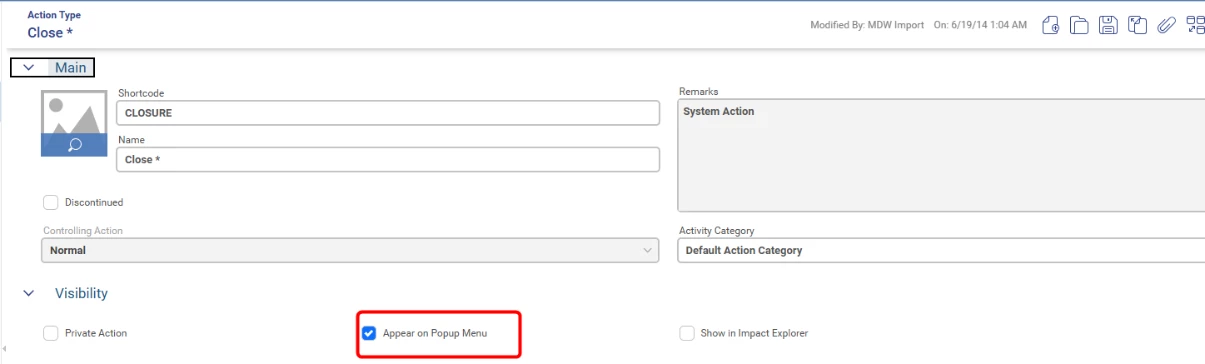
First, check that the service department has the Closure action set up as an available action type. You can do this either on the Service Department form or on the Action Type form.
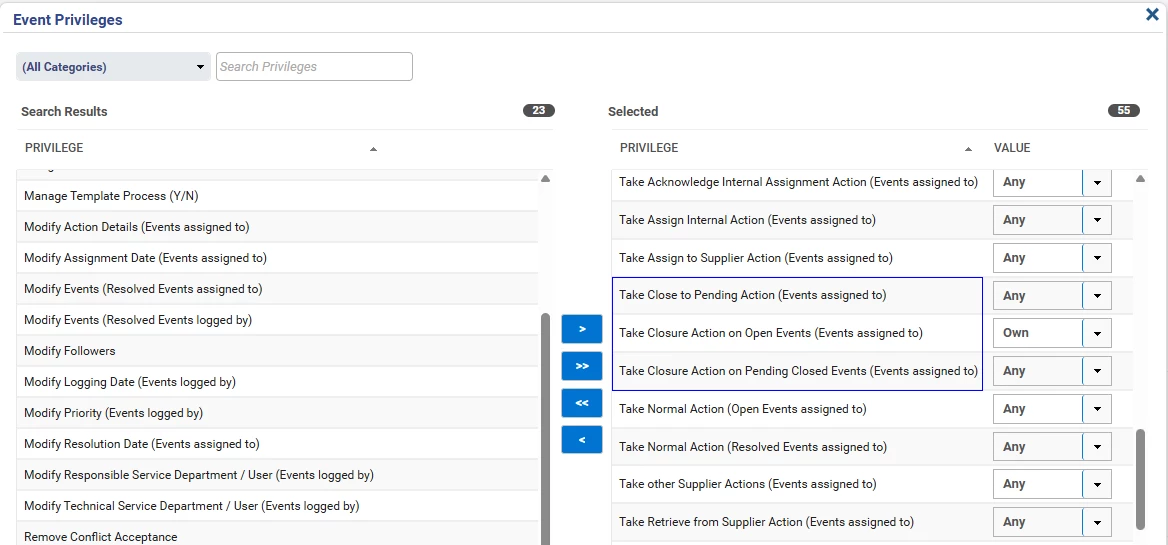
If that looks good, the next thing to check is whether the user has the right privileges and the desired ANY/OWN values for these priviledges. The relevant priviledges here are:
Take Closure Action on Open Events (Events assigned to) (this lets a user effectively skip Pending Closed if provided)
Take Closure Action on Pending Closed Events (Events assigned to) (this lets a user close the event after a pending closure has been registrered)
Take Close to Pending Action (Events assigned to) (this lets a user resolve the event, and making it availble to then be formaly closed by a Closure action)
For example, if a user only has the Take Closure Action on Pending Closed Events (Events assigned to OWN) , they won’t see the Close action for open events. Likewise, if the event is in pending closure and assigned to a service department where the user isn’t a primary or secondary member, the action won’t appear.
If this does not resolve the issue you’re having then there are other more special conditions and settings which can affect this, so if you want the full picture, check the System Action List in the wiki, link below. Look at the notes column for CLOSURE and PENDING-CLOSURE actions.
Here is the link to the System Action list, and some other related useful articles:
Thank you so much for providing such an extensive suggestions! I have verified all of it and all of it are in place. But I did manage to find out how to fix my situation.
Will leave below solution, as maybe will be useful for others :)
My problem occurred due to lack of the Stage at the end of the designed process (when designing a process it is a condition to have at the last always a Stage). After removing this process, the Change/Incident kept it, but it was not available anymore in the Process Designer, so I was not able to make any change or continue with process.
To solve it, I had to load a Change/Incident in the Process Designer and at the level of Change/Incident I was able to add a single Stage Action Type with system defined action of Closing the Event.