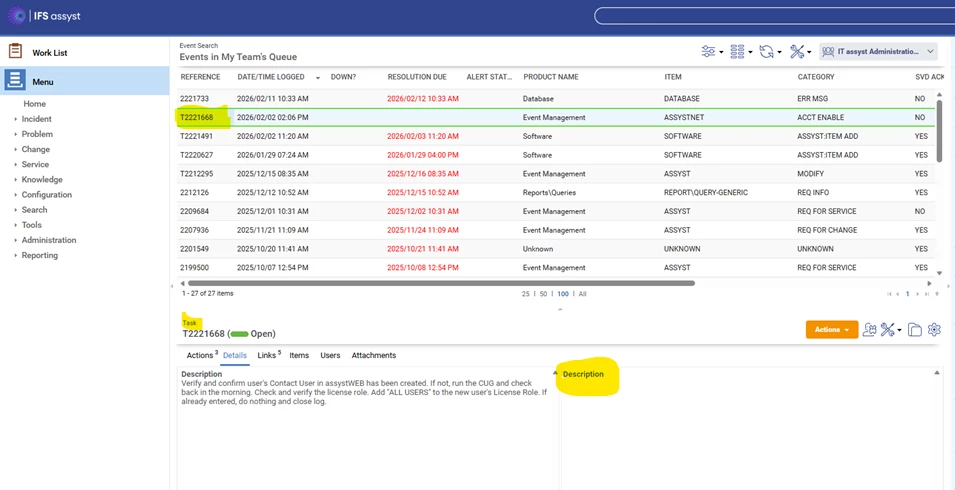
We recently upgraded from 11.5 to 11.8.4. We are experiencing a weird issue. When viewing in the queue, the task description shows but the parent log information (description) no longer shows, and it used to. This is for new and older tickets, we cannot see it.
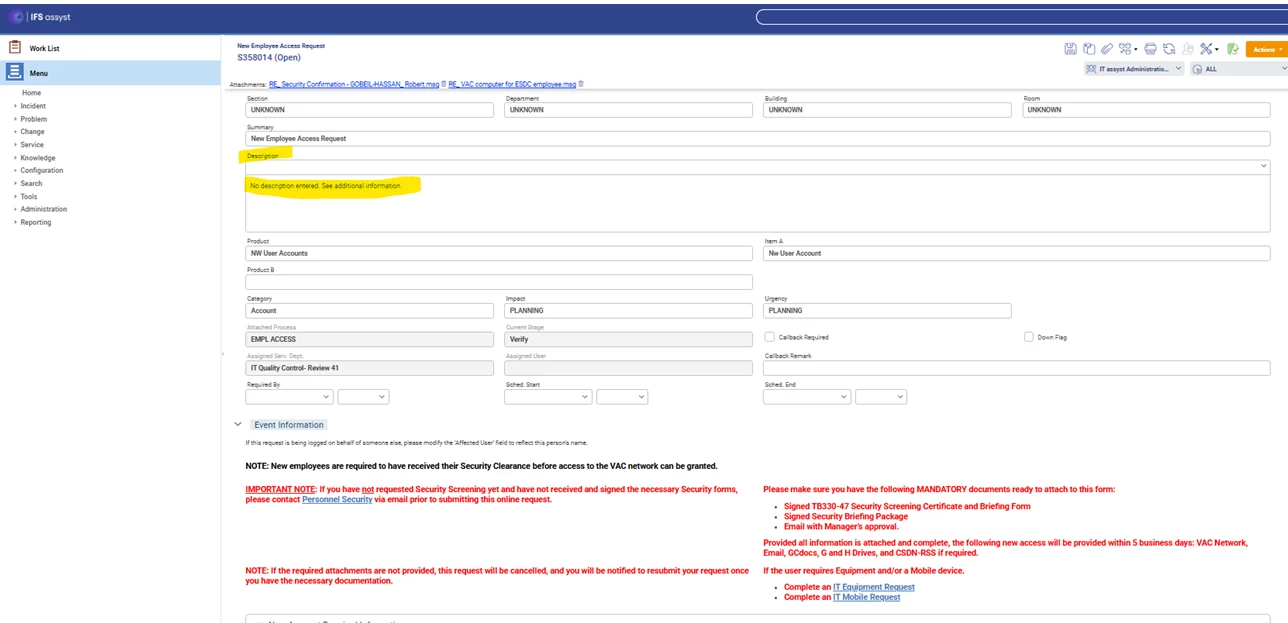
If we open the parent ticket, we can see the information but not in this view for some reason.
Here’s what it looks like when you open the parent
We were told by IFS that “You need to change description replace “ Additional information with” additional information”(replace uppercase A with lowercase a) and save it”
We don’t know where to change this or find where the issue is. They said its a known issue P1640.
Does anyone have a work around for this or can tell us where to find this location to try this change?
Best answer by CHRISTALM
Hello Christal,
I understand that our support team has continued to liaise with you regarding this matter and confirmed that the issue in your case is not associated with P16404. Following the most recent session with my colleague, it appears you were able to implement a successful workaround.
If you have any other queries or need further support, feel free to get in touch. Thank you for your engagement in the community.
Best Regards, Caroline
Hi Caroline, yes we did, This was the work around if using Oracle SQL Server
Make sure the ' ' has one space when using Oracle SQL Server
Run
update jptsys_parms set parmstring = ' ' where parmlongname = 'webFrontEnd/infoZoneContactUserFields'
Then run
commit
Then check to see if Parm String is empty and not null
select * from jptsys_parms
Where parmlongname = 'webFrontEnd/infoZoneContactUserFields'
I understand that our support team has continued to liaise with you regarding this matter and confirmed that the issue in your case is not associated with P16404. Following the most recent session with my colleague, it appears you were able to implement a successful workaround.
If you have any other queries or need further support, feel free to get in touch. Thank you for your engagement in the community.
I understand that our support team has continued to liaise with you regarding this matter and confirmed that the issue in your case is not associated with P16404. Following the most recent session with my colleague, it appears you were able to implement a successful workaround.
If you have any other queries or need further support, feel free to get in touch. Thank you for your engagement in the community.
Best Regards, Caroline
Hi Caroline, yes we did, This was the work around if using Oracle SQL Server
Make sure the ' ' has one space when using Oracle SQL Server
Run
update jptsys_parms set parmstring = ' ' where parmlongname = 'webFrontEnd/infoZoneContactUserFields'
Then run
commit
Then check to see if Parm String is empty and not null
select * from jptsys_parms
Where parmlongname = 'webFrontEnd/infoZoneContactUserFields'