



Question

Modify $EVENT_DESC

  • July 28, 2025
  • 6 replies
  • 80 views

CHRISTALM
Sidekick (Customer)
Forum|alt.badge.img+6

Email content contained in $EVENT_DESC in html format has no formatting and is all jumbled together.  Wondering where I can find this variable and when I do, how do I format it to show that is readable.  

html format looks like this:

No description entered. See Additional Information. <==# ADDITIONAL INFORMATION (DO NOT EDIT) #= ** Area Office Corner Brook, NL ** Your position: Veteran Service Agent (VSA) ** Please indicate your position title [empty] ** File or Notebook number(only if required): test ** File or Notebook number (only if required): [empty] ** Have you attempted to answer this inquiry using all available resources? (VSTM, STEO, VS Toolbox, other internal resource person, etc.) No ** Urgent? No ** Are you requesting an Urgent Mental Health Consultation? [empty] ** Please provide rationale for urgent request: [empty] ** Comments testing html email template #==>


Bonus if you can tell me how to only show what is selected or answered.  Text format shows this (below) and you can see above, in html it also shows empty but all in one paragraph:
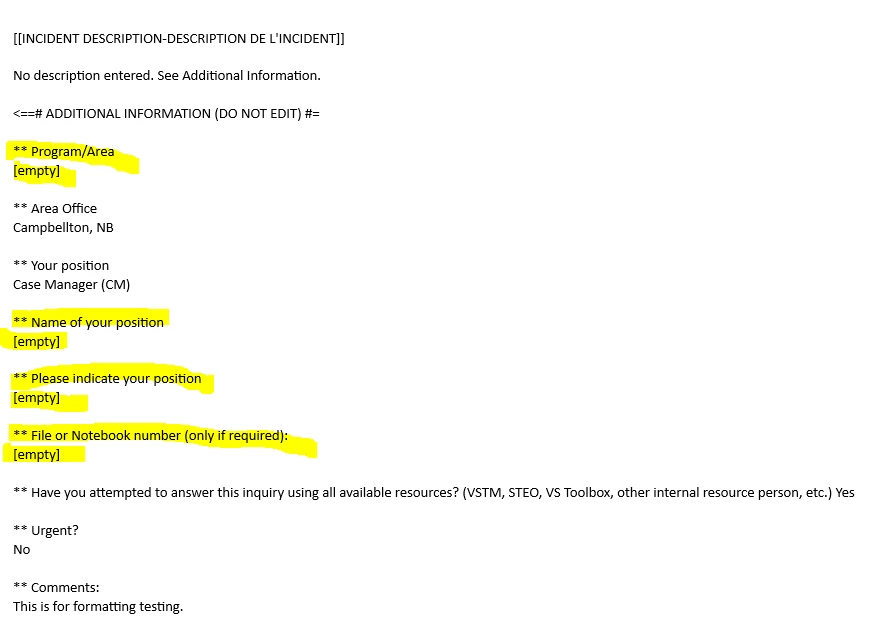


The text file:

$INTRO
Thank you for your email.
Je vous remercie pour votre courriel.

An Event has been recorded for your request.
Votre demande a été enregistrée.
==============================================
Client: $AFF_USR_N
Open Date-Date de création: $LOGGED_DATE

[[INCIDENT DESCRIPTION-DESCRIPTION DE L'INCIDENT]]
$EVENT_DESC
====================================================
You will be informed of the progress of your Incident.
Nous vous tiendrons informé du traitement de cet incident.
====================================================
$SIGNATURE

6 replies

Forum|alt.badge.img+14

Hello Christal ,

Are you using Smartmail or Notifier?


CHRISTALM
Sidekick (Customer)
Forum|alt.badge.img+6
  • Author
  • Sidekick (Customer)
  • July 31, 2025

I’m using Smartmail


Forum|alt.badge.img+14

Hello Christal,

While we await any suggestions from the community, please feel free to reach out to your dedicated Customer Success Manager to discuss this further. Professional Services may have a solution for this specific scenario.

Best Regards,
Caroline


CHRISTALM
Sidekick (Customer)
Forum|alt.badge.img+6
  • Author
  • Sidekick (Customer)
  • April 23, 2026

Hello Christal,

While we await any suggestions from the community, please feel free to reach out to your dedicated Customer Success Manager to discuss this further. Professional Services may have a solution for this specific scenario.

Best Regards,
Caroline


Hi Caroline.  I did never got an answer.  Still waiting


Forum|alt.badge.img+5
  • Do Gooder (Customer)
  • April 24, 2026

Hi Christal,

I’m not entirely sure what you’re currently doing with SmartMail or what your plans are. But maybe these 1–2 tips will help.

It’s the best to test the keyword replacement in the action templates (e.x. email template) before using it in SmartMail.

In addition, the Javadocs help you understand the structure and calls of Assyst. You can download them from the download portal.

Kind Regards!


Forum|alt.badge.img+10

Sorry in advance if I’ve misunderstood the core of your question, ​@CHRISTALM , but I think I can point you in the right direction.

This is based on my understanding of SmartMail from a slightly older (but working) installation. Newer versions might have an easier way to do this, but the approach below should still work.

If you want the formatted event description and/or action description in your emails, one way is to define your own SmartMail variables and populate them with SQL.

The general idea is described here:

https://wiki.axiossystems.com/assyst24R2Wiki/index.php/Integrations:SmartMail_Manual#Advanced_SQL_Query_Usage

1) Prep custom variables via an external SQL file

Instead of embedding a long SQL string directly, you can reference a file that contains the extra SQL. Below is a shortened example of what we use:

sql([[
SELECT
act_reg.rich_remarks "ACT_RICH_RMK",
inc_d.rich_remarks "EVENT_RICH_RMK"
-- Add extra selects and joins to populate whatever other variables you need

FROM
incident inc
INNER JOIN inc_data inc_d
ON inc_d.incident_id = inc.incident_id
INNER JOIN act_reg
ON act_reg.incident_id = inc.incident_id

WHERE
act_reg.act_reg_id = ]] .. ACT_REG_ID
)

2) Set the variables in mail.conf

We then modify these variables in the beginning of our main rules file mail.conf. This modifies the rick remark variable from the SQL step (EVENT_RICH_RMK) by appending any custom fields as a list at the end of the event’s rich remarks. Here’s an excerpt from event description:


if not FIELD_NAME then
CUST_FIELDS = " "
else
CUST_FIELDS = "<ul>"
for nameCount = 1, #FIELD_NAME do
if isnull(FIELD_VAL[nameCount]) then
CUST_FIELDS = CUST_FIELDS .. " "
else
CUST_FIELDS = CUST_FIELDS .. "<li><b>"
.. (FIELD_NAME[nameCount]) .. ":</b> "
.. (FIELD_VAL[nameCount]) .. "</li>"
end
end
CUST_FIELDS = CUST_FIELDS .. "</ul>"
end

if EVENT_RICH_RMK == "No description entered. See Additional Information." or isnull(EVENT_RICH_RMK) then
EVENT_RICH_RMK = " "
end

EVENT_RICH_RMK = EVENT_RICH_RMK .. " " .. CUST_FIELDS

(Note: I’m not 100% sure where FIELD_NAME and FIELD_VAL are populated in our setup. From a quick string search it seems top pop up as related to a module which Action Processor imports, but I’m not sure if its populated here, or simply referenced, meaning I’m not sure how this custom fields list would work if AP is not used in the chain to trigger smart mail)

3) Add the new variable in your email template

Once the variable is available, you can include it in an email template file:

!--scriptorstartfragment-->

$INTRO

Thank you for your email.

Je vous remercie pour votre courriel.


An Event has been recorded for your request.

Votre demande a été enregistrée.

==============================================

Client: $AFF_USR_N

Open Date-Date de création: $LOGGED_DATE


$EVENT_RICH_RMK

====================================================

You will be informed of the progress of your Incident.

Nous vous tiendrons informé du traitement de cet incident.

====================================================

$SIGNATURE!--scriptorendfragment-->


There may be some adjustments needed on your side depending on your setup, since this is based on an older SmartMail installation triggered by rules from action processor. 

Hope this helps and gets you moving in the right direction, and if anyone has a better way of doing this, I’d be very interested to hear about it myself.


Best regards,
Richard



