


Question

Tech Portal default setting for record selector

  • Sep 17, 2024 10:37 AM UTC
  • 4 replies
  • 124 views

Forum|alt.badge.img+5

Hello Community,


I hope you're all doing well!

I have noticed that when navigating certain pages in our Tech Portal, the record selector  automatically appears. This can be quite challenging, especially on smaller screens like iPads or mobile devices, as users have to manually hide it each time, which can be cumbersome.

Is there a way to set the record selector to be hidden by default across all screens in the Tech Portal? This adjustment would significantly improve the user experience on smaller devices.

Thank you for your assistance with this
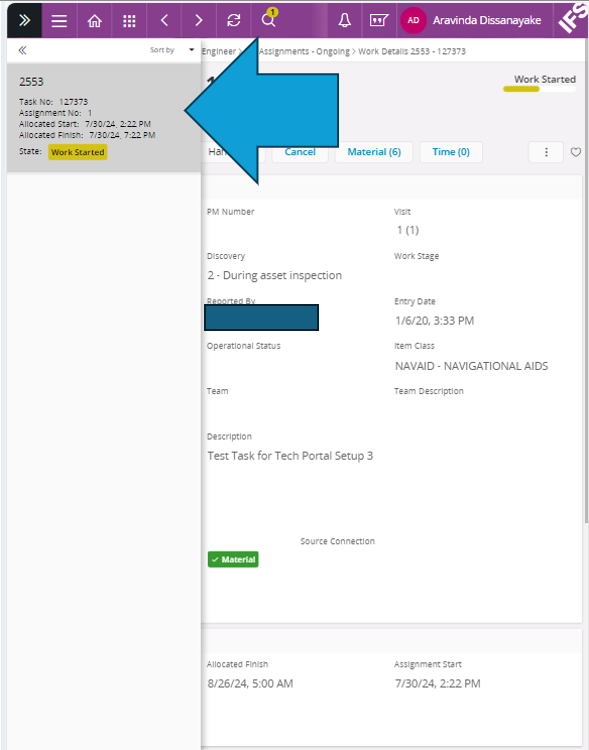
 

Thanks and Regards.

Aravinda

4 replies

Forum|alt.badge.img+8
  • Sidekick (Customer)
  • Mar 12, 2025 1:55 AM UTC

Hello Community,


I hope you're all doing well!

I have noticed that when navigating certain pages in our Tech Portal, the record selector  automatically appears. This can be quite challenging, especially on smaller screens like iPads or mobile devices, as users have to manually hide it each time, which can be cumbersome.

Is there a way to set the record selector to be hidden by default across all screens in the Tech Portal? This adjustment would significantly improve the user experience on smaller devices.

Thank you for your assistance with this


Thanks and Regards.

Aravinda

hi mate, have you figured out a work around for this?


Forum|alt.badge.img+5
  • Author
  • Sidekick (Partner)
  • Mar 12, 2025 11:45 PM UTC

​@athasanka 
I have not figured any work around for this mate.
Sorry


Forum|alt.badge.img+8
  • Sidekick (Customer)
  • Mar 18, 2025 2:07 AM UTC

​@athasanka 
I have not figured any work around for this mate.
Sorry

Cheers, thank you.


  • Do Gooder (Customer)
  • Dec 10, 2025 6:47 PM UTC

​@athasanka 
I have not figured any work around for this mate.
Sorry

Has anyone found a work around for this yet?