Question

Serial object creation for part serial in the structure


Forum|alt.badge.img+1
  • Do Gooder (Customer)

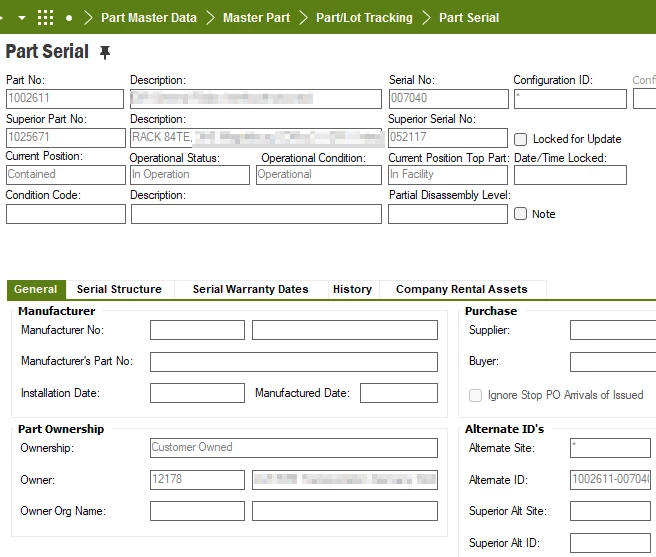
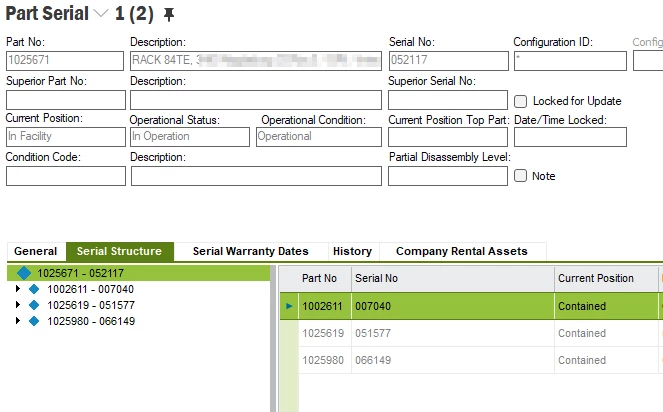
We have performed manufacturing over shop order and a part serial structure was created with the manufactured product RAC Part number 1025671 and serial 052117

With 3 components inside (see screenshot).

This RAC was sold to the customer over project deliverables.

Over “Serial Maintenance Aware” we have put it “In Facility” and created the Serial Object for the RAC.

Customer has dismounted one of the components (part number 1002611 serial 007040) and sent us for repair.

To perform correct repair process, we need the serial object for the component from the part serial structure.

How can I create the serial object?

If I try to search for the object in “Serial Maintenance Aware” it will not be found.

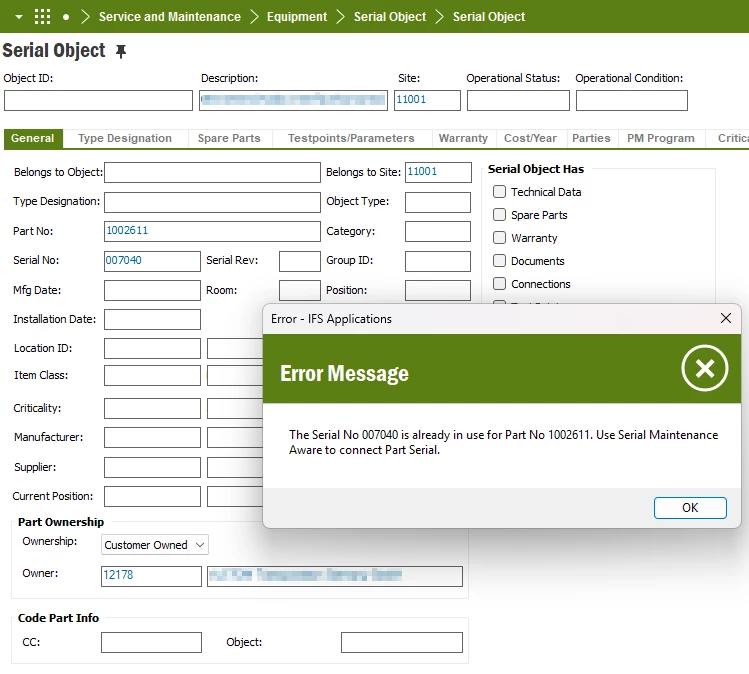
If I try to create the serial object just with plus I receive the fault message.

Part serial already exists. It has Status “In Operation” and current position “Contained”

I guess the problem here is, that the part is contained inside the RAC. How can I remove the part serial from the structure?
 

3 replies

Jinal
Sidekick (Partner)
Forum|alt.badge.img+6
  • Sidekick (Partner)
  • October 8, 2026

Why the error appears

Serial 1002611 / 007040 is still a child in the part serial structure of 1025671 / 052117. That is why its current position shows "Contained". IFS won't let you create a standalone serial object for a serial that sits inside another structure.

When you created the RAC's serial object, no child serial object was created for 007040. That normally means part 1002611 wasn't Maintenance Aware in Part Catalog at the time. Check that flag first, because you'll need it in either option below.

Option 1 – Remove the component from the serial structure (quickest)

  1. Go to Part Serial Catalog and query part 1025671, serial 052117.
  2. Open the Serial Structure for that serial, either from the tab or by right-clicking and choosing Serial Structure.
  3. Select the line for 1002611 / 007040, right-click and choose Remove from Structure.
  4. The child is no longer "Contained", and a history line is written on both serials. You can check this in Part Serial History.
  5. Make sure 1002611 is Maintenance Aware in Part Catalog.
  6. Create the serial object for 007040 in Serial Object (the Equipment serial object window). It should now save without the "Part serial already exists" error.
  7. Receive the part for repair through your normal flow, such as an RMA or a work order against the new serial object.

Option 2 – Dismount it through the equipment structure (better traceability)

Use this if you want the maintenance history on the RAC to show the dismount.

  1. Set 1002611 to Maintenance Aware.
  2. Open the RAC's serial object and check Equipment Object Structure (Navigator). If 007040 isn't listed under the RAC, create it as a child serial object of the RAC.
  3. Record the dismount against the RAC on a work order, using the serial or part change functionality on the work order. Alternatively, right-click the child in the structure and choose Move/Remove. Either way, the part serial structure and the object structure stay in sync.
  4. 007040 is now a standalone serial object that you can repair on its own work order.

If the customer has already fitted a replacement serial into the RAC, record that as an exchange: remove 007040 and add the new serial. That keeps the RAC's as-maintained structure correct.


Forum|alt.badge.img+1
  • Author
  • Do Gooder (Customer)
  • October 8, 2026

Hi ​@Jinal ,

thank you for the fast response. Unfortionatly non of both methodes works for me.

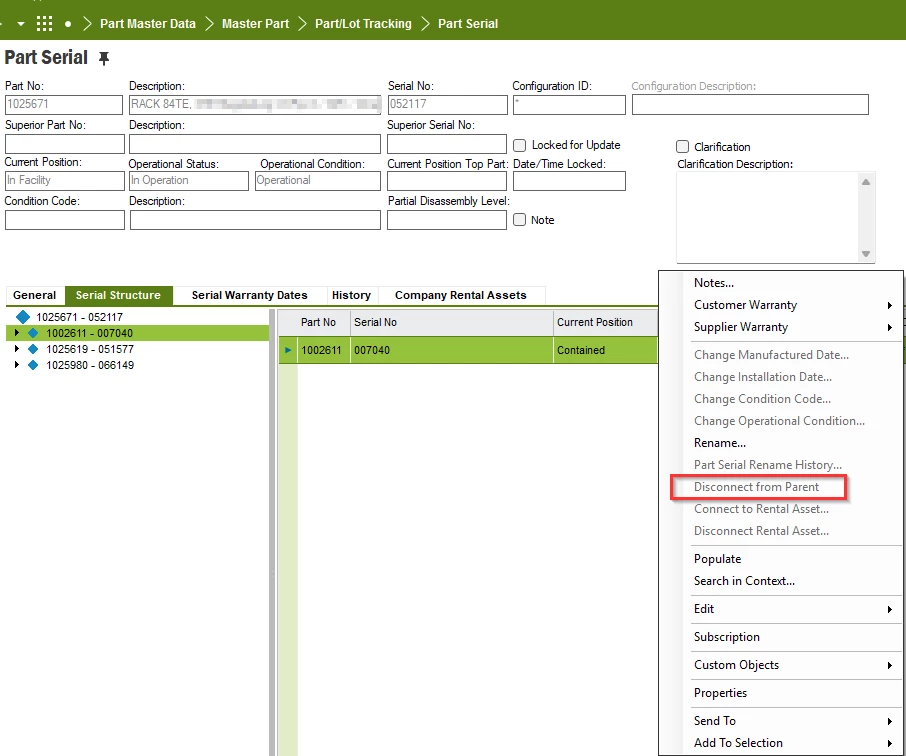
Option 1. If I open the paren part in part serial the RMT menu “Disconnect from parent” is not available. Doyou have an idea why? I have not found the right-click “Remove from structure”.

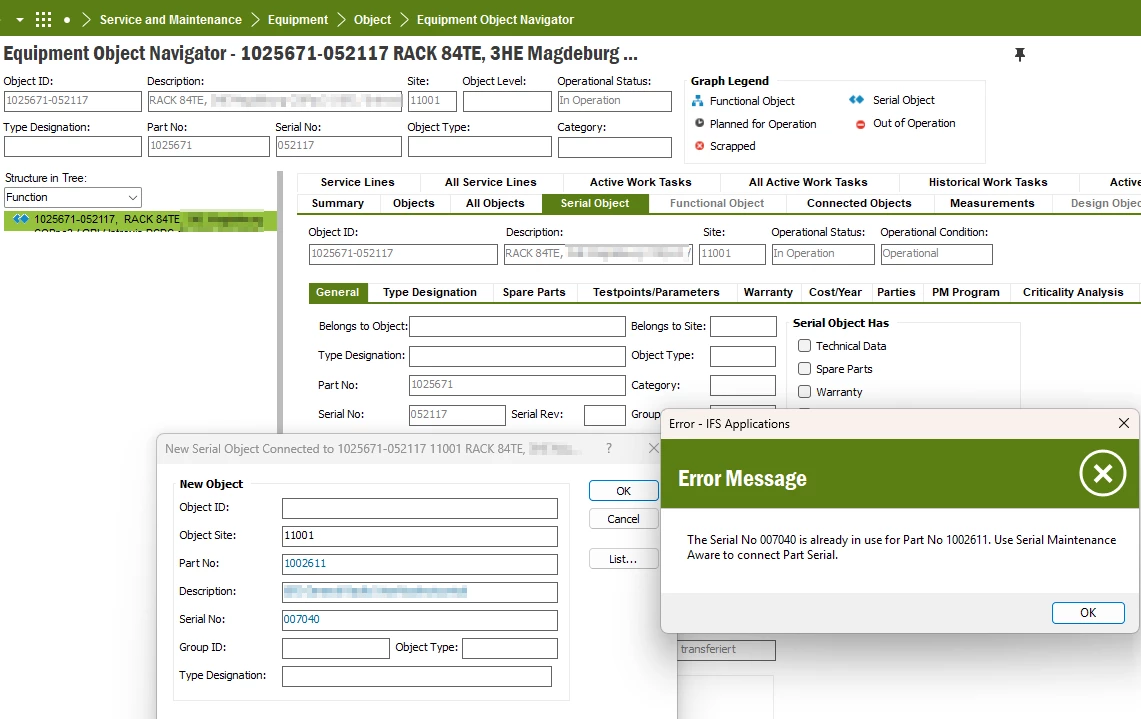
Option 2. I have opened the parent in Eqwuipment Object Navigator. In the Structure in Tree view there were no child components. When I press here the right-click “Create Serial Object” and fill in part number and serial number of the component in a new window “New Serial Object connected to 1025671-052117” I still receive the error message.

Is there some basic date, or special flag setup necessarry for manufacturing to make manufactured components available for maintenance?


Jinal
Sidekick (Partner)
Forum|alt.badge.img+6
  • Sidekick (Partner)
  • October 8, 2026

Hi ​@Jinal ,

thank you for the fast response. Unfortionatly non of both methodes works for me.

Option 1. If I open the paren part in part serial the RMT menu “Disconnect from parent” is not available. Doyou have an idea why? I have not found the right-click “Remove from structure”.

Option 2. I have opened the parent in Eqwuipment Object Navigator. In the Structure in Tree view there were no child components. When I press here the right-click “Create Serial Object” and fill in part number and serial number of the component in a new window “New Serial Object connected to 1025671-052117” I still receive the error message.

Is there some basic date, or special flag setup necessarry for manufacturing to make manufactured components available for maintenance?

Hi ​@DMT 

Thanks for the screenshots, they make it clearer. A correction to my earlier reply: in IEE the command is Disconnect from Parent, not "Remove from Structure".

Why Disconnect from Parent is greyed out

In your screenshot you're on the parent serial (1025671 / 052117), which has no parent, so the command isn't available. Open Part Serial for the component itself (part 1002611, serial 007040) and try Disconnect from Parent there. If it's greyed out there too, the structure is locked because the parent is In Facility, and the structure change has to be done from the maintenance side (steps below).

Your basic data question: yes, this is the key setting

The error tells you to use Serial Maintenance Aware to connect the part serial, so IFS wants you to connect the existing part serial rather than create a new object. Components only become available for that when their part is Maintenance Aware:

  1. Open Part Catalog for part 1002611 and check that Maintenance Aware is set. Do the same for the other components (1025619, 1025980) if you want them in the equipment structure too.
  2. Go to Serial Maintenance Aware and query part 1002611 / serial 007040. Once the part is maintenance aware, the serial should be listed. Use it to create the serial object for 007040.
  3. Check the RAC in Equipment Object Navigator. 007040 should now appear as a child of 1025671-052117.
  4. Record the dismount through a work order on the RAC, or move the object out of the structure. The part serial then leaves "Contained", and 007040 can go on its own repair work order.

If 007040 still doesn't appear in Serial Maintenance Aware after setting the flag, please share what Part Catalog shows for 1002611 and which IFS Applications version you're on (9 or 10).

If this helped, please mark it as the best answer.