


Question

PM Action - Work order/Work Task Canceled Yet Still Showing as overdue

  • July 24, 2026
  • 1 reply
  • 18 views

Forum|alt.badge.img

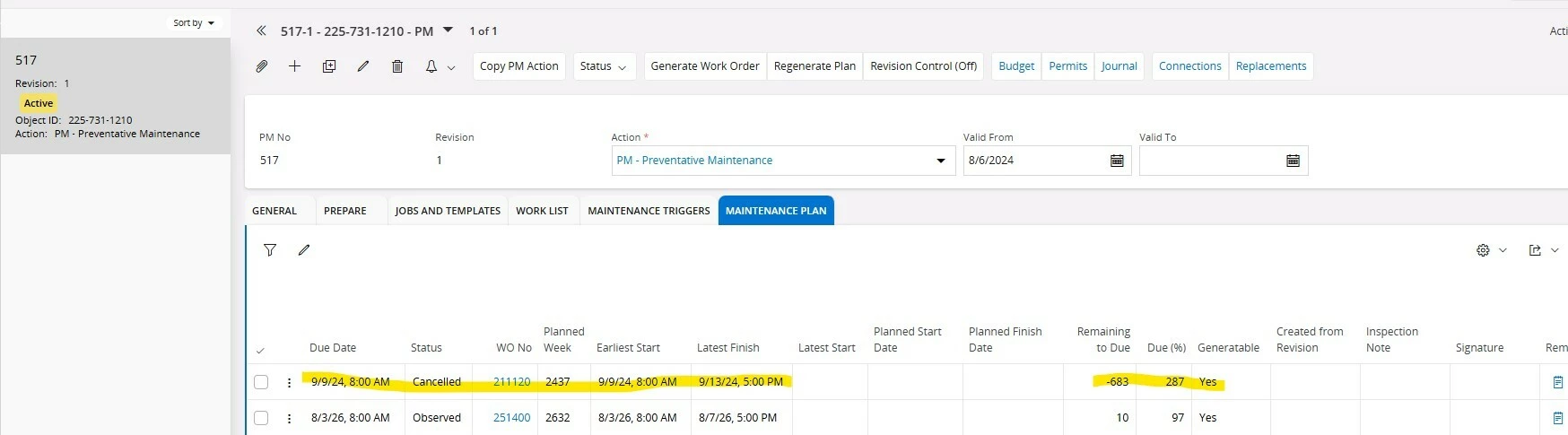
As we continue to learn more about PM Actions in our process and the negative consequences of cancelling items in IFS we have some PM actions that were canceled at the work order and work task level. These Work orders and work task still show up in our maintenance plan on the PM action and the remaining to due column is still counting the days overdue and the due percentage is also still counting and going up. 


My question: Is it possible to do anything with these as we have some KPI’s that look at PM compliance and these outliers are negatively impacting our KPI’s.


I have tried to go into the PM action maintenance plan and mark these as “No” for the generatable column, but due to the canceled status it will not allow me to edit the line and further more the work order or work task. There must be a way to fix this issue.
 

1 reply

VivekBhandiwad
Hero (Partner)
Forum|alt.badge.img+8

Dear ​@blecomte 

Based on known IFS behavior, the answer is unfortunately usually "not after the fact" if the Work Order/Work Task was canceled directly from the Work Order rather than from the PM Action Maintenance Plan. The system considers this ( consistently ) as an action where the execution team ( Supervisors, technicians etc) did not complete a planned WO, thus the due, overdue % remains

The same would not have happened, if the WO / Maintenance plan itself was set to Not Generatable or was cancelled. 

No harm done even now, as the calculations are still true- this particular maintenance was not executed. 

Here are a few options for you 

  1. If the work was done partially, reopen the WO in historical, update the completed details , and close the work order. 
  2. if the work was not carried out, then it reflects the correct status . Planner proposed, Supervisor disposed. the work itself is pending . Generate the next due work order at the right time . All of this will be properly sorted. 
  3. The line cannot be altered. It’s been generated, references maintained and that’s the “accurate picture” of what happened within the org, as explained above. 
  4. If this PM Action has become completely unusable, as it “broke” some assumptions of the planner, then retire this PM Action, but first copy the PM action to a new revision, then update it with the right details and activate the new one. That’s the last option and final option to get a clean maintenance plan.
  5. Use only the Closed/Completed lines to refer to the completion information for KPI and reporting purposes. Ignore /filterout the lines in reports.

Regards

Vivek

