

Solved

How to add materials to a work task template in IFS Cloud


Forum|alt.badge.img+10

I am creating a new work task template in IFS Cloud but I do not see an option to add material. How do I go about adding material? thank you

Best answer by eedwards

Hello,

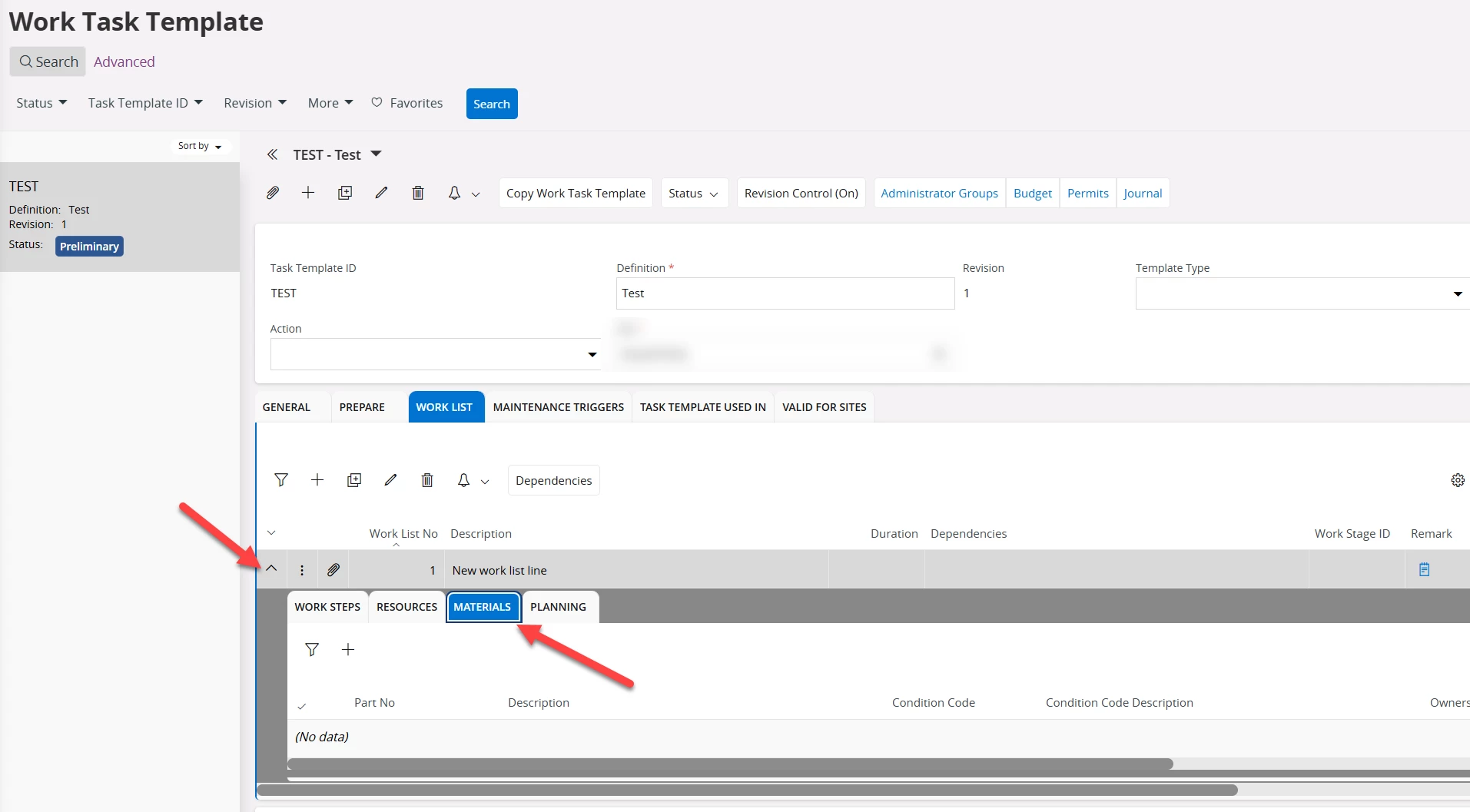
We recently went live with IFS Cloud and have had this same question from a couple of users. Like mentioned above, you first have to make a new Work List line and save it. Once saved, there is an arrow next to the work list line item that you can click to expand a sub-section below it that has different tabs to add to the work list line - including the MATERIALS tab.

 

View original

3 replies

Forum|alt.badge.img+2

Hi,

The material is associated with a Work List line within the template. If you have created only the template header and no Work List, the material entry option may not be visible.

Regards,

Pringa.


Forum|alt.badge.img+8
  • Sidekick (Customer)
  • Answer
  • October 19, 2026

Hello,

We recently went live with IFS Cloud and have had this same question from a couple of users. Like mentioned above, you first have to make a new Work List line and save it. Once saved, there is an arrow next to the work list line item that you can click to expand a sub-section below it that has different tabs to add to the work list line - including the MATERIALS tab.


Forum|alt.badge.img+10
  • Author
  • Sidekick (Customer)
  • October 20, 2026

Thank you! I used the little down arrow and it’s there