

Question

Attach a Work Task to another Work Task to provide traceability of related work done.

  • August 20, 2026
  • 3 replies
  • 18 views

Lindåker
Do Gooder (Customer)
Forum|alt.badge.img+2

Hello all,

We have a scenario when it would be useful to attach a Work Task to another Work Task to provide traceability of related work done.

It does not seem to be possible using the Attachment Panel. Is there any other way?

Thanks in advance!

Best regards

Anna-Lena

PS: We are still on Apps10 upd27 😁

3 replies

Abdul
Superhero (Partner)
Forum|alt.badge.img+20
  • Superhero (Partner)
  • August 20, 2026

Hi ​@Lindåker,

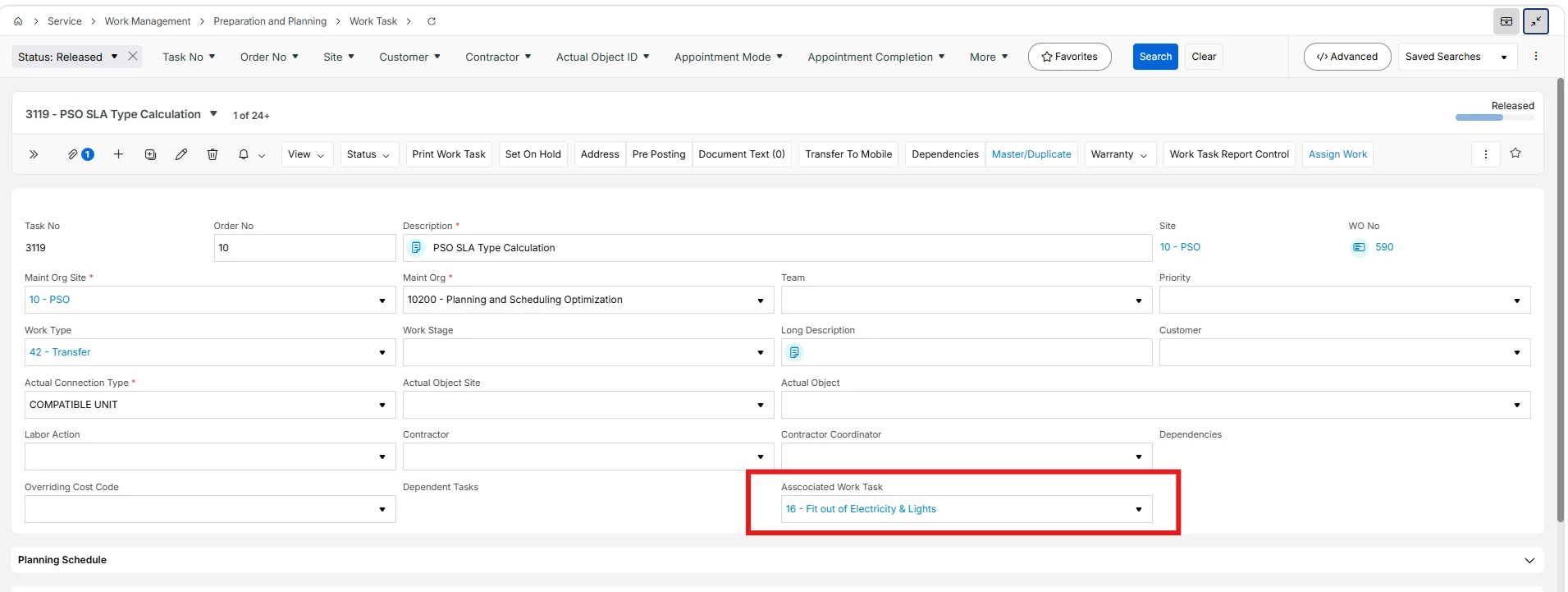
You can think about creating a reference type custom field on Work Task screen itself. Where business users can simply select associated Work Task from the drop down. Please refer to the screen shot below (though it is of IFS Cloud, but same approach will be applied for Apps10 as well).

Additionally, a custom command can be configured to navigation to associated work task.

This will not work If there are more than one associated task and then note type field can be another option.

hope this will help.


Lindåker
Do Gooder (Customer)
Forum|alt.badge.img+2
  • Author
  • Do Gooder (Customer)
  • August 20, 2026

Thank you so much for your answer.

So sorry for not making this clear. I see a limitation in this solution and that it seems you can only have one work task associated with another work task. In our scenario we need the possibility to connect/attach several work task to a “parent” work task.


Abdul
Superhero (Partner)
Forum|alt.badge.img+20
  • Superhero (Partner)
  • August 20, 2026

Yes, I anticipated this. 

Other potential options 

  1. Create a note type field and type it manually (I don’t think business users will opt for this)
  2. Print each work task report and attach as a document.

Another option, think about IFS Cloud upgrade 😊

List type custom tab can be added on Work Task page, to link other associated work task.