One of our customer experienced an issue during the week end , the service Astea Data Handler Dispatcher stopped and no” outbound messages” were sent to an external system.
It looks like when we restart the service the messages which were not generated during the week end where lost. Is there a way to regenerate them ?
thanks for your feedback
Rgds
Christophe
Best answer by Phil Seifert
Hi Christophe,
The Astea Data Handler Dispatcher does not generate the outbound messages but manages the transmission of the existing messages… you should check the OutBound Data Audit (Integration) module with filters similar to below. (You may want to restrict dates for example.
After doing this, you may see rows:
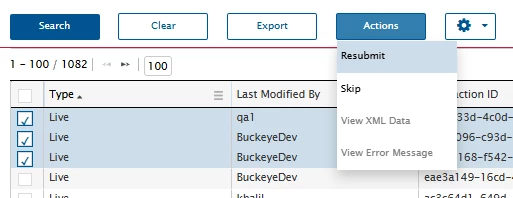
Select the rows and use the option from Action to re-submit.
I would test it for a few of them first to confirm the integration is functioning. It might take a minute or so depending on the integration speed/processing from the other end point.
Basically, if you have a Trans. Date but no Ack Date that means the other end did not respond… there may be error messages to help understand what happened. If you don’t have a Trans. Date, that means it did not attempt to send but should start sending automatically if the service is now operational. You might try searching a few times to see if the count of the orders goes down.
If it really is the case the API messages were not really generated, you will need to look into the process flow or whatever created them to see if you can get them triggered again. Of course, make sure the workflow services are both running.
Anything else, you probably should log a support case in the IFS Support portal.
The Astea Data Handler Dispatcher does not generate the outbound messages but manages the transmission of the existing messages… you should check the OutBound Data Audit (Integration) module with filters similar to below. (You may want to restrict dates for example.
After doing this, you may see rows:
Select the rows and use the option from Action to re-submit.
I would test it for a few of them first to confirm the integration is functioning. It might take a minute or so depending on the integration speed/processing from the other end point.
Basically, if you have a Trans. Date but no Ack Date that means the other end did not respond… there may be error messages to help understand what happened. If you don’t have a Trans. Date, that means it did not attempt to send but should start sending automatically if the service is now operational. You might try searching a few times to see if the count of the orders goes down.
If it really is the case the API messages were not really generated, you will need to look into the process flow or whatever created them to see if you can get them triggered again. Of course, make sure the workflow services are both running.
Anything else, you probably should log a support case in the IFS Support portal.