Solved

Identify Alliance Users

  • March 14, 2023
  • 8 replies
  • 99 views

Forum|alt.badge.img+1
  • Do Gooder (Customer)

Is there a way to identify user who are actively logging in and using the application.  Basically, i’d like to know who has logged in during the past 6 months.

Best answer by ktolkacevic

If you have access to the database, here’s a query to only show the last time user logged in for the past 120 days


select em.node_id,r.person_id,search_name,sa.sa_type_id,login_time,logout_time,client_machine_name,domain_user from (select 
asl.person_id,
ps.search_name,
asl.browser_version,
asl.custom_version,
'Y' as 'logged_in',
'' as logout_time,
Convert(VarChar(10),asl.login_time,101)+' '+Convert(VarChar(5),asl.login_time,108)login_time,        
client_machine_name,
domain_user,
row_number() over(partition by asl.person_id order by asl.login_time desc) as rn
from ap_session_log asl
join person ps on asl.person_id=ps.person_id
where (ps.is_background = 'N' and asl.person_id <>'seal')
and ps.is_employee ='Y'
and ps.is_mobile_user <>'5'
and ps.is_active='Y'
and asl.login_time >= getdate()-120
)r
join employee em on r.person_id=em.person_id
join sa on r.person_id=sa.person_id
where rn = 1
union 
select em.node_id,r.person_id,search_name,sa.sa_type_id,login_time,logout_time,client_machine_name,domain_user from (select 
csl.person_id,
ps.search_name,
csl.browser_version,
csl.custom_version,
'N' as 'logged_in',
Convert(VarChar(10),csl.logout_time,101)+' '+Convert(VarChar(5),csl.logout_time,108)logout_time,
Convert(VarChar(10),csl.login_time,101)+' '+Convert(VarChar(5),csl.login_time,108)login_time,        
client_machine_name,
domain_user,
row_number() over(partition by csl.person_id order by csl.login_time desc) as rn
from c_session_log csl
join person ps on csl.person_id=ps.person_id
where (ps.is_background = 'N' and csl.person_id <>'seal')
and ps.is_employee ='Y'
and ps.is_active='Y'
and ps.is_mobile_user <>'5'
and csl.login_time >= getdate()-120)r
join employee em on r.person_id=em.person_id
join sa on r.person_id=sa.person_id
where rn = 1
order by node_id,logout_time desc,login_time,person_id


8 replies

Forum|alt.badge.img+10
  • Hero (Employee)
  • March 14, 2023

Hi,


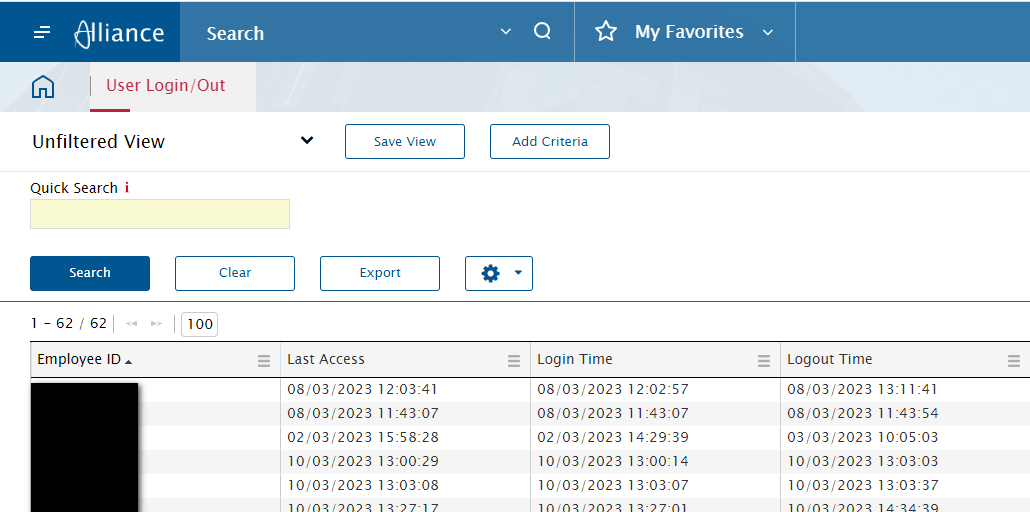
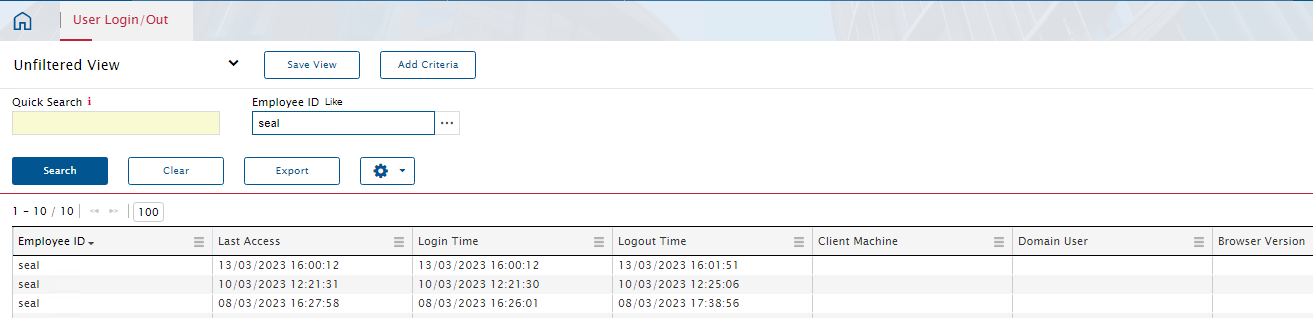
You can use the User Login/out module.


Regards,

Susie


Forum|alt.badge.img+12
  • Superhero (Employee)
  • March 14, 2023

Hi Simon,


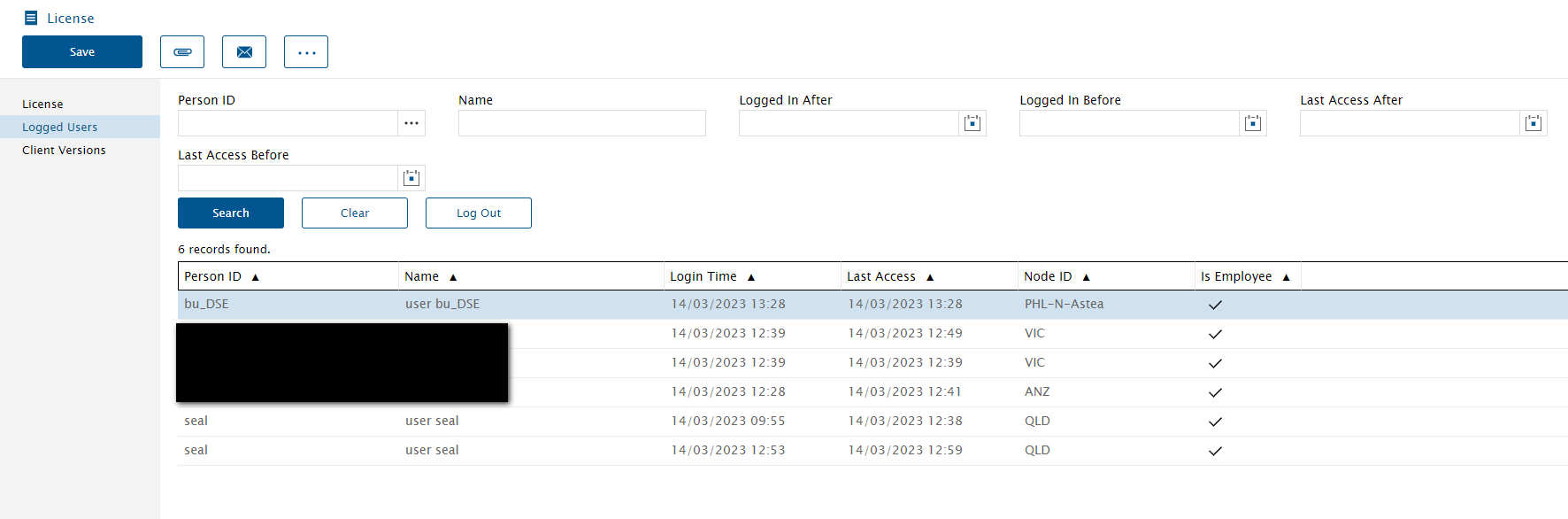
Please try License Module.

Logged users & Client Versions


Regards,

Joshua


Forum|alt.badge.img+12
  • Superhero (Employee)
  • March 14, 2023

There is also Module called ‘Users Login/Out’


Phil Seifert
Ultimate Hero (Employee)
Forum|alt.badge.img+24
  • Ultimate Hero (Employee)
  • March 14, 2023

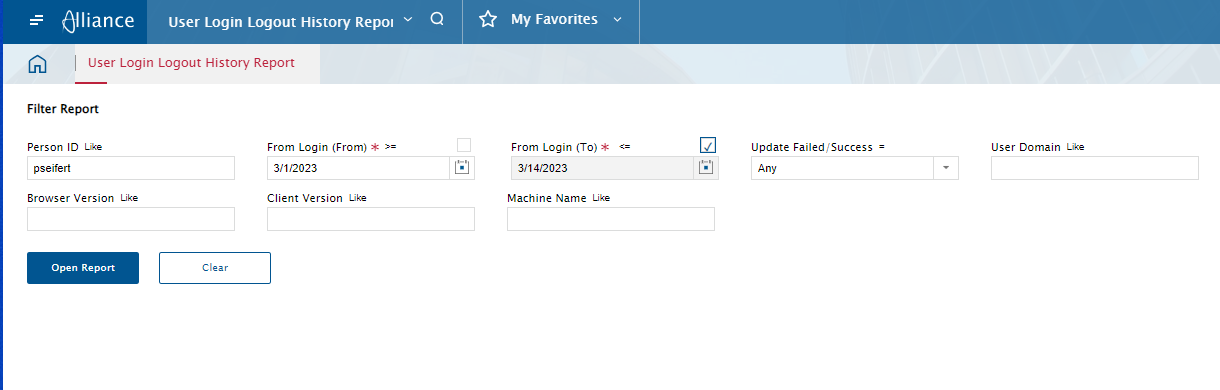
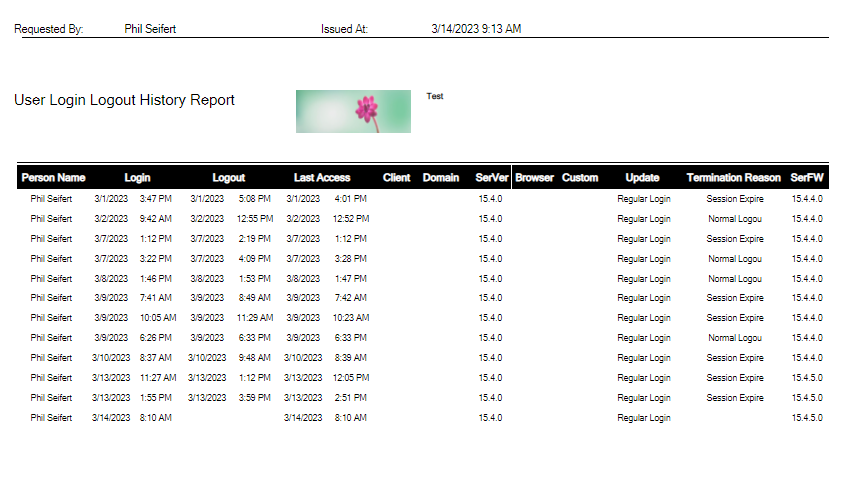
In addition to the User Login/Logout module, Alliance also has a report which you can use if you prefer the information in a report form.

This is useful if you want to download a PDF Report for example if you want to search for a date range (you can search dates as well in the other module too).


ktolkacevic
Hero (Customer)
Forum|alt.badge.img+9
  • Hero (Customer)
  • Answer
  • March 14, 2023

If you have access to the database, here’s a query to only show the last time user logged in for the past 120 days


select em.node_id,r.person_id,search_name,sa.sa_type_id,login_time,logout_time,client_machine_name,domain_user from (select 
asl.person_id,
ps.search_name,
asl.browser_version,
asl.custom_version,
'Y' as 'logged_in',
'' as logout_time,
Convert(VarChar(10),asl.login_time,101)+' '+Convert(VarChar(5),asl.login_time,108)login_time,        
client_machine_name,
domain_user,
row_number() over(partition by asl.person_id order by asl.login_time desc) as rn
from ap_session_log asl
join person ps on asl.person_id=ps.person_id
where (ps.is_background = 'N' and asl.person_id <>'seal')
and ps.is_employee ='Y'
and ps.is_mobile_user <>'5'
and ps.is_active='Y'
and asl.login_time >= getdate()-120
)r
join employee em on r.person_id=em.person_id
join sa on r.person_id=sa.person_id
where rn = 1
union 
select em.node_id,r.person_id,search_name,sa.sa_type_id,login_time,logout_time,client_machine_name,domain_user from (select 
csl.person_id,
ps.search_name,
csl.browser_version,
csl.custom_version,
'N' as 'logged_in',
Convert(VarChar(10),csl.logout_time,101)+' '+Convert(VarChar(5),csl.logout_time,108)logout_time,
Convert(VarChar(10),csl.login_time,101)+' '+Convert(VarChar(5),csl.login_time,108)login_time,        
client_machine_name,
domain_user,
row_number() over(partition by csl.person_id order by csl.login_time desc) as rn
from c_session_log csl
join person ps on csl.person_id=ps.person_id
where (ps.is_background = 'N' and csl.person_id <>'seal')
and ps.is_employee ='Y'
and ps.is_active='Y'
and ps.is_mobile_user <>'5'
and csl.login_time >= getdate()-120)r
join employee em on r.person_id=em.person_id
join sa on r.person_id=sa.person_id
where rn = 1
order by node_id,logout_time desc,login_time,person_id


Phil Seifert
Ultimate Hero (Employee)
Forum|alt.badge.img+24
  • Ultimate Hero (Employee)
  • March 14, 2023

Thanks, Kyle.

I was not sure the user had access to the database but your query is also works to identify the last login.


Forum|alt.badge.img+1
  • Author
  • Do Gooder (Customer)
  • March 16, 2023

Thank you all, very much appreciated.  I believe querying the database provides me with the exact information I need.


Forum|alt.badge.img+6

This question was raised by a client today so thank you for the post that I was able to reference!