Solved

Ho to set up a "current user" dashboard ?

  • February 2, 2022
  • 3 replies
  • 149 views

Forum|alt.badge.img+9

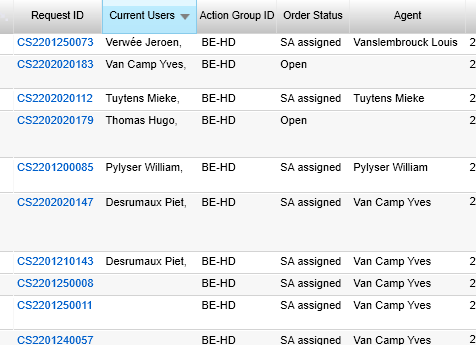
  We want to set up a dashboard in v15.3.3 to see which employee actually is in a Customer Support order.

In what tables and in what fields do we have to look to see what ticket the user currently has opened in this dashboard ?

We want that dashboard to replace the current customization we have in v10 were we see the “current User” in the UI


Best answer by Phil Seifert

Hi Piet,

In our previous discussions, you indicated there was an automatic replication of any changed data in your production database profile to a reporting database in a real-time way.

If this is the case, you can use the following scripts to get an idea who is looking at what order, etc.


SELECT ap_user_login,

       ap_table_name,

       ap_table_key

FROM ap_lock WITH(NOLOCK)

WHERE ap_table_name = 'Call_Center';   -- Call Center is Customer Support


SELECT ap_user_login,

       ap_table_name,

       ap_table_key

FROM ap_lock WITH(NOLOCK)

WHERE ap_table_name = 'Service_Order';


Note, if the agent has more than one tab open to different orders, they will appear multiple times as they are technically working on multiple orders (opened in the UI) at the same time.

We normally do not recommend running such queries for the ‘ap’ tables in Production and definitely recommend using with(nolock) table hints to prevent the rows from being locked.

Hope this helps.

Phil

3 replies

Phil Seifert
Ultimate Hero (Employee)
Forum|alt.badge.img+24
  • Ultimate Hero (Employee)
  • Answer
  • February 3, 2022

Hi Piet,

In our previous discussions, you indicated there was an automatic replication of any changed data in your production database profile to a reporting database in a real-time way.

If this is the case, you can use the following scripts to get an idea who is looking at what order, etc.


SELECT ap_user_login,

       ap_table_name,

       ap_table_key

FROM ap_lock WITH(NOLOCK)

WHERE ap_table_name = 'Call_Center';   -- Call Center is Customer Support


SELECT ap_user_login,

       ap_table_name,

       ap_table_key

FROM ap_lock WITH(NOLOCK)

WHERE ap_table_name = 'Service_Order';


Note, if the agent has more than one tab open to different orders, they will appear multiple times as they are technically working on multiple orders (opened in the UI) at the same time.

We normally do not recommend running such queries for the ‘ap’ tables in Production and definitely recommend using with(nolock) table hints to prevent the rows from being locked.

Hope this helps.

Phil


Forum|alt.badge.img+9
  • Author
  • Sidekick (Customer)
  • February 7, 2022

Hi Phil, this works correctly using Edge or Chrome browser. We noticed that using Vivaldi as browser resulted in not correctly un-lock the order. Closing the order did not clear the lock field.


Phil Seifert
Ultimate Hero (Employee)
Forum|alt.badge.img+24
  • Ultimate Hero (Employee)
  • February 7, 2022

Hi Piet,

I have never used Vivaldi as a browser but the scripts themselves are not relying on which browser you use, only showing that there is a lock in the table.  If Vivaldi does not clear the lock field, this suggests more a problem with using that browser versus how the script functions which is only showing you the current data.

You stated earlier that you would be using Edge as your company standard browser.