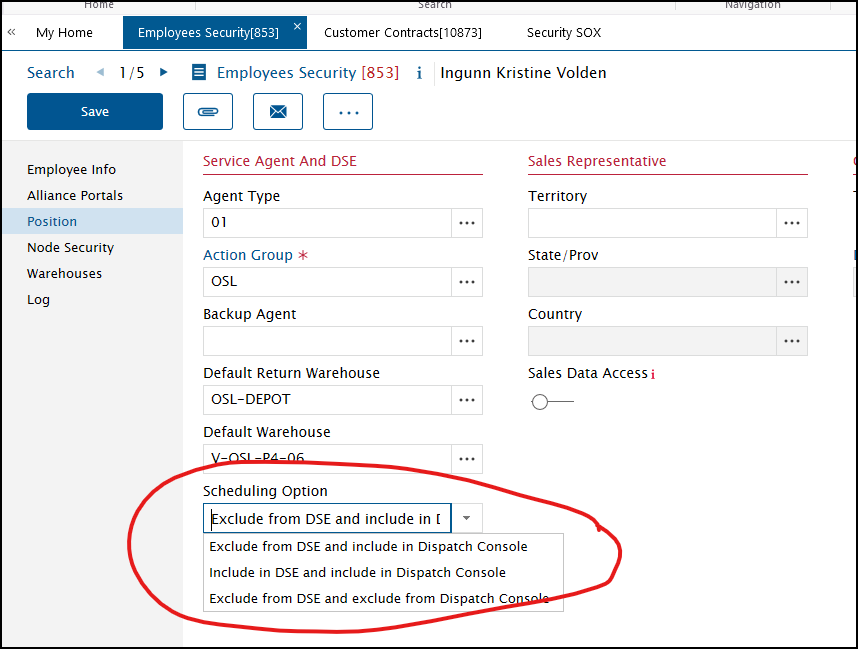
In v15.2 (as opposed to 12.5) - under Employees Security - Position - Scheduling Options, the default is Exclude from DSE and Exclude from Dispatch Console. Is there a way to change this? We would like toi have the default as Exclude from DSE and include in Dispatch Console
Best answer by Phil Seifert
Hi Bjørn,
I am not aware of an option to change the default as user configurable. I also asked other consultants with the same response.
Having said this, I suppose you could explore alternative ways than an application setting. For example, defining this on an employee import? If you go this route, I believe the element is is_excluded_dse on the person business object.
There is an employee_security_maint import where this is defined in the import template as scheduling option. I saw value of null, D, Y so am guessing that D is DC console allowed.
I am not aware of an option to change the default as user configurable. I also asked other consultants with the same response.
Having said this, I suppose you could explore alternative ways than an application setting. For example, defining this on an employee import? If you go this route, I believe the element is is_excluded_dse on the person business object.
There is an employee_security_maint import where this is defined in the import template as scheduling option. I saw value of null, D, Y so am guessing that D is DC console allowed.