Question

Astea Not Showing Date

  • May 19, 2025
  • 4 replies
  • 50 views

Forum|alt.badge.img+2

We have issue on Astea where dates are not being displayed on application.

We are getting below errors:

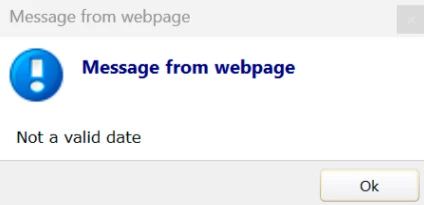
  1. Not a valid date
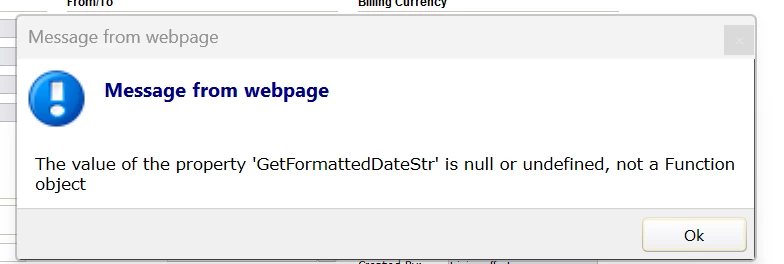
  2. The value of the property ‘GetFormattedDateStr’ is null or undefined, not a Function Object

Please help us on how we can able to resolve the issue
 

4 replies

Phil Seifert
Ultimate Hero (Employee)
Forum|alt.badge.img+24
  • Ultimate Hero (Employee)
  • May 19, 2025

HI Sudeep,

Several points:

  1. There are no steps supplied - what screen was this in for example. Does it occur in all modules?
  2. This is really a case that should be raised to Support, not resolved via Community especially as it is likely to be resolved by code fix if neither of the two steps below resolve the issue..

I sometimes encounter this error (not a valid date) going into a module after an update and perhaps changing my regional settings in Windows  before starting the Employee Portal (you are on Alliance 14.5 so using the Astea Browser).  Try clearing the search form of the module.

Execute an IISRESET if the above did not work and if the IISRESET does not resolve, plus log a support request via the normal channels and supply steps/screens/message/etc.


Forum|alt.badge.img+2
  • Author
  • Do Gooder (Customer)
  • May 19, 2025

Hello Phil,


The error is for all the modules that displays date. For eg: Service order, contract, etc

As soon as we open any service order and main page is displayed, the above error appears and date doesn’t get displayed correctly.

We have raised ticket as well to the Support.


Phil Seifert
Ultimate Hero (Employee)
Forum|alt.badge.img+24
  • Ultimate Hero (Employee)
  • May 19, 2025

Thanks, Sudeep.

This will be handled via the Support case as it will not be solved here in Community.


Reid Gilbert
Superhero (Employee)
Forum|alt.badge.img+15
  • Superhero (Employee)
  • May 19, 2025

Hi Sudeep,
Were any Windows Updates or browser updates applied recently?  Try adding the application URL to the list of trusted sites in your browser, then close the application and re-launch and see if that helps…
Thanks,
Reid