Solved

When updating to 25R2 on the build place, Order Delivery fails.

  • December 23, 2025
  • 5 replies
  • 99 views

Forum|alt.badge.img+3

I'd like to know how to resolve this.

・I haven't performed any customizations.

・Which log file should I check?

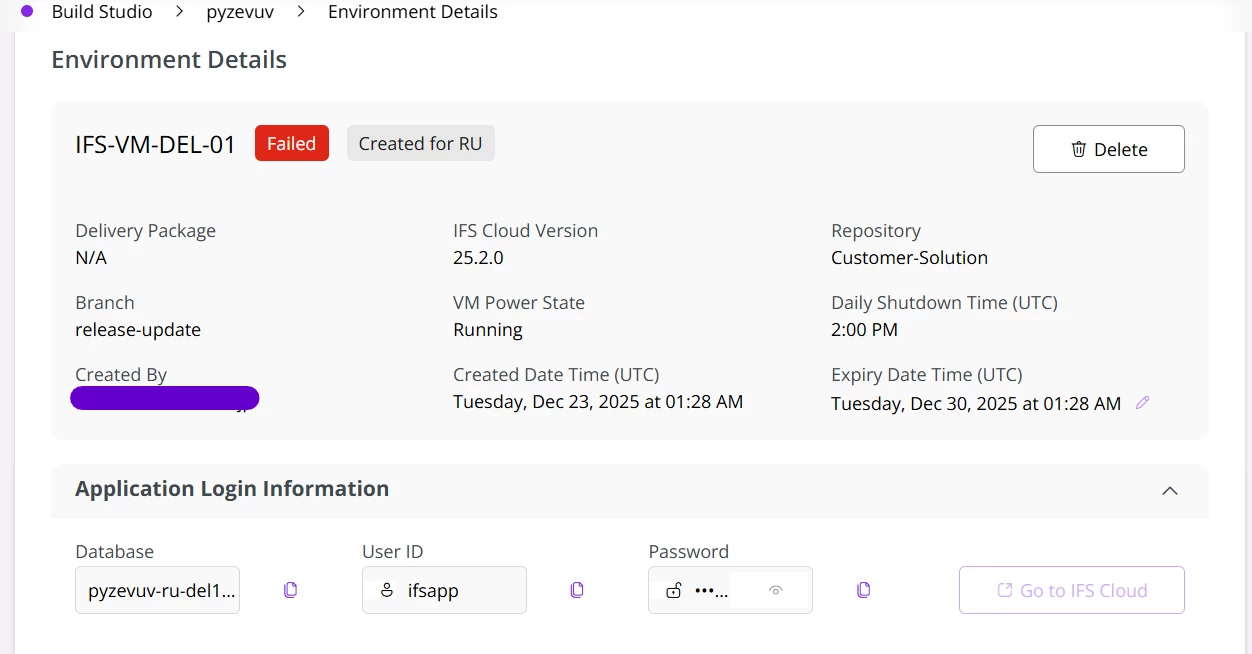
・When I check the screen, the Delivery Package status says N/A.
 

Best answer by SimonTestard

Thank you for your answer! 

I checked and found a different error.

Any ideas on how to fix it?


_ERROR_install.log


!!!Error deploying file wrktsk/POST_Wrktsk_2510_UpgradeCmpuntExecutionToWorkList.sql at 23-DEC-25 07:10:17
!!!Error occurred while executing Plsql Block
DECLARE
stmt_ VARCHAR2(32000);
BEGIN
$IF Component_Cmpunt_SYS.INSTALLED $THEN
stmt_ := '
DECLARE
source_lu_name_db_ VARCHAR2(30) := Jt_Connected_Object_API.DB_CMPUNT_WORK_LIST;
object_lu_name_ VARCHAR2(30) := Jt_Connected_Object_API.DB_CMPUNT;
old_source_lu_name_ VARCHAR2(30) := Jt_Connected_Object_API.DB_CMPUNT_EXECUTION;
actual_conn_type_ VARCHAR2(30) := Maint_Connection_Type_API.DB_CMPUNT;
BEGIN
UPDATE work_task_tab wt
SET source_connection_lu_name = source_lu_name_db_,
source_connection_rowkey = ( SELECT wl.rowkey
FROM cmpunt_work_list_tab wl
WHERE wl.task_seq = wt.task_seq )
WHERE wt.reported_obj_conn_lu_name = object_lu_name_
AND wt.reported_connection_type = actual_conn_type_
AND wt.actual_obj_conn_lu_name = object_lu_name_
AND wt.actual_connection_type = actual_conn_type_
AND wt.source_connection_lu_name = old_source_lu_name_;
COMMIT;
END;
';
EXECUTE IMMEDIATE stmt_;
$END
END;
ORA-06550: line 27, column 1:
PLS-00103: Encountered the symbol "END" when expecting one of the following:

( begin case declare exit for goto if loop mod null pragma
raise return select update while with <an identifier>
<a double-quoted delimited-identifier> <a bind variable> <<
continue close current delete fetch lock insert open rollback
savepoint set sql execute commit forall merge pipe purge
json_exists json_value json_query json_object json_array


If your upgrade is not urgent you can also basically cancel the release upgrade and wait for 25R2 SU1 in which this will be already fixed.


This is a known issue with 25R2 SU0.


You need to request an out of band fix from IFS Support and Apply it as a customization in your Customer Repository (deploy.ini and updated POST File)


See this knowledge base article for more information


https://support.ifs.com/csm?id=kb_article_view&sys_kb_id=2216ccab9739b2d0d0c0b901f053afd5&table=kb_knowledge&searchTerm=KB0092303

5 replies

Forum|alt.badge.img+7
  • Sidekick (Customer)
  • December 24, 2025

hello IWANBE

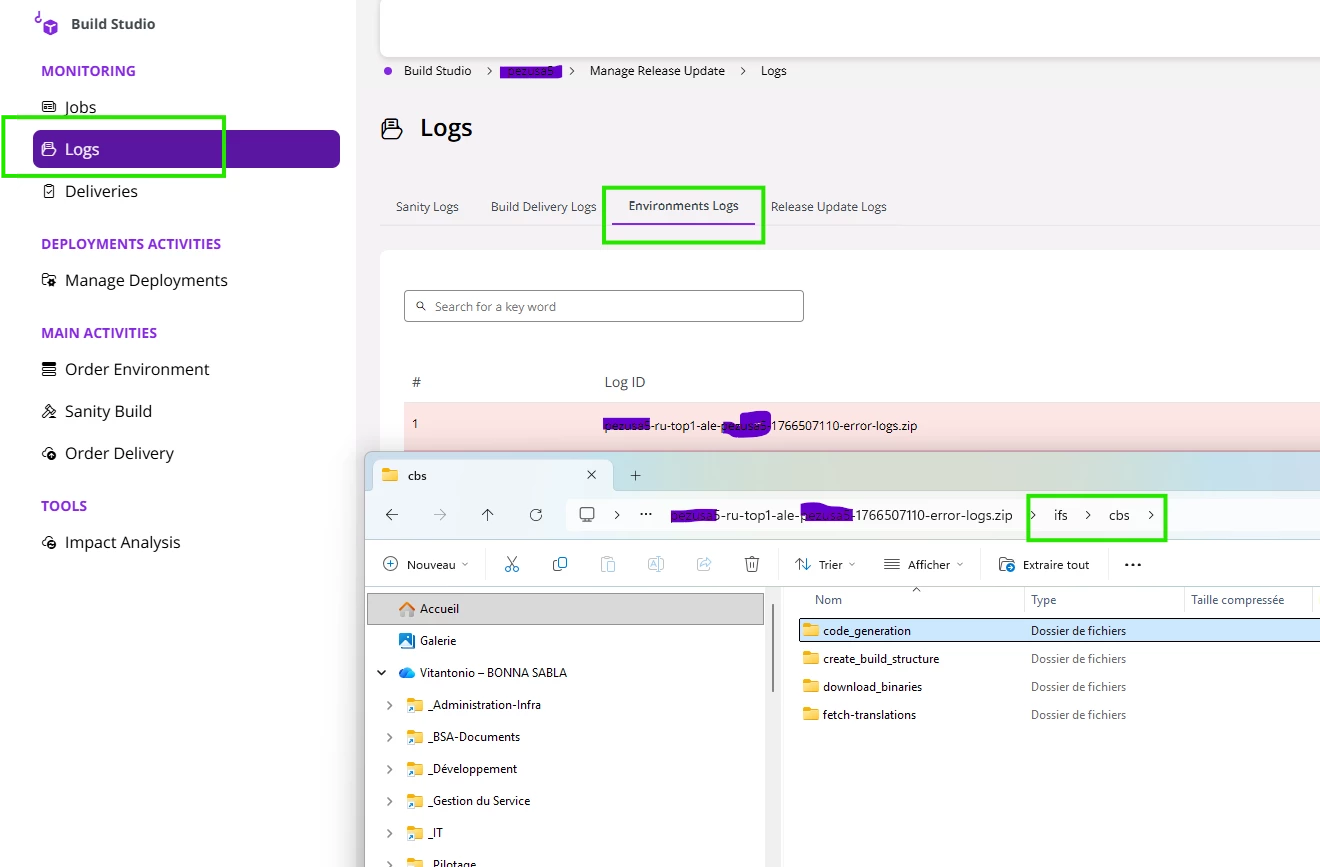
you should check Environnent logs and download it and then check in IFS\CBS directory

curently we are facing a similar issue durin 25R2 delivery building and in the log we can see the hereunder error :

ERROR:Component fndwf is on version 25.2.0 in the database, but there is no support in deploy.ini for that specific version!

Correct the deploy.ini or the value in the database!

what is yours? doe anyone face the same issue? i check the deploy ini and actually the “25.2.0=WorkFlow IFS Cloud 25.2.0” is missing if you compare with others lines but is it the only one missing, and should we just add this line and ask again for the environment...that’s wherre we are


Forum|alt.badge.img+3
  • Author
  • Sidekick (Partner)
  • December 24, 2025

Thank you for your answer! 

I checked and found a different error.

Any ideas on how to fix it?


_ERROR_install.log


!!!Error deploying file wrktsk/POST_Wrktsk_2510_UpgradeCmpuntExecutionToWorkList.sql at 23-DEC-25 07:10:17
!!!Error occurred while executing Plsql Block
DECLARE
stmt_ VARCHAR2(32000);
BEGIN
$IF Component_Cmpunt_SYS.INSTALLED $THEN
stmt_ := '
DECLARE
source_lu_name_db_ VARCHAR2(30) := Jt_Connected_Object_API.DB_CMPUNT_WORK_LIST;
object_lu_name_ VARCHAR2(30) := Jt_Connected_Object_API.DB_CMPUNT;
old_source_lu_name_ VARCHAR2(30) := Jt_Connected_Object_API.DB_CMPUNT_EXECUTION;
actual_conn_type_ VARCHAR2(30) := Maint_Connection_Type_API.DB_CMPUNT;
BEGIN
UPDATE work_task_tab wt
SET source_connection_lu_name = source_lu_name_db_,
source_connection_rowkey = ( SELECT wl.rowkey
FROM cmpunt_work_list_tab wl
WHERE wl.task_seq = wt.task_seq )
WHERE wt.reported_obj_conn_lu_name = object_lu_name_
AND wt.reported_connection_type = actual_conn_type_
AND wt.actual_obj_conn_lu_name = object_lu_name_
AND wt.actual_connection_type = actual_conn_type_
AND wt.source_connection_lu_name = old_source_lu_name_;
COMMIT;
END;
';
EXECUTE IMMEDIATE stmt_;
$END
END;
ORA-06550: line 27, column 1:
PLS-00103: Encountered the symbol "END" when expecting one of the following:

( begin case declare exit for goto if loop mod null pragma
raise return select update while with <an identifier>
<a double-quoted delimited-identifier> <a bind variable> <<
continue close current delete fetch lock insert open rollback
savepoint set sql execute commit forall merge pipe purge
json_exists json_value json_query json_object json_array


Forum|alt.badge.img+7
  • Sidekick (Customer)
  • December 24, 2025

sorry, but no idea, we choose to not do any modification of IFS code and only use customizations like BPA or external call to IFS API,  so i am not use to IFS code syntax ...


Forum|alt.badge.img+12
  • Hero (Customer)
  • Answer
  • December 30, 2025

Thank you for your answer! 

I checked and found a different error.

Any ideas on how to fix it?


_ERROR_install.log


!!!Error deploying file wrktsk/POST_Wrktsk_2510_UpgradeCmpuntExecutionToWorkList.sql at 23-DEC-25 07:10:17
!!!Error occurred while executing Plsql Block
DECLARE
stmt_ VARCHAR2(32000);
BEGIN
$IF Component_Cmpunt_SYS.INSTALLED $THEN
stmt_ := '
DECLARE
source_lu_name_db_ VARCHAR2(30) := Jt_Connected_Object_API.DB_CMPUNT_WORK_LIST;
object_lu_name_ VARCHAR2(30) := Jt_Connected_Object_API.DB_CMPUNT;
old_source_lu_name_ VARCHAR2(30) := Jt_Connected_Object_API.DB_CMPUNT_EXECUTION;
actual_conn_type_ VARCHAR2(30) := Maint_Connection_Type_API.DB_CMPUNT;
BEGIN
UPDATE work_task_tab wt
SET source_connection_lu_name = source_lu_name_db_,
source_connection_rowkey = ( SELECT wl.rowkey
FROM cmpunt_work_list_tab wl
WHERE wl.task_seq = wt.task_seq )
WHERE wt.reported_obj_conn_lu_name = object_lu_name_
AND wt.reported_connection_type = actual_conn_type_
AND wt.actual_obj_conn_lu_name = object_lu_name_
AND wt.actual_connection_type = actual_conn_type_
AND wt.source_connection_lu_name = old_source_lu_name_;
COMMIT;
END;
';
EXECUTE IMMEDIATE stmt_;
$END
END;
ORA-06550: line 27, column 1:
PLS-00103: Encountered the symbol "END" when expecting one of the following:

( begin case declare exit for goto if loop mod null pragma
raise return select update while with <an identifier>
<a double-quoted delimited-identifier> <a bind variable> <<
continue close current delete fetch lock insert open rollback
savepoint set sql execute commit forall merge pipe purge
json_exists json_value json_query json_object json_array


If your upgrade is not urgent you can also basically cancel the release upgrade and wait for 25R2 SU1 in which this will be already fixed.


This is a known issue with 25R2 SU0.


You need to request an out of band fix from IFS Support and Apply it as a customization in your Customer Repository (deploy.ini and updated POST File)


See this knowledge base article for more information


https://support.ifs.com/csm?id=kb_article_view&sys_kb_id=2216ccab9739b2d0d0c0b901f053afd5&table=kb_knowledge&searchTerm=KB0092303


Forum|alt.badge.img+3
  • Author
  • Sidekick (Partner)
  • January 13, 2026

Thank you for your reply!

It appears that the 25.2.1 service update was released on the same day as my release update.

The issue was resolved after reapplying the 25.2.1 service update.