Question

IFS Connect -SMTP Apps 9

  • March 16, 2021
  • 7 replies
  • 392 views

Forum|alt.badge.img+8

Hi there, 


Has anyone got O365 working correctly using smtp.office.365.com? 

I’ve been playing with this in test instance as we are thinking of switching over but messages are in Waiting state with very little detail in error message.

 

This topic has been closed for replies.

7 replies

Dumeesha Wanigarathna
Superhero (Partner)
Forum|alt.badge.img+16

Hi,


Check whether this content is use full to you.


Forum|alt.badge.img+8
  • Author
  • Sidekick (Customer)
  • March 16, 2021

Hi,


Check whether this content is use full to you.


Hey Dumeesha,


This content is restricted to me. I’ve emailed asking for access. 


Thanks,

Kasia 


Srikanth
Superhero (Partner)
Forum|alt.badge.img+18
  • Superhero (Partner)
  • March 16, 2021

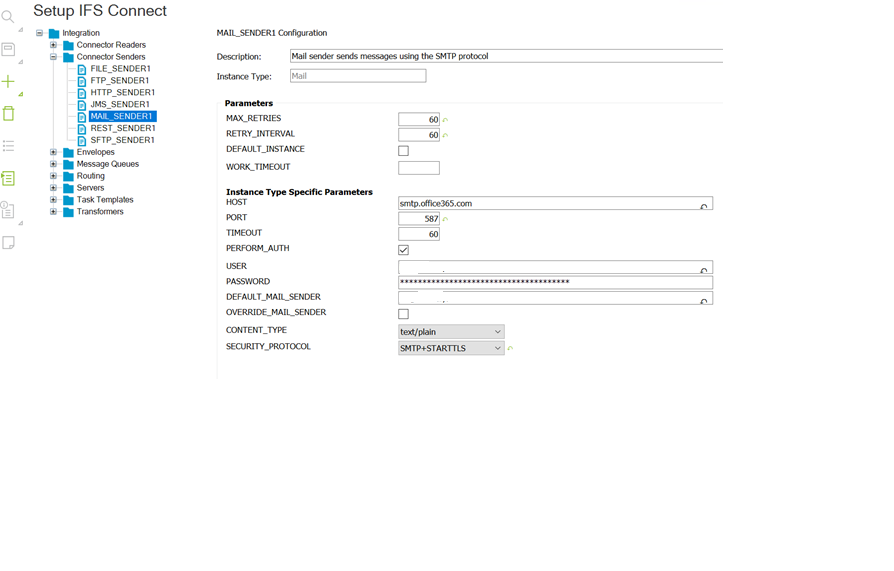
These settings should work for Office 365 (Apps 10):


Forum|alt.badge.img+8
  • Author
  • Sidekick (Customer)
  • March 16, 2021

These settings should work for Office 365 (Apps 10):


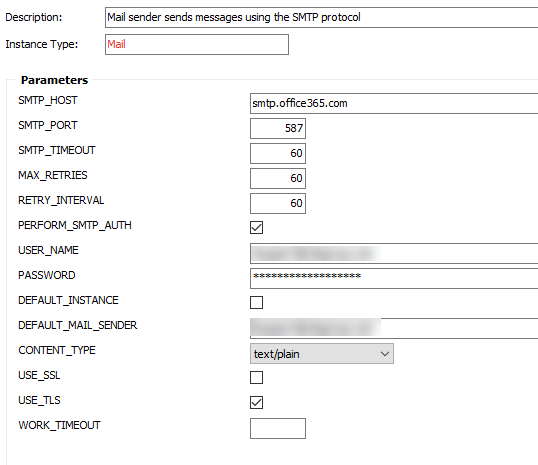
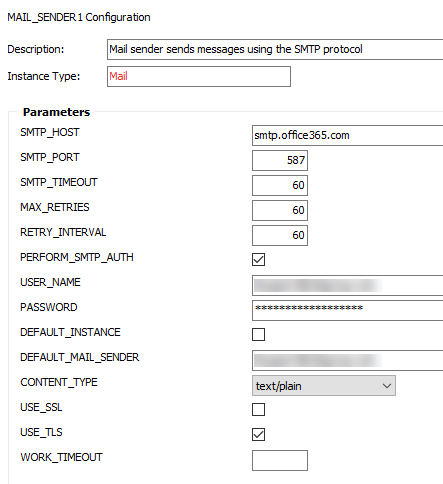
Thanks Srikanth, Apps 9 does not have SECURITY_PROTOCOL drop down. 

Please see, I’m using same ports and still nothing. 


Srikanth
Superhero (Partner)
Forum|alt.badge.img+18
  • Superhero (Partner)
  • March 16, 2021

Are the Error messages in Waiting status eventually failing with an Error message?


Forum|alt.badge.img+8
  • Author
  • Sidekick (Customer)
  • March 16, 2021

Hey @Srikanth eventually they do change to Failed state, error message is not that helpful as it just says Error while sending data….


KristenGastaldo
Superhero
Forum|alt.badge.img+18

@Kasia - Here’s the public resource available: