

Quick one for the community…. does anyone know if it is possible to create a custom menu to a specific tab on a form. For example to Inventory Part\Costs\Estimated Costs per Condition?

Solved
Custom Menu to a specific tab on form?
Best answer by sutekh137
Quick one for the community…. does anyone know if it is possible to create a custom menu to a specific tab on a form. For example to Inventory Part\Costs\Estimated Costs per Condition?
Have you tried adding a Custom Menu from that tab? I could not get that tab enabled, but in the one next to it I right-clicked and did this:
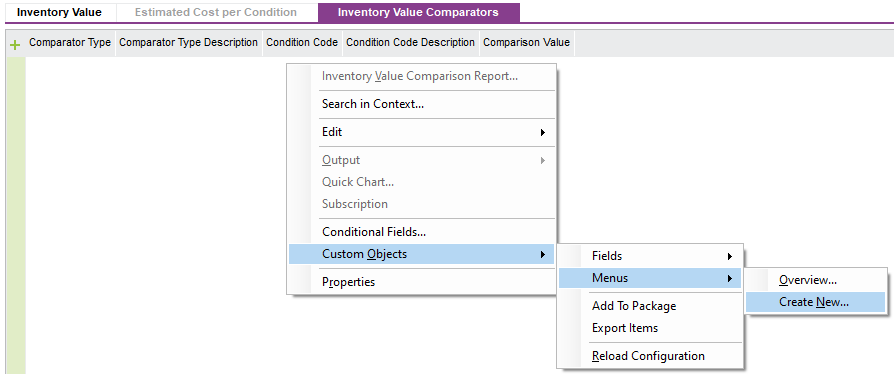
In the Custom Menu screen that came up, it looked like this:
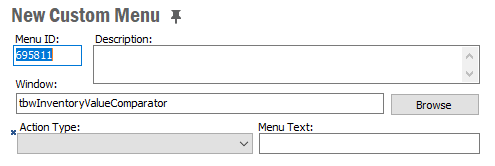
Notice the Window is specific to that tab. If I right-click to add a menu to the tab above (the Costs tab) I get:
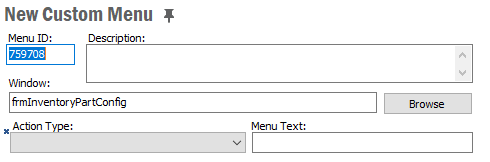
So, a different form. And if I right-click to add a menu all the way in the header of that screen (Inventory Part) I get:
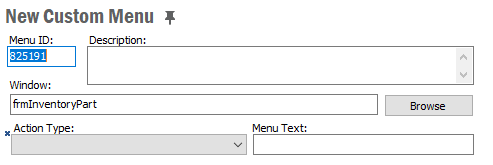
As would be expected. Three different “Windows” for the three different areas of the screen. I have to assume each Custom Menu links each specific area and is independent of the others. So maybe just give a try and see what you can do?
Good luck!
Joe Kaufman
This topic has been closed for replies.



Enter your E-mail address. We'll send you an e-mail with instructions to reset your password.