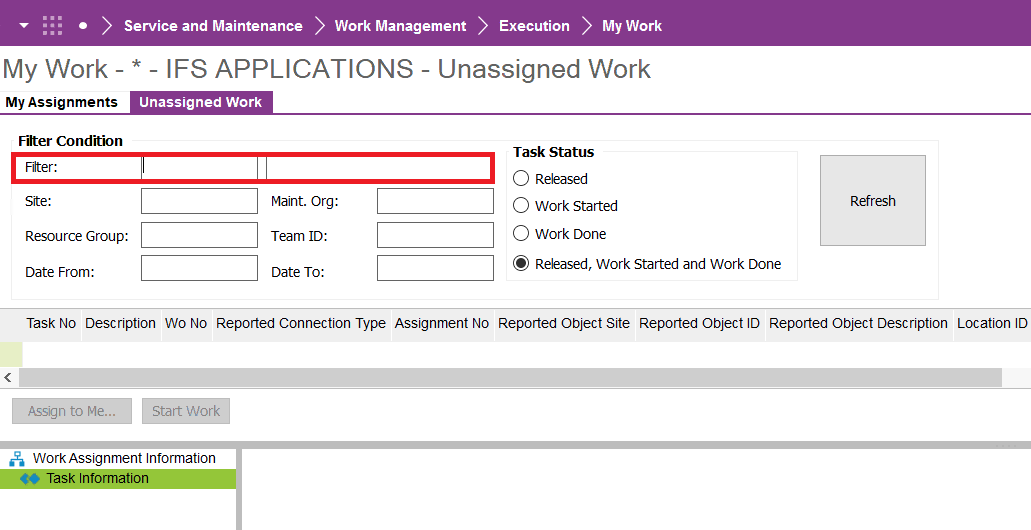
I found no documentation for what the selection of this flag does. Does anyone know? Does anyone have examples?
Regards,

I found no documentation for what the selection of this flag does. Does anyone know? Does anyone have examples?
Regards,
Best answer by Thommy
Hi,
Here is the information from field help:
Selection Released
If this check box is selected, only the work tasks in Released status will be displayed. Only one of the check boxes, Selection Released, Selection Started or Selection WorkDone can be selected at a time. If all checkboxes are left unchecked, work tasks in Released, Started and WorkDone statuses will be displayed.
Selection Started
If this check box is selected, only the work tasks in Started status will be displayed. Only one of the check boxes, Selection Released, Selection Started or Selection WorkDone can be selected at a time. If all checkboxes are left unchecked, work tasks in Released, Started and WorkDone statuses will be displayed.
Selection WorkDone
If this check box is selected, only the work tasks in WorkDone status will be displayed. Only one of the check boxes, Selection Released, Selection Started or Selection WorkDone can be selected at a time. If all checkboxes are left unchecked, work tasks in Released, Started and WorkDone statuses will be displayed.
Auto Start Populate
If this check box is selected, the unassigned work tasks in the My Work/Unassigned Work tab will be populated automatically with data for the logged-in user.
A default work task filter can be defined for the logged-in user in Resource Detail/Details/Maintenance Employee/ Work Task Filter tab.
Hope this helps.
Enter your E-mail address. We'll send you an e-mail with instructions to reset your password.