Solved

Mixed payment - pre-populate voucher type

  • April 2, 2024
  • 2 replies
  • 104 views

Forum|alt.badge.img+9

When creating a mixed payment, the voucher type is no longer pre-populating.  Why would this be, and how can we fix?

Best answer by Furkan Zengin

Hello,

Go to voucher series per voucher type window. Find voucher type N (I am assuming you are using N, otherwise find voucher type with function group N).

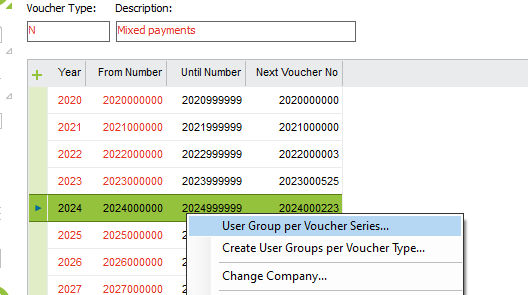
Select the accounting year, e.g. 2024. Click right mouse button and Select User Group per Voucher Series
 

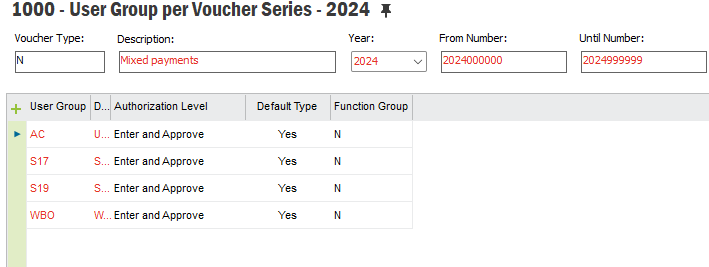
In detail window, set Default Type yes for the user groups that need to be pre-populated


Hope this helps

2 replies

TimeMarBou
Hero (Partner)
Forum|alt.badge.img+9
  • Hero (Partner)
  • April 2, 2024

Hello,

Did you check that your user group is connected to the voucher series for voucher type N in 2024?

Voucher Type > RMB > Vocher Serie > RMB in 2024 > User Group per Voucher Series


Regards.


Furkan Zengin
Ultimate Hero (Partner)
Forum|alt.badge.img+21
  • Ultimate Hero (Partner)
  • Answer
  • April 2, 2024

Hello,

Go to voucher series per voucher type window. Find voucher type N (I am assuming you are using N, otherwise find voucher type with function group N).

Select the accounting year, e.g. 2024. Click right mouse button and Select User Group per Voucher Series


In detail window, set Default Type yes for the user groups that need to be pre-populated


Hope this helps