Solved

APPS9 - Does anyone have any events running on background jobs to notifiy if one finishes in 'Warning' or 'Error' state?

  • September 24, 2020
  • 5 replies
  • 814 views

Forum|alt.badge.img+11

We have interfaces running, which occasionally fail because an object has been modified by another user (ORA-20114 Error)

When this happens, we have a process to re-send failed items but its often overlooked.

Is there an event anyone has that fires on the background job sending a notification the user/app owner when these jobs are in a ‘Warning’ or ‘Error’ state??

Thansk

Best answer by ShawnBerk

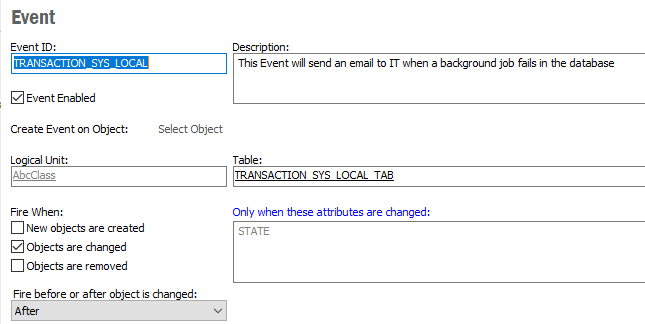
Yes, we have an Event Action that triggers on Event TRANSACTION_SYS_LOCAL and sends an email to the IT Team as well as the User who generated the error for action or follow up.  It works well to both stop users from generating the same error over and over as well as to catch bigger problems that need investigation and action.


5 replies

Forum|alt.badge.img+28
  • Superhero (Customer)
  • Answer
  • September 24, 2020

Yes, we have an Event Action that triggers on Event TRANSACTION_SYS_LOCAL and sends an email to the IT Team as well as the User who generated the error for action or follow up.  It works well to both stop users from generating the same error over and over as well as to catch bigger problems that need investigation and action.


Forum|alt.badge.img+11
  • Author
  • Sidekick (Customer)
  • September 24, 2020

Thanks! Is that a custom event? sounds perfect.

Any ideas how I set that up? Am struggling to find the table/object.


Forum|alt.badge.img+28
  • Superhero (Customer)
  • September 24, 2020

Yes, it is a custom event

Custom Event


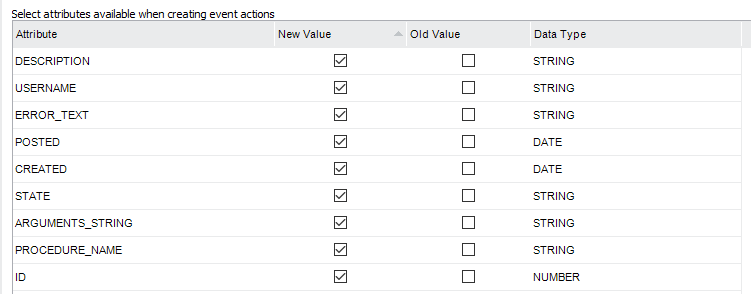
Attributes


From there, the Event Action uses the command_sys.mail function to generate the email.


Forum|alt.badge.img+11
  • Author
  • Sidekick (Customer)
  • September 24, 2020

Ahh I see, I need to create a table that records the background jobs and the event fires from that


Cheers


Forum|alt.badge.img+11
  • Author
  • Sidekick (Customer)
  • September 25, 2020

I see I was looking at the wrong table! Now have gotten the right table have it all sorted. Thanks for the help :)