Question

Supplier Hire - Create Manual Event

  • February 20, 2026
  • 1 reply
  • 14 views

Forum|alt.badge.img

Need some advise please


We are using Rental Workbench to control external supplier hire. We created a Date Exception ID to not pay for bank holidays. This means transactions will not generate for those days. 

However some suppliers have charged us for these days, we have tried to create a manual event at standard 100% price factor on that day, however it records the manual event but will not create transactions for that missing date. 

I have tried removing the date exception ID and repeating the steps but this still does nothing. 

We now cannot match invoices because there is a cost of a single day missing, hoping there is an easy front end fix to this issue! 

1 reply

Nikila Dis
Superhero (Employee)
Forum|alt.badge.img+14
  • Superhero (Employee)
  • February 20, 2026

Hi ​@sparker123,

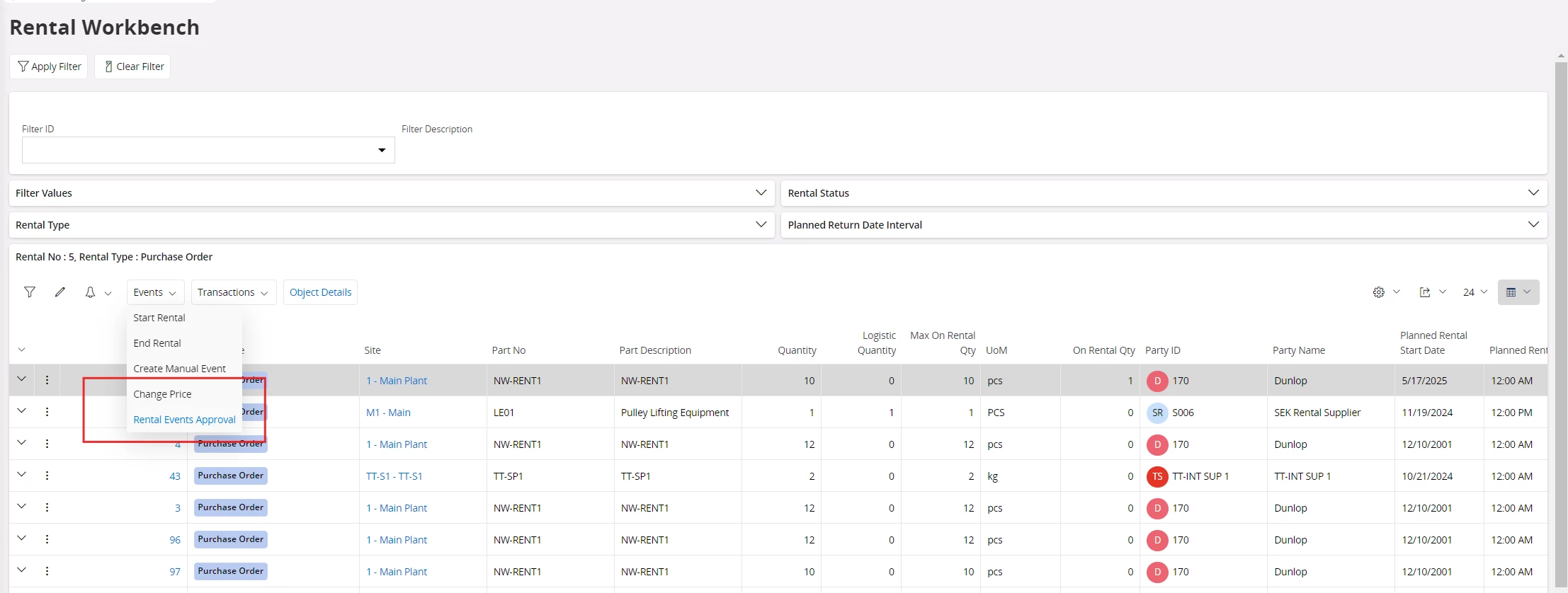
When a Date Exception ID blocks a day, IFS does not create the rental event record for that date at all. Removing the Date Exception afterwards does not retroactively regenerate historical rental days. The rental engine only creates transactions during its scheduled calculation run. So could you please try to use a One-Time Manual Rental Charge.


1. Identify the Rental Object and Line

  • Go to Rental Workbench.

  • Open the specific Rental Object.

  • Navigate to Events and locate the Rental Line for which the missing date needs a charge.

  • Make sure the line is Active.

2. Create a One-Time / Ad-hoc Event


Option A: Via Change Price / Ad-hoc Charge

  • Go to Change PriceAdd Ad-hoc Charge.

  • Select the relevant Rental Line.

  • Set the Charge Type (usually the standard daily rental).

  • Enter the Transaction Date = the missing bank holiday.

  • Quantity = 1, Price / Factor = 100%.

  • Save the event.

Option B: Via Rental Events Approval

  • Go to EventsRental Events Approval.

  • Look for Add Event / Create One-Time Charge.

  • Enter the same details as above:

    • Event Type / Charge Type → Standard daily rental

    • Transaction Date → Missing date

    • Quantity → 1

    • Price / Factor → 100%

  • Save the event.

3. Generate the Transaction

  • Return to Rental Workbench.

  • Select the Rental Line.

  • Go to TransactionsCreate Transactions.

  • Set From / To Date = the missing date.

  • Execute the transaction creation.

Check whether the system now generate a transaction for the previously blocked date.

Regards,

Nikila Dissanayake