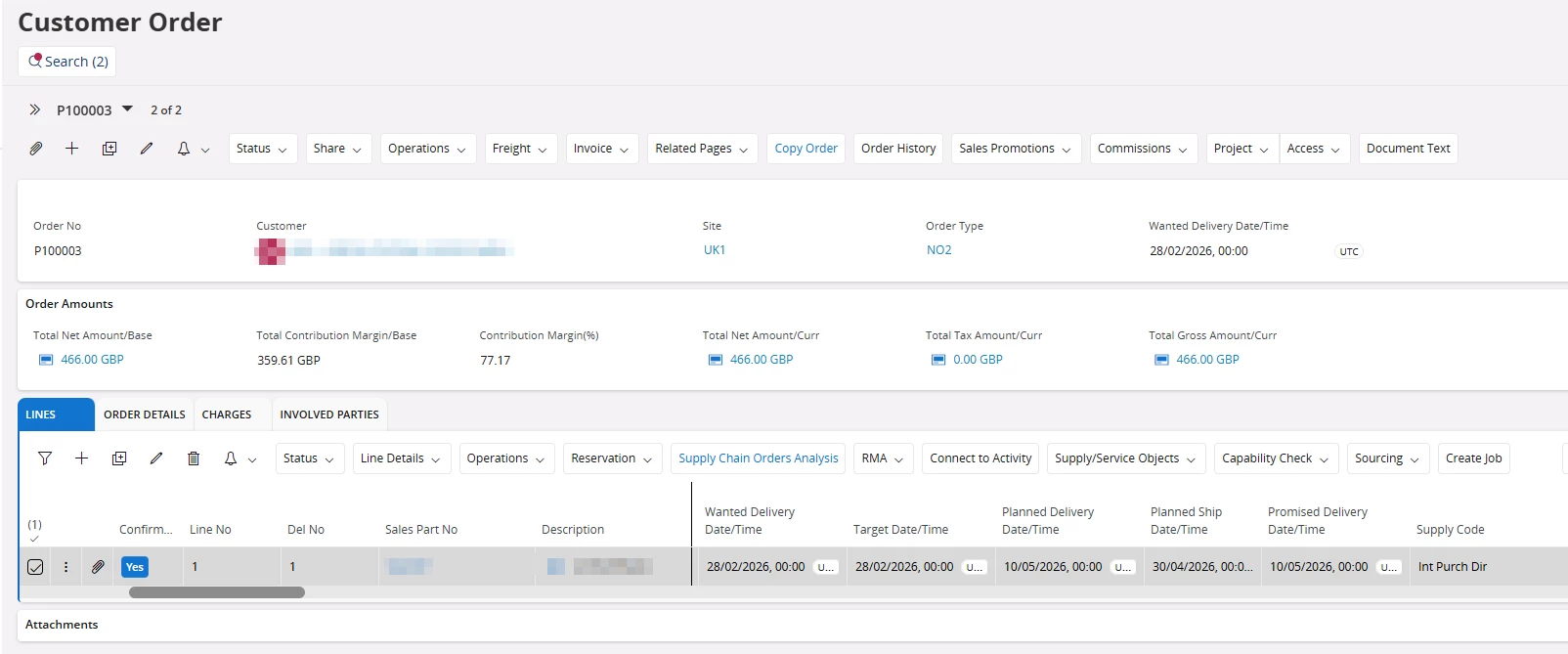
My understanding isthat the Promised Delivery Date on a Customer Order Line should stay as is if the order/line is confirmed.
I have created this order and confirmed.
I then change the target date to 08/06/2026, I expected the Planned Delivery Date and the Planned Ship Date to align, however expected the Promised Delivery Date to be kept.
Is my understanding wrong?
Best answer by Nikila Dis
Hi @COVJAMIEB,
We were able to recreate the issue in core environment with Capability Check enabled + using the Supply Code: Int Purch Direct for the CO line. In this specific scenario you have Have an Inventory Part with Capability Check enabled. This was reported to RnD and the correction will only available in IFS Cloud 26R1 EA.
If this resolves your question, please mark it as the best answer. So that it will be helpful for other peers.
The promised Delivery Date is the date/time on which the goods are promised to be delivered to the customer's address. The promised delivery date/time is initially the same as the planned delivery date/time. This will not change if the planned delivery date/time is updated for a confirmed line, and an order confirmation has been printed or sent once with the latest changes. The date/time can be manually updated if the delivery time is changed because of unforeseen disturbances.
Please mention the product version and the Service Update (SU) you are currently working on.
Hi @Arcfarazt confirmation was printed when the change was made.
Out of curiosity, I tested this in two environments (25R2 Partner and a 25R1 internal environment). I noticed two different behaviors. One being the same as what you saw and the other being the same as my understanding (i.e. if the order confirmation is printed, the promised delivery date stays static).
From my brief testing, this appears to be based on the Customer Order Confirmation level set on the Site. When it was ‘Order Level’, the Promised Delivery Date remained static. When it was ‘Line Level’, it modified if an upstream date was changed (i.e. Target Date).
Perhaps you can try something similar to see if you encounter the same results.
Just for more information. I seen this when the setting was at line level and order level.
It seems to be due to the Capability being checked, we havent100% confirmed it yes, still running through an IFS case.
When the capability check is turned off, the promised date is not changed after first confirmation, however when capability check is on, the promise date is changed in all scenarios, regardless of confirmation or not.
We were able to recreate the issue in core environment with Capability Check enabled + using the Supply Code: Int Purch Direct for the CO line. In this specific scenario you have Have an Inventory Part with Capability Check enabled. This was reported to RnD and the correction will only available in IFS Cloud 26R1 EA.
If this resolves your question, please mark it as the best answer. So that it will be helpful for other peers.