Question

PO - Coordinator

  • March 24, 2026
  • 2 replies
  • 36 views

Forum|alt.badge.img+6

Hello,

How to check in the IFS application that this for this particular PO and Project - what coordinator to be added.
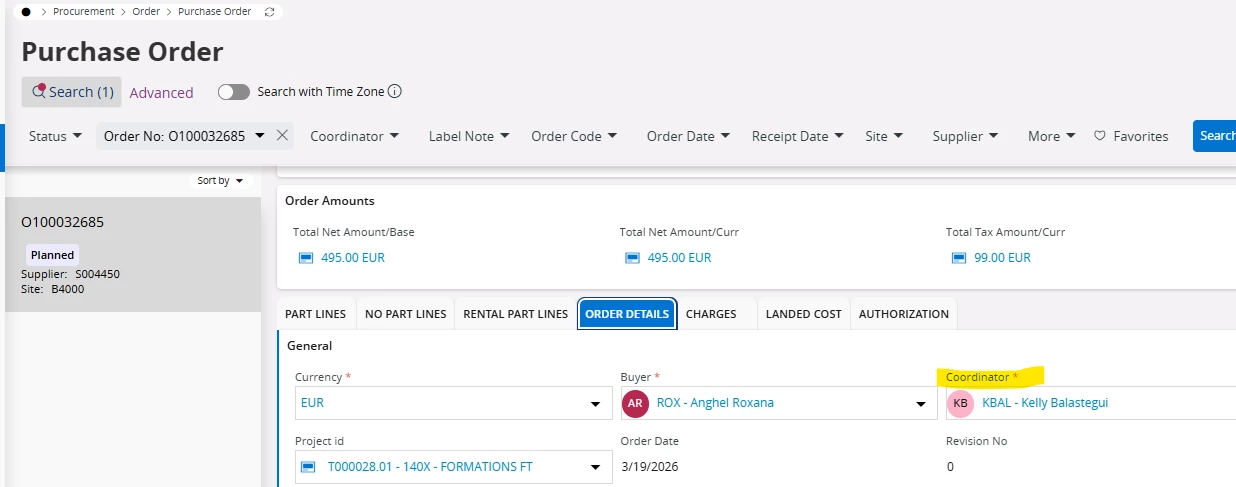
Kindly help me with this.

Regards,

kruthika

2 replies

KethakaG
Superhero (Employee)
Forum|alt.badge.img+14
  • Superhero (Employee)
  • March 24, 2026

Hi ​@kruthika 

As per field description, the coordinator is the person who is handling purchase order registrations. The coordinator is automatically filled in when a coordinator is connected to your user ID. This connection is done in Sites per User page. If no coordinator is connected to your user ID, you can indicate a coordinator manually.

Therefore, if you have specified a coordinator for your user, it will be automatically fetched to the Purchase Order. Otherwise, deciding what coordinator to be added for a particular PO and Project depends on the business decision for that Project and PO.

Regards,
Kethaka


Forum|alt.badge.img+7
  • Do Gooder (Partner)
  • April 2, 2026

Hi ​@kruthika ,

In IFS Cloud, the Coordinator on a Purchase Order is not always entered manually — it is often defaulted from setup, depending on how the PO is created.

 How to identify where the Coordinator comes from

 1. Check Site / Purchase Organization Setup

Go to:

Procurement Basic Data → Site / Purchase Organization

Check:

  • Default Coordinator
  • Buyer → Coordinator mapping

 In many cases:

Coordinator is derived from Buyer or Site setup

 2. Check Buyer Setup

On your PO:

  • You already have:
    • Buyer = ROX - Angel Rosana

 Go to:

Procurement → Buyer

Check:

  • Assigned:
    • Coordinator
    • Default values

 Often:

Coordinator is inherited from Buyer

 3. Check Project Setup (Important in your case)

Since your PO is linked to a Project:

 Go to:

  • Project → Project Definition

Check:

  • Coordinator / Responsible person
  • Project roles

 In project-driven procurement:

Coordinator may be derived from Project roles

 4. Check Supply Chain / Defaulting Rules

If PO is created from:

  • Shop Order
  • Requisition
  • Project

 Then coordinator may come from:

  • Source document

 How to control which Coordinator is assigned

Option 1:

  • Maintain Coordinator in:
    • Buyer setup

Option 2:

  • Maintain Coordinator in:
    • Project roles

Option 3:

  • Adjust manually in PO (if allowed)

 Key Insight

Coordinator is usually defaulted, not randomly assigned

 Source depends on:

  • Buyer
  • Site
  • Project
  • Origin document