


Solved

How to Customize PurchaseOrderLinePartList

  • Sep 19, 2022 8:55 AM UTC
  • 5 replies
  • 370 views

Forum|alt.badge.img+7

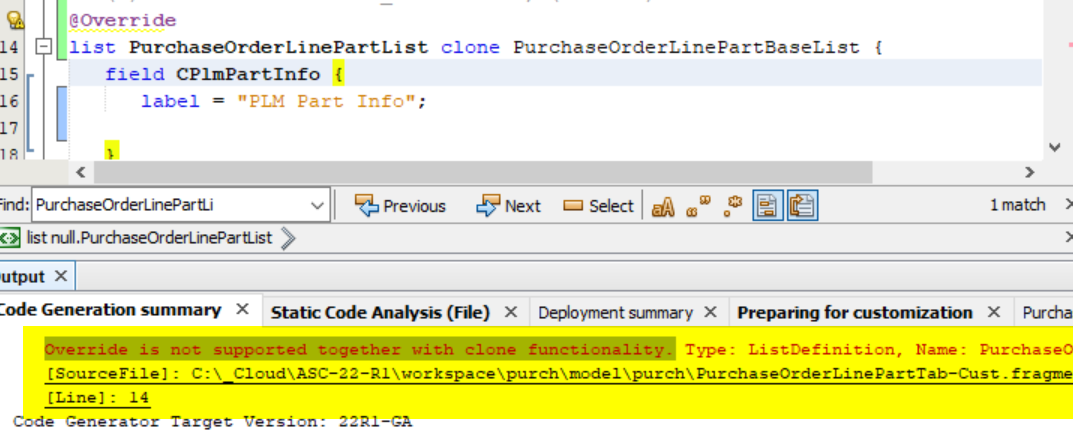
We have a custom requirement to override ‘PurchaseOrderLinePartList’ an  Error as below get raised when trying to customized this list .
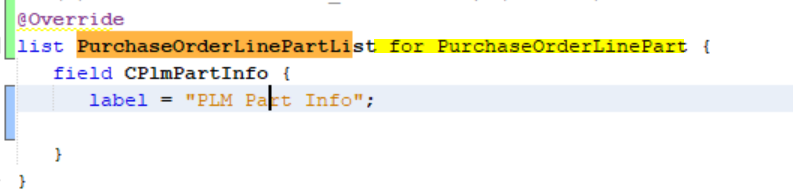
No Error comes when tried as below but the custom column do not appear in Purchase Order Page.
 

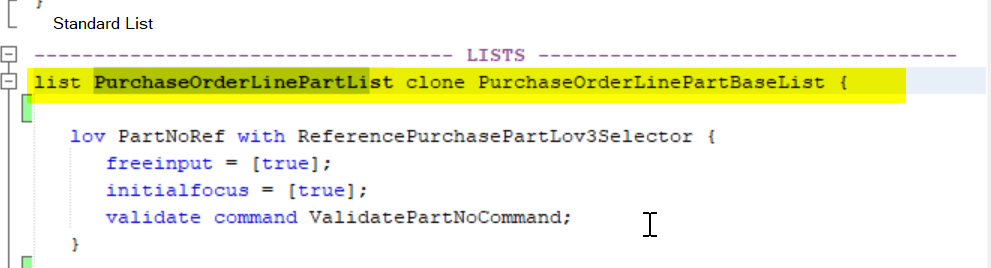
Standard List has been defined using clone.
 

Appreciate any inputs to resolve this issue.

Thanks!

Best answer by bhraau

Added New field customizing PurchaseOrderLinePartBaseList fragment to overcome this Error. But not the ideal solution since the new field is only required in PurchaseOrderLinePart. Now the field appears in Nopart and Rentals as well.

View original

5 replies

Forum|alt.badge.img+7
  • Author
  • Sidekick (Employee)
  • Answer
  • Oct 4, 2022 4:28 AM UTC

Added New field customizing PurchaseOrderLinePartBaseList fragment to overcome this Error. But not the ideal solution since the new field is only required in PurchaseOrderLinePart. Now the field appears in Nopart and Rentals as well.


Forum|alt.badge.img+9
  • Do Gooder
  • Sep 1, 2023 2:16 PM UTC

We have a custom requirement to override ‘PurchaseOrderLinePartList’ an  Error as below get raised when trying to customized this list .

No Error comes when tried as below but the custom column do not appear in Purchase Order Page.


Standard List has been defined using clone.


Appreciate any inputs to resolve this issue.

Thanks!

Hi,

Did suggested solution of customizing fragment worked for you?

Thanks.


Forum|alt.badge.img+7
  • Author
  • Sidekick (Employee)
  • Sep 4, 2023 2:30 AM UTC

Yes customization on   Fragment worked.  Made the columns added on to Rental as Non Visible.


Forum|alt.badge.img+9
  • Do Gooder
  • Sep 4, 2023 9:18 AM UTC

Yes customization on   Fragment worked.  Made the columns added on to Rental as Non Visible.

Thank you.


Forum|alt.badge.img+6
  • Sidekick (Employee)
  • Mar 28, 2025 7:57 PM UTC