



Question

Export Control on Customer Orders

  • August 5, 2024
  • 3 replies
  • 192 views

Chamath Kuruppuarachchi
Hero (Partner)
Forum|alt.badge.img+13

Hello, I am looking into the Export control. As I remember in App9 or App10 version when I am trying to set up export control for Customer orders (Inventory Part type purchase) when connecting the license I had to create a supplier for purchase part and define the export control codes in there.

In App9, in the connection log it shows the user that you need to create supplier for purchase part and define those export control basic data if you haven’t defined them. And in that version both Part catalog export control data and supplier for purchase part export control data required in order to fully connect the license.

But in Cloud 23R1 version, even when I didn’t define any supplier for purchase part export control data, system allows me to connect the master part export control type and approve the entire license. In previous versions if we only connect one it appeared as “Partially connected”.
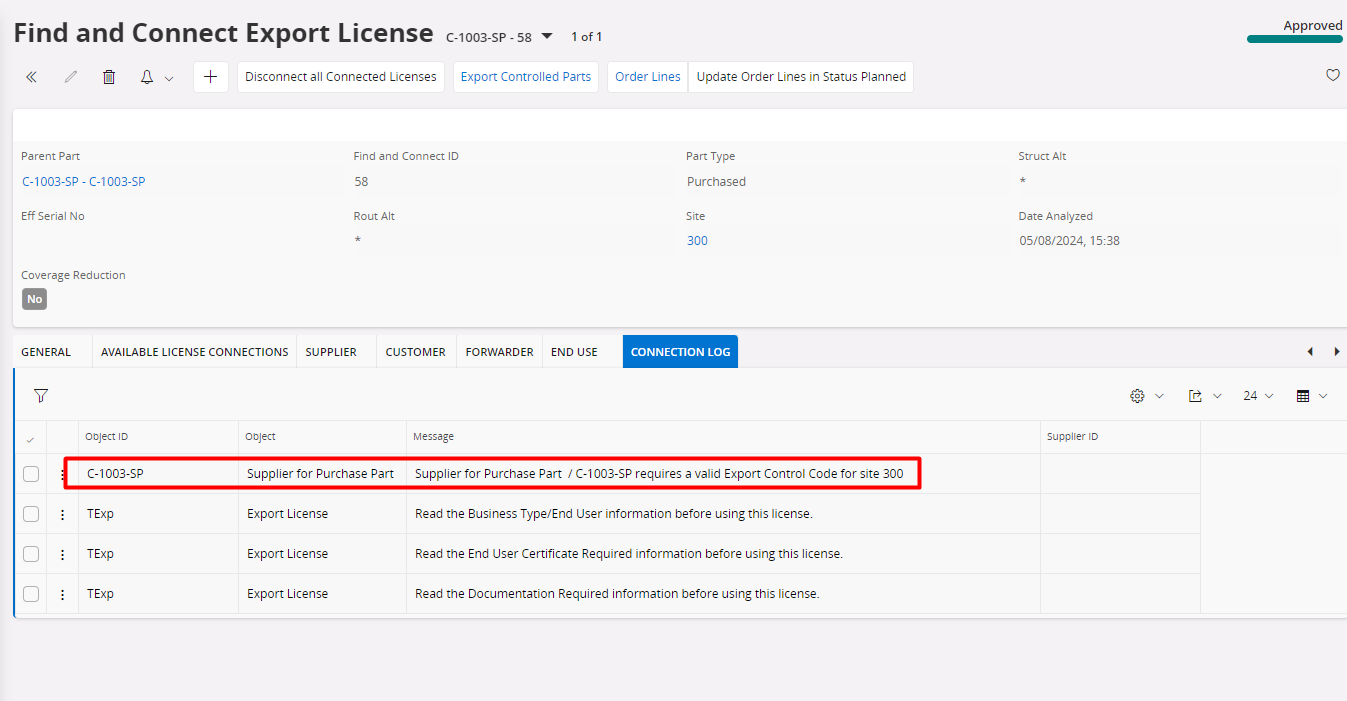
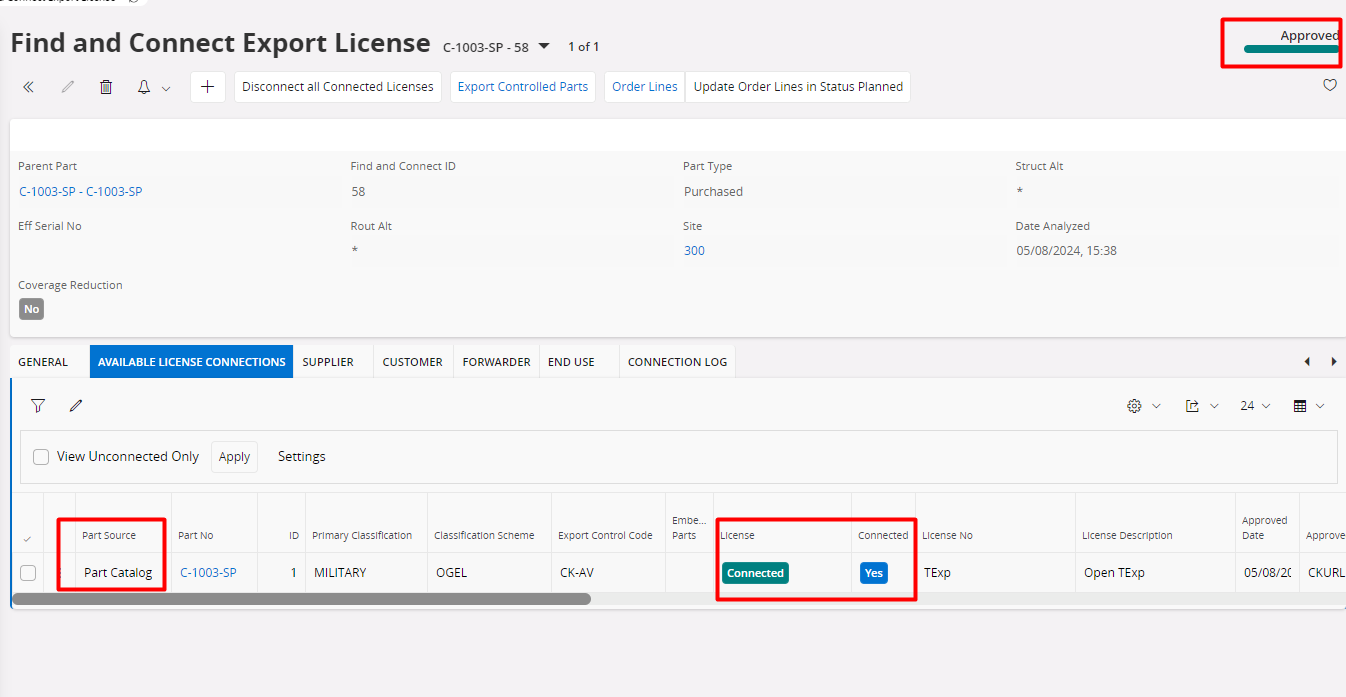
 

Did something changed after moving to cloud? I assumed since my sales part type is purchased system wanted to check the suppliers export control types. Seems that is not checking in the cloud. Did anyone came across in this situation?


3 replies

Forum|alt.badge.img+1
  • Do Gooder (Customer)
  • June 24, 2026

In my opinion it makes no sense, because if an article is export controlled, it didn`t depend on the supplier, but on the article. The function export control means export of goods, not of purchasing. And here you have to put in the same data twice in different windows...It should be fixed soon.


Nikila Dis
Superhero (Employee)
Forum|alt.badge.img+14
  • Superhero (Employee)
  • June 24, 2026

Hi ​@Chamath Kuruppuarachchi 

Initially, a defect was identified where the Find and Connect Export License process in IFS Cloud incorrectly moved to Approved status even when export control data was missing in Supplier for Purchase Part. This behavior was inconsistent with IFS Applications 10, where the status remained Partly Connected and the missing setup was clearly indicated in the logs.

As a result, a correction was delivered in the following versions:

  • 24R1 SU22 (24.1.22)
  • 24R2 SU16 (24.2.16)
  • 25R1 SU10 (25.1.10)
  • 25R2 SU4 (25.2.4)
  • 26R1 EA (26.1E.0)

This correction changed the behavior so that the status remained Partly Connected when required Supplier for Purchase Part export control information was missing.

However, R&D later identified another scenario involving manufactured inventory parts that had previously been defined as purchase parts. In such cases, the system was validating against a secondary license setup (Supplier for Purchase Part) even when no supplier relationship existed. This caused the status to remain Partly Connected unnecessarily.

Therefore, a subsequent correction was delivered in:

  • 24R2 SU18 (24.2.18)
  • 25R1 SU12 (25.1.12)
  • 25R2 SU6 (25.2.6)
  • 26R1 GA (26.1.0)
  • 26R2 EA (26.2E.0)

With this later correction, if a manufactured part has no associated supplier or Supplier for Purchase Part records, the Find and Connect Export License process will correctly progress to Approved status. The validation against Supplier for Purchase Part is only applicable when such supplier-related data exists. 

Regards,

Nikila Dissanayake.


Forum|alt.badge.img+1
  • Do Gooder (Customer)
  • June 24, 2026

I agree, but it creates another major problem as we have now:

If you`ve disabled the export control for purchasing in the basic data (picture) - as we have for years - you are not able to ship any part via customer order or project deliverables, if you don`t put the same data in your master part AND in purchased parts (which we don`t and won`t do, because it`s not needed for export control reasons and still the same data twice). 


So why should I maintain the data twice, which is time-consuming for >100k parts?


Solution should be like:

If export control for purchasing is disabled, the license should connect as before via export licences from the master part data/export control - like before. 

If it is enabled, it should work like you mentioned above - this would be the right behaviour. Otherwise why do I need these basic settings, if they take no effect?



