Question

Custom field from Purchase Order Line added to Register Arrivals

  • April 3, 2026
  • 4 replies
  • 31 views

Forum|alt.badge.img+3

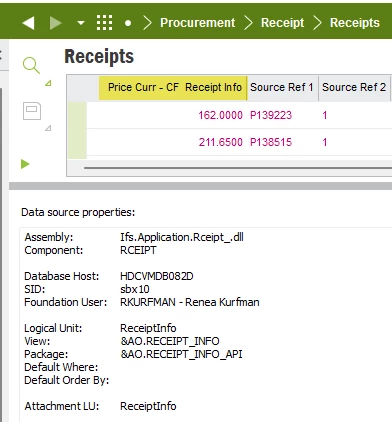
Trying to add custom field for Price/Curr from the Purchase Order Line to Register Arrivals screen, but these are not available:

 

4 replies

Forum|alt.badge.img+9
  • Hero (Partner)
  • April 6, 2026

Trying to add custom field for Price/Curr from the Purchase Order Line to Register Arrivals screen, but these are not available:

 

Hi ​@rkurfman.vib,

The issue is due to how custom fields are handled in IFS.

 Custom fields created on PurchaseOrderLine are only available for that LU and won’t automatically appear in Register Arrivals, since it is based on a different LU (e.g., ReceiptInfo / ReceiptInfoAlt).

 What you need to do

Option 1: Create Custom Fields on Receipt LU

  • Identify the LU used in Register Arrivals (e.g., ReceiptInfoAlt)

  • Create the same custom fields there

  • Approve and Publish them

Option 2: Use Custom Attribute Mapping / Logic

  • If you need to bring values from PO Line:

    • Use event/action or projection logic

    • Populate the receipt custom field from PO Line during arrival

 Important

  • Even though PO Line is the source, Register Arrivals does not directly use that LU

  • So CFs must exist on the target LU (Receipt side)

 Tip

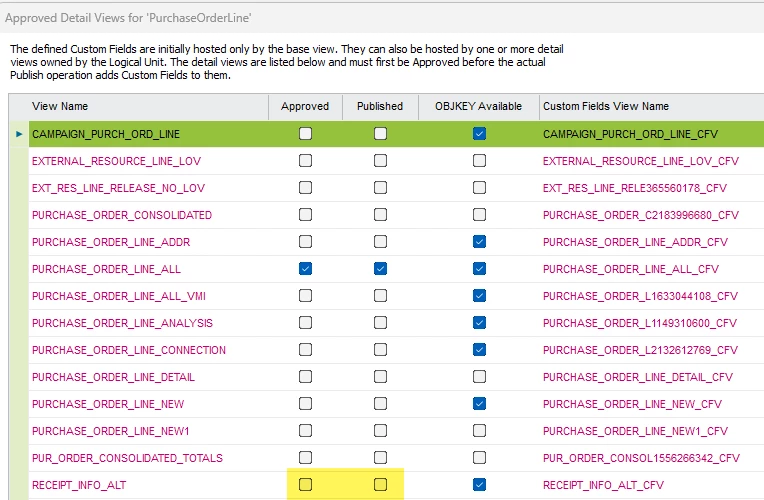
From your screenshot:

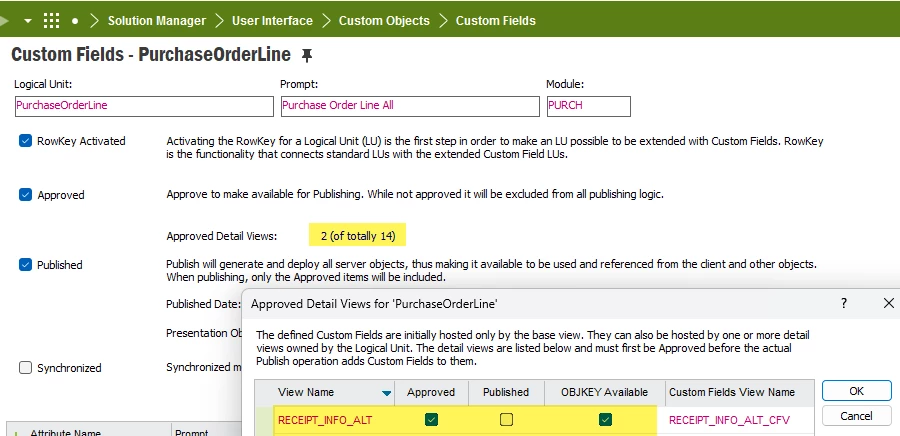
  • RECEIPT_INFO_ALT is not yet approved/published

 Try:

  1. Approve

  2. Publish

  3. Refresh metadata

 Summary

✔️ CF on PO Line ≠ visible in Receipt
✔️ Create CF on Receipt LU
✔️ Use logic if value needs to be copied

Let me know if you need help identifying the exact LU behind your screen.


Forum|alt.badge.img+3
  • Author
  • Do Gooder (Customer)
  • April 6, 2026

Hello Update:

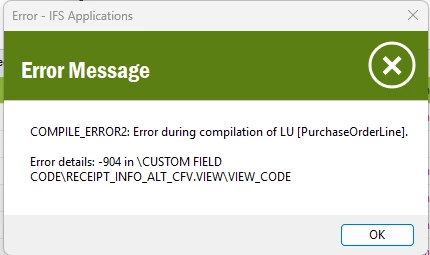
When I try again to add this view, I get the error message below when trying to Synch:


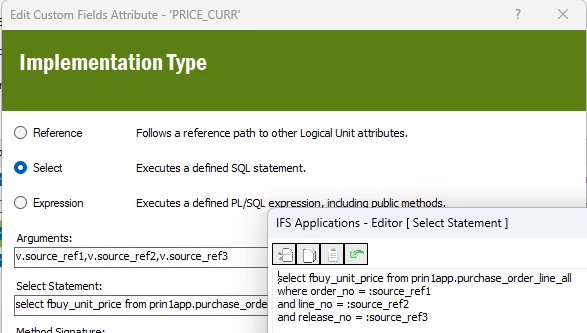
I was able to add the Price_Curr (FBUY_UNIT_PRICE) field from Purchase Order Lines to Receipts as a Read Only custom field

Logical Unit:    ReceiptInfo
View:        &AO.RECEIPT_INFO

with below Arguments and Select Statement 

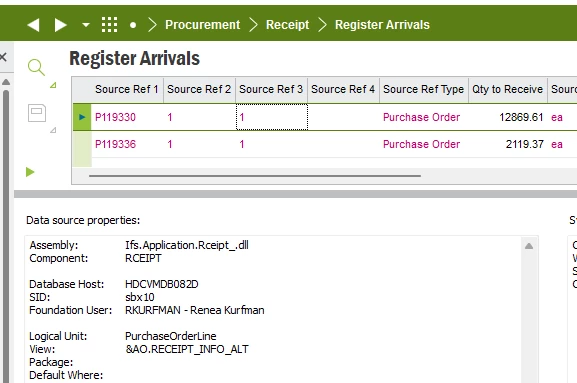
But still not able to transfer or add this value for Price_Curr from Purchase Order Lines to 

Register Arrivals where I need it:


*Can you help me with the Custom Field Logical Unit needed, the Arguments and Select Statement needed for the Price_Curr field value from the Purchase Order Line to show up on Register Arrivals?


Forum|alt.badge.img+9
  • Hero (Partner)
  • April 6, 2026

Hello Update:

When I try again to add this view, I get the error message below when trying to Synch:


I was able to add the Price_Curr (FBUY_UNIT_PRICE) field from Purchase Order Lines to Receipts as a Read Only custom field

Logical Unit:    ReceiptInfo
View:        &AO.RECEIPT_INFO

with below Arguments and Select Statement 

But still not able to transfer or add this value for Price_Curr from Purchase Order Lines to 

Register Arrivals where I need it:


*Can you help me with the Custom Field Logical Unit needed, the Arguments and Select Statement needed for the Price_Curr field value from the Purchase Order Line to show up on Register Arrivals?

@rkurfman.vib ,

Hi,

You are very close, but the issue comes from mixing LUs and how Custom Fields are compiled/extended in IFS.

 Root Cause

  • You are trying to extend PurchaseOrderLine LU using a detail view from Receipt (RECEIPT_INFO_ALT)

  • This causes the compile error:

    Error -904 in CUSTOM_FIELD_CODE[RECEIPT_INFO_ALT_CFV.VIEW]
  • Custom Fields must only reference views belonging to the same LU

 Correct Approach

✔️ 1. Use the correct LU (target screen)

For Register Arrivals, the correct LU is:

  • ReceiptInfo (or ReceiptInfoAlt depending on screen)

 Custom Fields must be created on this LU, NOT on PurchaseOrderLine

✔️ 2. Use Source References correctly

From your screen:

  • Source Ref1 = Order No

  • Source Ref2 = Line No

  • Source Ref3 = Release No

These map correctly to:

order_no
line_no
release_no

✔️ 3. Correct Select Statement (on Receipt LU)

Use this:

SELECT fbuy_unit_price
FROM purchase_order_line_all
WHERE order_no = :source_ref1
AND line_no = :source_ref2
AND release_no = :source_ref3

 This is correct and already working for Price

✔️ 4. For Price_Curr (Currency)

You need to fetch the correct column from PO line:

Example:

SELECT currency_code
FROM purchase_order_line_all
WHERE order_no = :source_ref1
AND line_no = :source_ref2
AND release_no = :source_ref3

 Use the exact column name from:

  • PURCHASE_ORDER_LINE_ALL (e.g. currency_code, buy_currency, etc. depending on version)

 Important Fix for Your Error

From your screenshot:

  • You selected RECEIPT_INFO_ALT as detail view under PurchaseOrderLine
    ❌ This is incorrect

 Fix:

  1. Remove RECEIPT_INFO_ALT from PurchaseOrderLine CF setup

  2. Create CF directly on:

    • ReceiptInfo or ReceiptInfoAlt LU

  3. Approve → Publish → Sync

 Key Rule (Very Important)

✔ Custom Fields must be created on the target LU (screen LU)
✔ You can fetch data from other LUs using SELECT logic
❌ You cannot mix detail views across different LUs

 Why your Price worked but Currency didn’t

  • Price worked because:

    • You created it correctly on ReceiptInfo LU

  • Currency failed because:

    • You tried extending via wrong LU/view combination

 Final Solution Summary

  • Create CF on ReceiptInfo / ReceiptInfoAlt

  • Use SELECT with :source_ref1/2/3

  • Do NOT attach Receipt views under PurchaseOrderLine

  • Ensure correct column name for currency

If needed, I can help you identify the exact column name for Price_Curr in your environment 


Forum|alt.badge.img+3
  • Author
  • Do Gooder (Customer)
  • April 6, 2026

Hello,
I had no issue creating the custom field on LU RECEIPT_INFO on the Receipt(s)

But still not able to get it to appear on Register Arrivals screen which is where I need it.  User wants to be able to see the Price/Curr value from Purchase Order Line before they do the Receive step