Question

Alternative to Drop Shipment (Direct Delivery) Without a Customer Order

  • January 8, 2026
  • 4 replies
  • 74 views

Forum|alt.badge.img+1

Hi Everyone,

I’m looking for guidance on whether there is an alternative way to perform a drop shipment (direct delivery) in IFS Cloud from supplier to external customer without using a customer order as a demand.

Business Scenario- The client is using the Projects and Service modules, where demand is generated through these modules. Based on this demand, the supplier ships the items directly to the customer, subcontractor, or technician trucks.

Specifically, is it possible to handle drop shipment based on project demand or a service request, rather than creating a customer order? If so, I’d appreciate any insights on recommended setups, processes, or best practices.

Thank you in advance for your support.

Kind regards,
Nirushi

4 replies

Forum|alt.badge.img+11

Hi,

In recent releases the Maintenance Material Requisition Line has been enhanced to provide more flexibility in sourcing and delivery. You can source from any supplier, site and/or remote warehouse. It will either create a pegged Purchase Order (external supplier), pegged Shipment Order (Site / Remote Warehouse in the same company) or a pegged Distribution Order (Site / Remote Warehouse in different company).

This is supported for:

  • Request Task
  • Aviation Task
  • Work Order (in coming release)

For request task you can get this delivered directly to the service location where the service should happen. Not sure if this is a bit what you are asking for?

When you write Project I guess you are referring to Project Misc Demand, there is nothing similar there. Or are you thinking about project deliverables? There you can have shipment plans to be delivered to installation sites, I don’t think it is possible to source from other location and deliver directly to installation site, however I am not an expert here.

Best Regards

Fredrik


Forum|alt.badge.img+1
  • Author
  • Do Gooder (Partner)
  • January 8, 2026

Hi Fredrik,

Thank you for your response.

Could you please share the steps to deliver items directly to a service location? For example, if a request task is created and a purchase requisition is generated from it, which is then converted into a purchase order—how can the items be delivered directly to the service location after that?

Regarding Projects, I was referring to project miscellaneous demand. Thank you for the clarification and for your effort in providing the explanation.

Kind regards,
Nirushi


Forum|alt.badge.img+11

Hi,

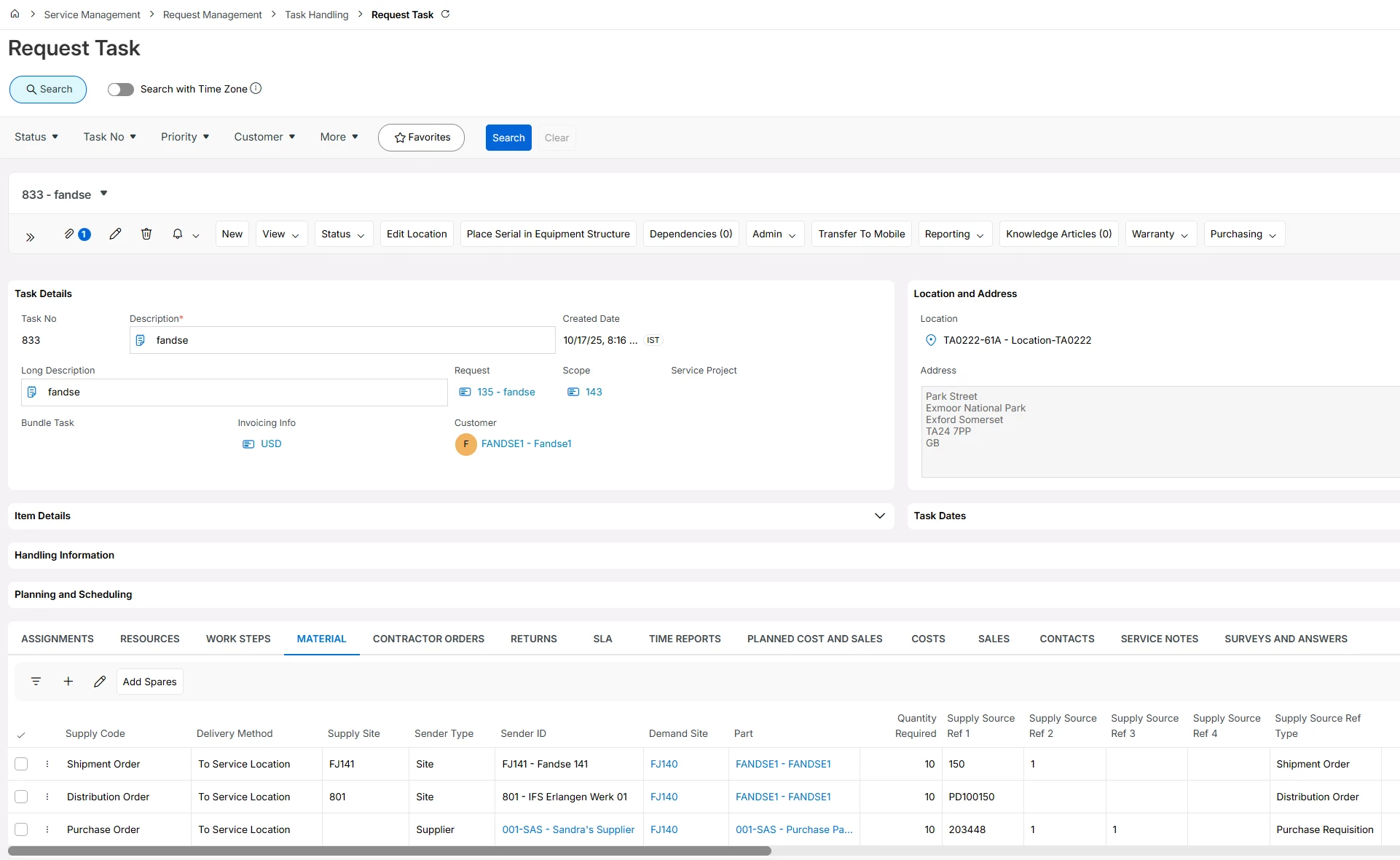
Below is an example I have created:


The Delivery Method field decides the destination of the delivery, when having To Service Location it means that the material is delivered directly to the service location stated in the Location and Address groups.

In this scenario I have sourced in three different ways:

  • First line, sourced from a site in the same company using shipment order delivered direct to service location
  • Second line, sourced from a site in a different company using distribution order, creating customer order to be delivered direct to service location
  • Third line, sourced from external supplier using purchase req/order to be delivered to service location

In each of those scenario we create a pegged shipment order, distribution order or purchase order depending on supply code. When receiving the material it gets reserved to the material line automatically. 

Sender Type and ID decides from where the sourcing happens.

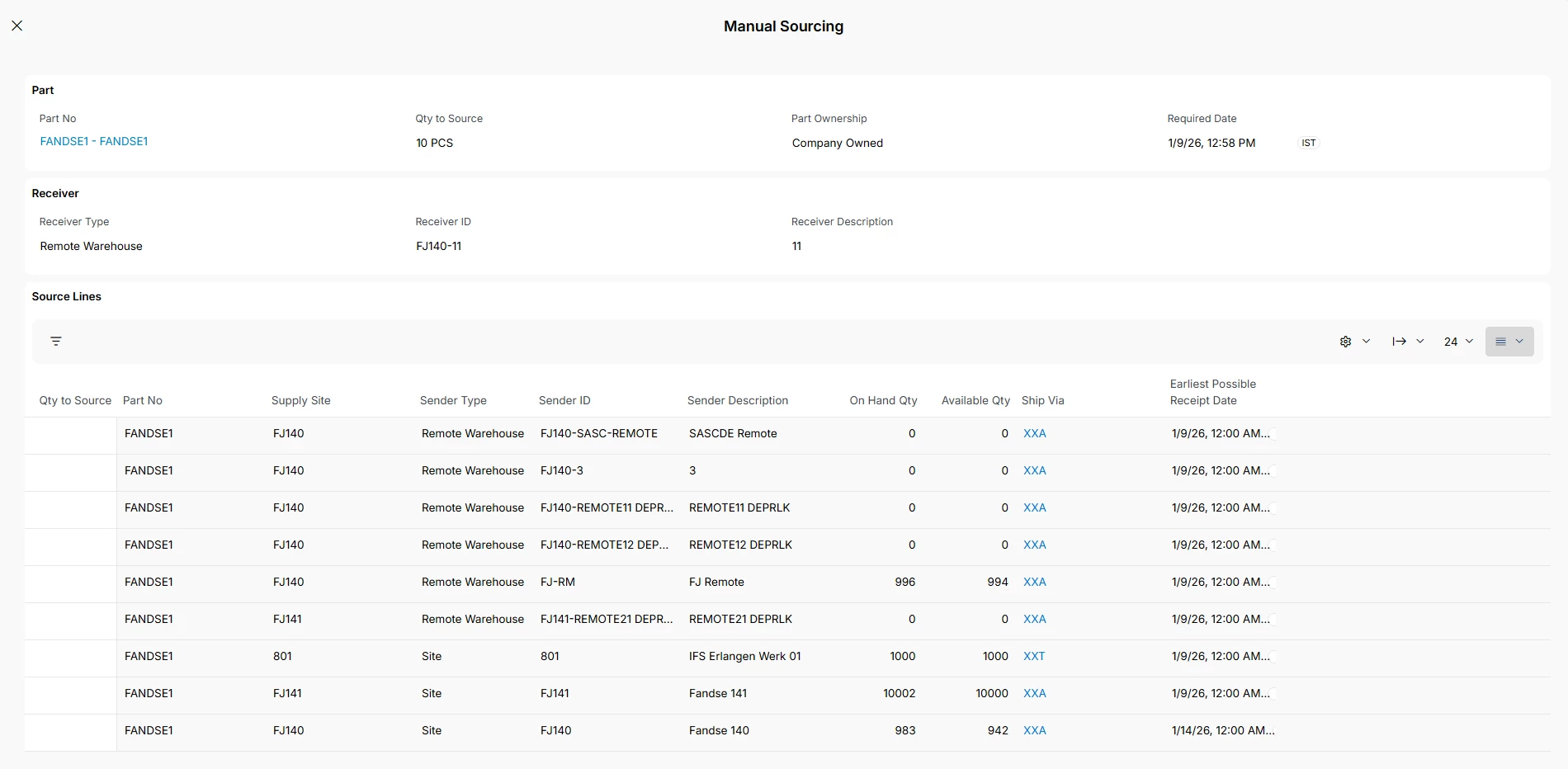
An addition feature is that, we have added a sourcing assistant to see the options as a help when entering the lines. So here you can enter quantities and get the material line updated automatically based on the sourcing you choose:


I hope this is what you are asking for?`Perhaps something similar could be requested in future releases for project misc demand?

Best Regards

Fredrik


Forum|alt.badge.img+1
  • Author
  • Do Gooder (Partner)
  • January 20, 2026

Hi Fredrik,

Thank you for your response.