Solved

Why My Resource Planning is not show up in Resource Analysis

  • September 13, 2022
  • 4 replies
  • 210 views

Forum|alt.badge.img+16

Community,

Wondering why my resource planning is not showing up in my resource analysis window. attached the 2 screenshots. one is the expected result, the other screenshot is from my project window, you can see i scheduled the 1000 hours in project 1057, but in resource analysis window, still show 0 in my project.

Best answer by Johan Lagerström

Hi Ron,

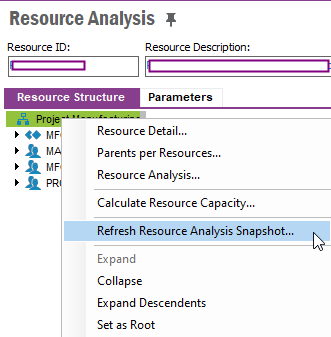
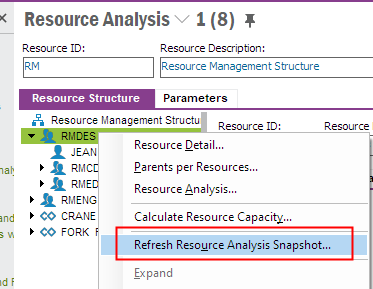
Have you refreshed the snapshot? If not, please right click the resource in the Resource Analysis screen and select the ‘Refresh Resource Analysis Snapshot’ option:


Hope this helps.


Kind regards,

Johan


4 replies

Forum|alt.badge.img+16
  • Author
  • Hero (Customer)
  • September 13, 2022

reload picture.


Forum|alt.badge.img+9

Hi Ron,

Have you refreshed the snapshot? If not, please right click the resource in the Resource Analysis screen and select the ‘Refresh Resource Analysis Snapshot’ option:


Hope this helps.


Kind regards,

Johan


Åsa_B
Hero (Employee)
Forum|alt.badge.img+5
  • Hero (Employee)
  • September 14, 2022

Hi,

Have you run the command “Refresh Resource Analysis Snapshot”? . This function was introduced to improve the performance of the Resource Analysis page. This will take a new snapshot of all resource demands and update the graph. This function should be run when changes to resource demands have been made to display the accurate data.


Forum|alt.badge.img+16
  • Author
  • Hero (Customer)
  • September 14, 2022

@Åsa_B 

@Johan Lagerström 

you guys are awesome. appreciated.