Question

Update revision in a shop order

  • January 13, 2026
  • 9 replies
  • 83 views

Forum|alt.badge.img+11

Hello.

We have a shop order in which the revision is outdated despite the shop order is not yet over, how can we update its revision?

Thanks

IFF APPS 10 UPD 5

9 replies

Nikila Dis
Hero (Employee)
Forum|alt.badge.img+13
  • Hero (Employee)
  • January 13, 2026

Hi ​@romsar,

  • Navigate to: Manufacturing → Shop Orders → Shop Orders
  • Query your Shop Order.
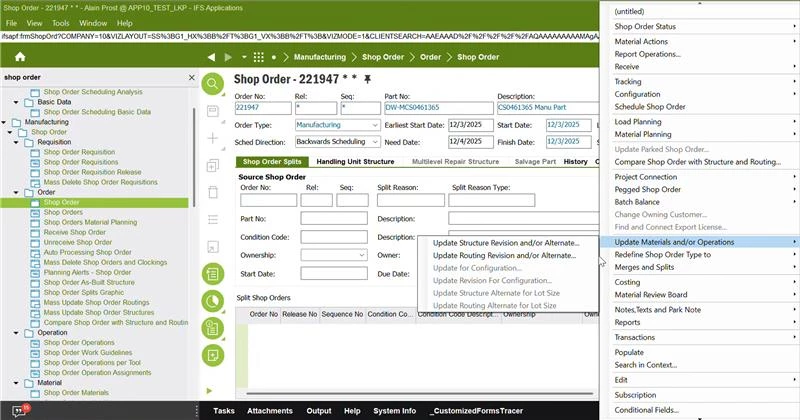
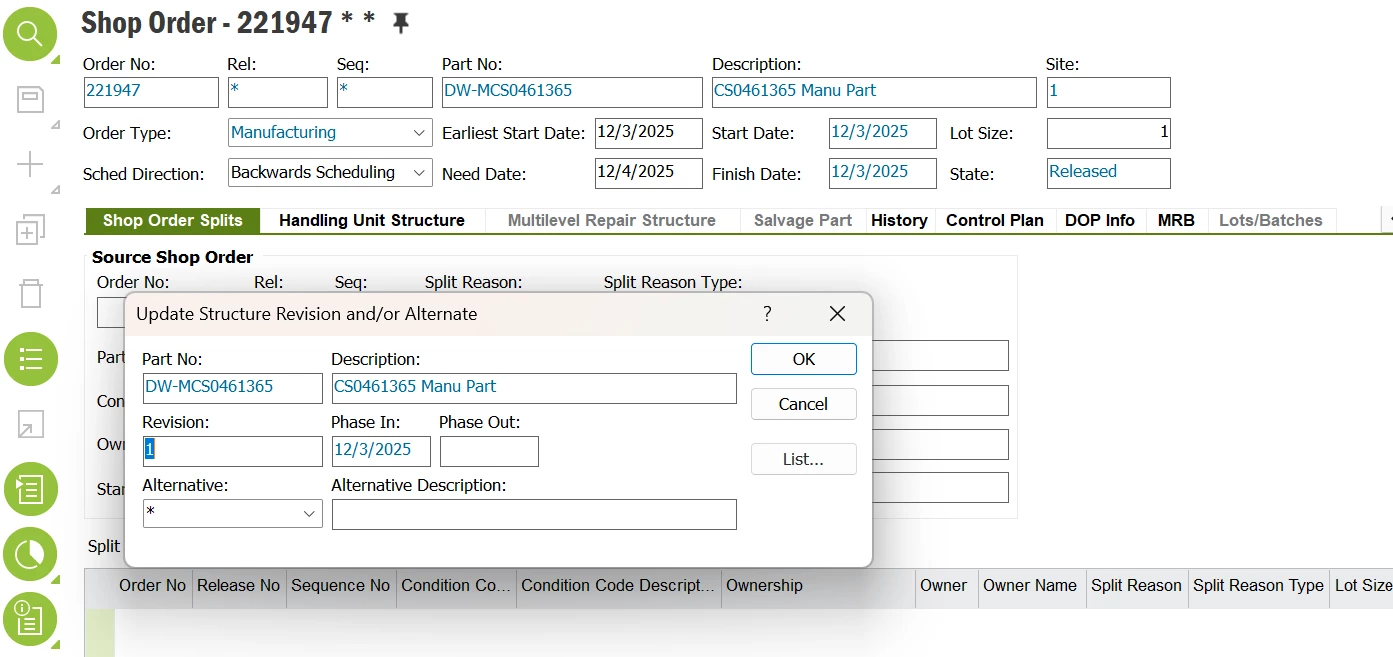
  • Click on the header > Select the below option 

  • Select the new revision from the list of available revisions for that item.


Regards,

Nikila Dissanayake


Forum|alt.badge.img+7
  • Hero (Employee)
  • January 13, 2026

In App10, you can update the part revision on a shop order only before any irreversible transactions have taken place.


Shop Order → RMB (Right‑Mouse Button) → Update Revision

This option is available only when:

  • Shop Order status is Planned or Released
  • No material consumption is done on the shop order
  • No operation reporting (clocking, labor/machine reporting) exists
  • No part receipt (Report Operations/Receive Manufactured Items)
  • Shop order is not connected to a project activity that has already accumulated costs

In App10, once transactions start, the system protects revision integrity and disables the command.

App10 blocks revision changes if:

System detects:

  • Any material issue (manual issue or backflush)
  • Any labor or machine time reported
  • Any operation completed
  • Partial or full receipt performed
  • Any WIP costs already posted into project or general ledger (if Project Connected SO)
  • Shop order pegged to a pegging supply that has already been consumed

In these situations, App10 enforces traceability and the revision is locked.

If transactions already exist → You must create a new shop order


Forum|alt.badge.img+11
  • Author
  • Hero (Customer)
  • January 13, 2026

Thanks you both for your message, our shop order has its status set to Started, is that still possible to update the revision?


Nikila Dis
Hero (Employee)
Forum|alt.badge.img+13
  • Hero (Employee)
  • January 13, 2026

Hi ​@romsar,

No. So even though the Shop Order is not yet finished, “Started” is already too late to change the part revision. This is standard IFS behavior designed to safeguard issued materials, reported operations, and the integrity of WIP and costing.

Regards,

Nikila Dissanayake


Forum|alt.badge.img+11
  • Author
  • Hero (Customer)
  • January 13, 2026

Hello ​@Nikila Dis 

Alright. Now I’m thinking, can we make a new release / sequence version of our shop order, is there any workaround to fix that? Or should we cancel the SO to make a new one?


Nikila Dis
Hero (Employee)
Forum|alt.badge.img+13
  • Hero (Employee)
  • January 13, 2026

Hi ​@romsar,

Once a Shop Order is Started, IFS does not allow creating a new release or sequence version to change the part revision. Therefore, the correct and supported approach is to cancel or close the started Shop Order, then create a new Shop Order using the correct (latest) part revision. After that, re-issue the required materials and continue production on the new order.

I hope the above explanation works for you. 

Regards,

Nikila Dissanayake


Forum|alt.badge.img+11
  • Hero (Employee)
  • January 13, 2026

If you have Partial receipts, then Comprehensive Shop Order Split would help to process the remainder with a new shop order.


Björn Hultgren
Hero (Employee)
Forum|alt.badge.img+25

Actually you can update the revision of a Started shop order by first Parking it with a park reason that allows this. Then you can change the revision. However, note, that this will not automatically change the materials according to the new revision, this must be done manually or through the compare with structure/routing function. 


Forum|alt.badge.img+11
  • Author
  • Hero (Customer)
  • January 19, 2026

Hello. 

Our user told me they could find out a solution to their issue, so my request is over.

Thanks