


Solved

Shop floor workbench employee selection

  • February 9, 2026
  • 3 replies
  • 13 views

Forum|alt.badge.img+6

Hello,

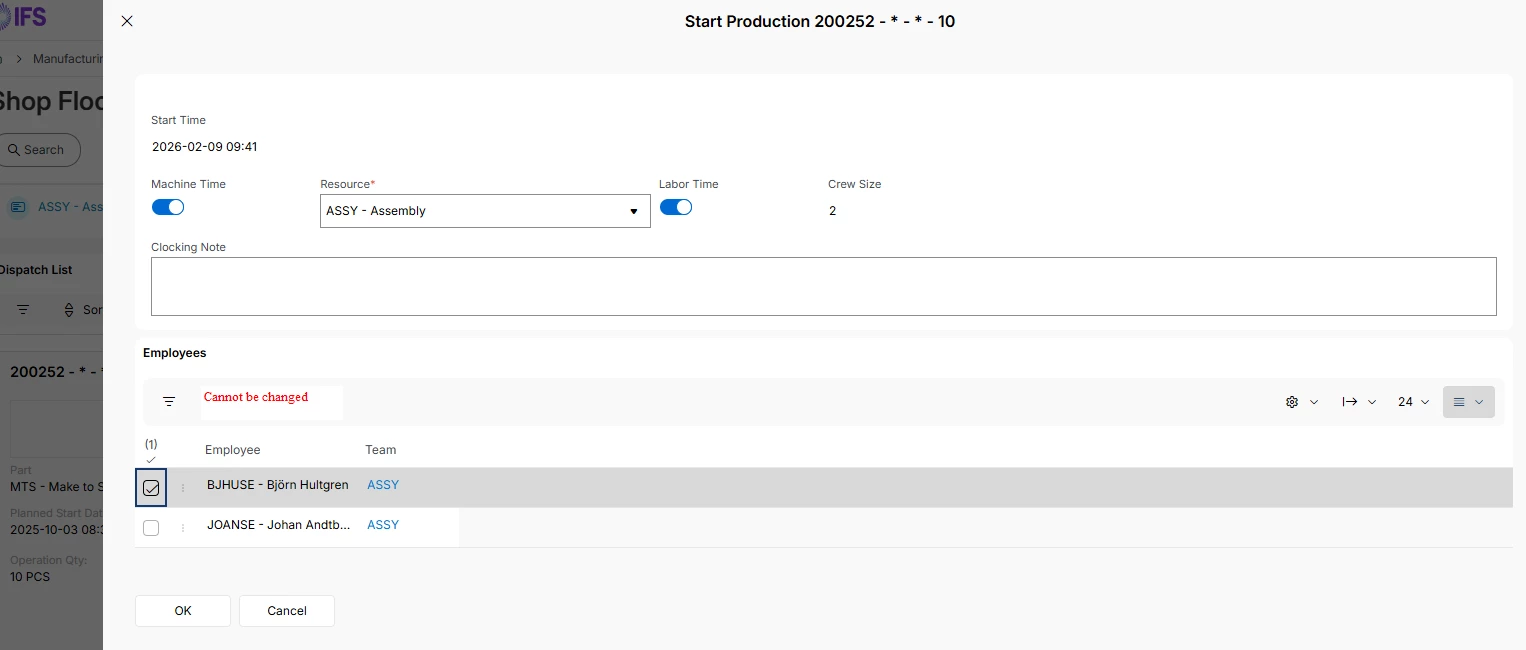
When working in a team on the shop floor workbench and an operation is started there is the option to select team members. With this option I would expect the shop floor clockings would only be created for those team members. 
But when Im checking the shop floor clockings after stopping the production, the clockings are created for all team members. 
Am Im missing a setting or can this be a bug? 

Kind regards, 
Willem
Best answer by Björn Hultgren

If you start an operation as a team, the time will always be started for all the employees currently logged in to the team. It should not be possible to edit the team members manually when starting the operation.

Maybe you can share some screenshots to clarify the scenario?

3 replies

Björn Hultgren
Hero (Employee)
Forum|alt.badge.img+25
  • Hero (Employee)
  • Answer
  • February 9, 2026

If you start an operation as a team, the time will always be started for all the employees currently logged in to the team. It should not be possible to edit the team members manually when starting the operation.

Maybe you can share some screenshots to clarify the scenario?


Forum|alt.badge.img+6
  • Author
  • Sidekick (Partner)
  • February 9, 2026

Yes, that’s the screen I was referring to. It seems team members can be selected to execute the operation.

If there is one team per work center and they execute multiple operations on that work center, it would be efficient to select the team members per operation. Otherwise, multiple teams would need to be created for that work center. Right now, the time for the operations is divided across all team members.


Björn Hultgren
Hero (Employee)
Forum|alt.badge.img+25

You can also manually enter the employees that works on an operation when starting it without using the team concept. Because the very basics of the team concept is that everyone in the team is working on the same jobs.

