Question

Shop Floor Clocking Duration

  • December 17, 2025
  • 1 reply
  • 9 views

Forum|alt.badge.img+1

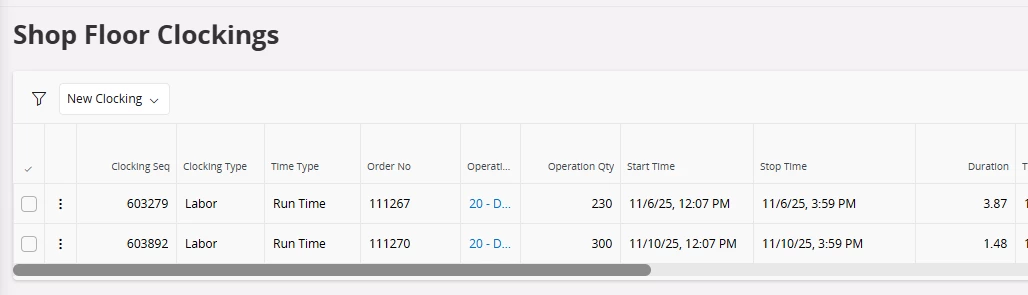
Why would the duration be different on two clocking when the start and stop times are the same?  Note the screen shot below… the duration on 11/6 is 3.87 hours, but the duration on 11/10 is only 1.48 hours.  

It appears that the system is doing something different on Mondays but it’s only impacting certain employees.



1 reply

Forum|alt.badge.img+10
  • Hero (Employee)
  • December 17, 2025

Hi;

http://clouddocs/ifsdoc/25R1/Documentation/en/Manufacturing/AboutShopFloorReporting.htm

This(About Shop Floor Reporting) will probably have the answer for your question

Labor Clocking Calculation


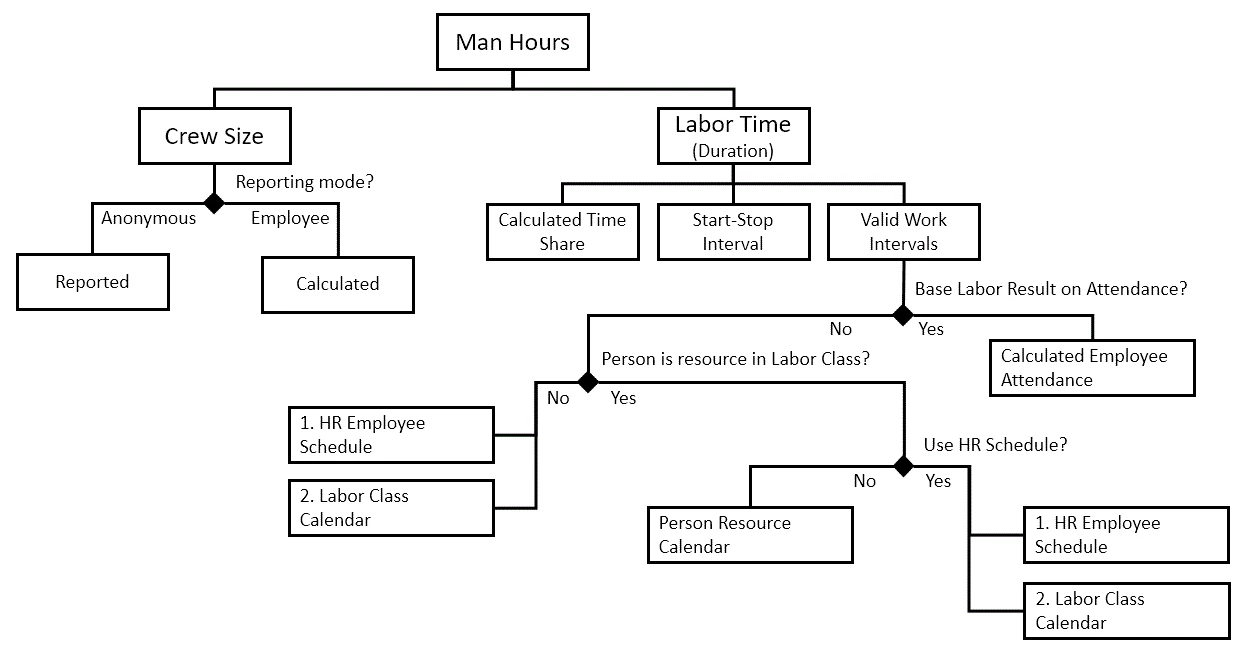
Man Hours are the time used as the base for labor cost calculation. More details of the labor cost logic can be found in About Cost for Shop Order Labor Reports. Man Hours are calculated by multiplying the Labor Time representing the duration of the labor activity with the Crew Size representing the number of persons performing the labor activity.

Crew Size

If Reporting Mode on the Site//Manufacturing page is set to Anonymous, you must define the employees that will work with the operation as the Crew Size when starting the operation.

If Reporting Mode on the Site/Manufacturing page is set to Employee, the Crew Size value is calculated as a result of the number of employees and cannot be manually adjusted. If an employee is working on several operations with overlapping intervals, the value in Crew Size field is automatically divided between the operations according to their planned crew size. You can control whether or not an employee is allowed to work on concurrent operations using the Allow Concurrent Operations on the Shop Floor Employees page.

E.g. 1:

Three operations has the planned crew size as below:

Operation Planned Crew Size
1 0.5
2 2
3 1

If the crew size > 1, it indicates several employees are planned to work on the operation

If the crew size < 1, it  indicates an employee is planned to work on several operations simultaneously

An employee reports on the operation as below:

Operation Start Time Stop Time Labor Time
1 8:00 10:00 2h
2 9:00 10:30 1.5h
3 9:00 11:00 2h

The system will divide overlapping intervals into subsections and calculate the crew size for each subsection weighted according to the planned crew size of the overlapping operations. The total crew size for an employee each subsection is always 1. Finally an average crew size for the entire clocking interval is calculated.

Note that a crew size > 1 is not considered in the calculations since one employee never is considered to do more than one persons work. Instead we can expect additional employees to report on these operations.

Example 8:00 - 9:00 9:00 - 10:00 10:00 - 10:30 10:30 - 11:00 Average Crew Size Man Hours
Operation 1 0.5 / 0.5 = 1.0 0.5 / (0.5 + 1 + 1) = 0.2 - - ((1 x 1) + (1 x 0.2)) / 2 = 0.60 2 x 0.6 = 1.2h
Operation 2 - 1 / (0.5 + 1 + 1) = 0.4 1 / (1 + 1) = 0.5 - ((1 x 0.4) + (0.5 x 0.5)) / 1.5 = 0.43 1.5 x 0.43 = 0.65h
Operation 3 - 1 / (0.5 + 1 + 1) = 0.4 1 / (1 + 1) = 0.5 1 / 1 ((1 x 0.4) + (0.5 x 0.5) + (0.5 x 1) / 2 = 0.57 2 x 0.57 = 1.15h
Total 1.0 1.0 1.0 1.0   3.0h

The average Crew Size multiplied with the duration of the interval gives the Labor Time in Man Hours which the cost is based on.

Labor Time (Duration)

The elapsed duration of a labor operation is calculated from:

  • Time Share
  • Start - Stop Interval
  • Valid Work Intervals

The Time Share represents how big share of the total valid clocking duration the operation should receive. To minimize time spent on reporting you can select and start several operations simultaneously (in sequence). The Time Share will then be calculated according to the remaining labor hours on each operation for runtime and planned hours for setup time.

E.g.2:

Example of operations reported in sequence:

Three operations (not previously reported on) with the planned time as below are selected and production with machine and labor with crew size 2 is simultaneously started 8:00 and stopped 12:00.

Operation Planned Labor Runtime Planned Machine Runtime
1 2h 2h
2 4h 2h
3 0h 4h

The total duration of 4 hours are divided between the operations according to the planned values above:

Operation Labor Time Share Actual Labor Time Machine Time Share Actual Machine Time
1 (2 / (2 + 4 + 0)) = 0.33 4 x 0.33 = 1.33h (2 / (2 + 2 + 4)) = 0.25 4 x 0.25 = 1.00h
2 (4 / (2 + 4 + 0)) = 0.67 4 x 0.67 = 2.67h (2 / (2 + 2 + 4)) = 0.25 4 x 0.25= 1.00h
3 (0 / (2 + 4 + 0)) = 0 4 x 0= 0.00h (4 / (2 + 2 + 4)) = 0.5 4 x 0.5= 2.00h
Total   4.00h   4.00h

Since Crew Size was 2, the Labor Time in Man Hours which the cost is based on will become the Labor Time x 2.

Compare with the example of operations reported in parallel.

Valid Work Intervals

There are several parameters affecting how much of the time elapsed between a clocking start and stop that is considered valid work time.

First, if the Base Labor Result on Attendance option is enabled on the Site/Manufacturing page and the labor clocking is reported on an employee for which the attendance result has been calculated on the day of the transaction, only intervals for which a valid attendance result exists are counted.

Second, Calendar Consideration setting on the Site/Manufacturing page will decide which time intervals between the start time and end time of the clocking should be considered for the calculation. Possible values are:

  • Calendar Time Only. Only the calendar work hours between the start and stop time is considered. If the whole clocking is reported outside of calendar time no transactions will be created.
  • Calendar Time and Non-Break Overtime. The entire time period between start and stop time is considered except the embedded calendar breaks. Calendar breaks will be excluded regardless of operation reports within breaks.
  • Calendar Time and Overtime. The entire time period between start and stop time is considered except the embedded calendar breaks. However, if operations are reported within calendar breaks, reported time within the breaks will be considered as overtime.
  • All Time. The entire time period between start and stop time is considered. Calendar is not considered.

Finally, the Calendar or the Work Schedule which should be used to extract time will be decided according to the following hierarchy:

If the person connected to the employee is not defined as a resource in a labor class:

  1. Employee HR Schedule - Defined on the Employee Schedule and Rules page. Note that this option is only applicable if IFS Time and Attendance is used.
  2. Labor Class Calendar - Defined on the Manufacturing Labor Class page, header section, Calendar ID field, based on Primary Labor Class on the Shop Floor Employee page for employee and site.

If the person connected to the employee is defined as a resource in a labor class:

  1. If Use HR Schedule is selected on the resource, Employee HR Schedule - Defined in Employee Schedule and Rules. Note that this option is only applicable if IFS Time and Attendance is used.
  2. Resource Calendar - Defined on the Manufacturing Labor Class/Persons page, Calendar ID field.
  3. Labor Class Calendar - Defined on the Manufacturing Labor Class page, header section, Calendar ID field.

To avoid hard stops for the operator when reporting, the calendar of the labor class will act as the last resort if Use HR Schedule is selected, but no valid schedule is found and no resource calendar is defined for the person either.