Solved

Schedule MS with multiple sites

  • June 3, 2020
  • 7 replies
  • 327 views

Forum|alt.badge.img+2

Hi,

Is there a way of running the “calculate MS level 1” in a smart way.

We have multiple sites and we are distrubuting slaes parts betwen them all.

To get the drive thrue the system now i need to run them all two times.

Sie 1

Site 2

Site 3

Site 4 and then again

Site 1

Site 2 etc

So All sites has shared Theres needs to each other.

We hare sending parts from site 1 to site 2 and 3 and we are sending parts from site 2 to 1 etc.

Is this the right way or?


(I posted the same question in bying as well, no respons there)


Br Jerker

Best answer by majose

Hi,

Unfortunately MS does not have the same capability as Planning Network MRP, where you can kick of one job and MRP plans the parts in the network, using an internal low level code. Planning Netowork MRP finds out in which order to execute the parts, for example, it realizes that part X from the demand site D should be processed prior part X from the supply site S.

So yes, you have to do this boring job

But actually I think we (IFS) should be able to execute the Level 1 Calculation in MS, using Planning Network (in same way as in MRP). Since I know the code here, it is not a big deal. So I think it is very good candidate for future enhancements in Master Scheduling, even though I can’t promise anything.

7 replies

Forum|alt.badge.img+14
  • Hero (Employee)
  • Answer
  • June 9, 2020

Hi,

Unfortunately MS does not have the same capability as Planning Network MRP, where you can kick of one job and MRP plans the parts in the network, using an internal low level code. Planning Netowork MRP finds out in which order to execute the parts, for example, it realizes that part X from the demand site D should be processed prior part X from the supply site S.

So yes, you have to do this boring job

But actually I think we (IFS) should be able to execute the Level 1 Calculation in MS, using Planning Network (in same way as in MRP). Since I know the code here, it is not a big deal. So I think it is very good candidate for future enhancements in Master Scheduling, even though I can’t promise anything.


Forum|alt.badge.img+2
  • Author
  • Do Gooder (Customer)
  • June 9, 2020

Hi,


Thank you for your answer! Yes it is a quite boring job and im glad that we dont have more sites than 5 yet with materialflow.


Br Jerker


Forum|alt.badge.img+9
  • Hero (Partner)
  • January 15, 2026

Hi,

Unfortunately MS does not have the same capability as Planning Network MRP, where you can kick of one job and MRP plans the parts in the network, using an internal low level code. Planning Netowork MRP finds out in which order to execute the parts, for example, it realizes that part X from the demand site D should be processed prior part X from the supply site S.

So yes, you have to do this boring job

But actually I think we (IFS) should be able to execute the Level 1 Calculation in MS, using Planning Network (in same way as in MRP). Since I know the code here, it is not a big deal. So I think it is very good candidate for future enhancements in Master Scheduling, even though I can’t promise anything.


Hi ​@majose ,

I’m refreshing this topic suspecting that feature that you have described  above (5 years ago) went life cause in Planning Network MRP backgroung job details I’m seeing this:

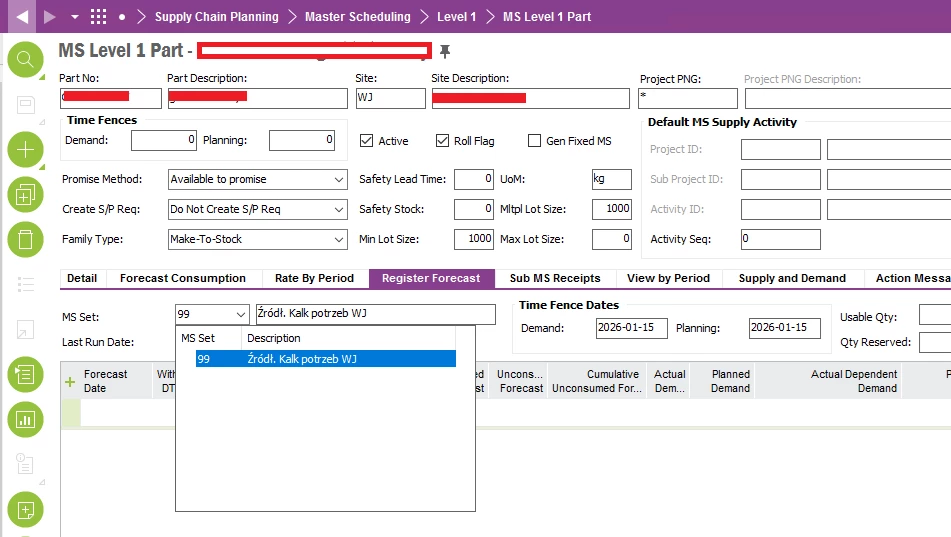
The issue we have now is that our Customer migrated 17k new Parts to MS Level 1 Part. But all of them were migrated only with MS Set = 99 (no MS Set 1). We don’t want them to be visible as demand in MS/MRP calculation. After that, the execution time of a background job for Planning Network MRP raised to 8 hours. It seems like Network MRP was somehow affected even though forecast are in MS Set 99.

Do you think it might be considered as a bug? Similar issue but with “Active” checkbox found as bug id 166453.

Regards, Lukasz


Forum|alt.badge.img+14
  • Hero (Employee)
  • January 15, 2026

Hi Lukasz,

Are we talking 17 000 new MS Parts? Or are we talking 17 0000 forecast lines?

The master scheduled parts - are they manufactured top parts?

And if we are talking 17k new MS Level 1 parts, are they spread out across many sites? Typically master scheduling requires quite a bit of manual work, if you work a bit more active around the time-fences. Please consider that. 

Anyway… after you get back with some more info I will dig into this a little bit more.

And, finally which version of IFS are we talking about?

Cheers,

Mats


Forum|alt.badge.img+9
  • Hero (Partner)
  • January 15, 2026

@majose, thanks for quick reponse.

For now, they have just migrated Parts to MS Level 1 + MS Set = 99 in one Site. No forecasts so far, no MS Set 1.

IFS 10.

These are all Manufactured Parts, but I don’t know yet if they are top parts or semi. Or if they are anyhow involved in multisite supply chain. Need to confirm it with the Customer.

But, what are we wondering right now, is it correct that those parts are even concidered / calculated during MRP Planning Network?

Regards, Lukasz


Forum|alt.badge.img+14
  • Hero (Employee)
  • January 15, 2026

Hi Lukasz,

Active Master scheduled level 1 parts are loaded into MRP Part Information, but are not processed by MRP.

However at the end of (in Apps10) MRP job, master scheduled parts that are on sub-assembly level or purchased part (i.e low level code > 0) are calculated, one by one, by calling the MS Level 1 calculation. But since you don’t have any forecasts in MS Set 1 for these parts it will not do anything. But MRP is starting up MS Level One calculation one time per part. If a lot of these 17k parts have low level code  > 0 then there will be a significant number of calls to Ms Level 1 Calculation. Please look at Background Jobs - Details for a Site MRP job or a MRP Planning Network job.

Look out if there are messages like: “Site X MS Calculation for MS parts that have received exploded demand started at 2026-01-15-14.26.20”

and “Site X MS Calculation finished at 2026-01-15-14.35.50”

I guess we could fine tune this in Core, but even more important; Does the customer really going to master schedule these 17k parts?

You know that you can set them to Inactive in MS Level 1 Part right?! Then the parts will be MRP planned. 

Cheers,

Mats


Forum|alt.badge.img+9
  • Hero (Partner)
  • January 20, 2026

Hi ​@majose,

Based on this message in the background job "Site X MS Calculation for MS parts that have received exploded demand started at 2026-01-15-14.26.20" we were able to confirm that migrating +17k parts to MS Level 1 in one Site had increased the execution time (for this one site) for about 2-3 hours. Before migration the message was also there, but the execution time was shorter. At the beggining we were quite surprised that 'Planning Network MRP' job takes some actions with the MS, but then I found this topic.

Now I confirmed the goal behind with the Customer. Those Parts were migrated to MS for some business reasons (analytics, reports, variation analysis), aside from standard MS flow. They will have forecasts migrated & updated but the won't be migrated to MS Set = 1, there will be no MS calculation. I advised to de-activate those Parts in MS so they could be handled by MRP again and the job execution time goes as before. I think in that case tuning is not necessary.

Thanks for your commitment and support.

Regards, Lukasz