


Question

Reporting Labor time and machine time in one go using Shop floor Workbench

  • January 28, 2026
  • 2 replies
  • 22 views

Forum|alt.badge.img+1

Hi,

We are working on a solution for a manufacturing metal fabrication customer who would do multiple cutting operations for different products using an Operation Block. They are not using clockings to track start and end operations, only manual approving operations.

Cutting Example:

Cutting 10 Shop orders are created to fabricate 10 different pipe products of 10 different diameters. Each and every shop order has a cutting operation is their operation list. For all the cutting operations planners use one cutting resource. All the cutting operations from 10 shop orders combine into 1 operation block. 

Then the operator uses shop floor workbench to approve the operations in the operation block. When the operator tries to approve, he has to enter, machine, labor and quantities manually for each operation. What they expect is to enter quantity, labor and machine time total quantity and distribute.

We find that distributing quantity is confusing because it is different quantities and can even be different UoM, but can we distribute machine and labor time equally between operations?
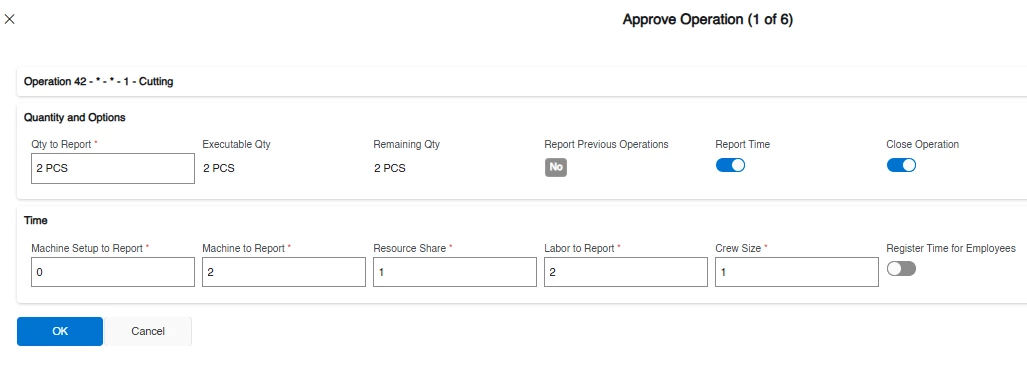


2 replies

Björn Hultgren
Hero (Employee)
Forum|alt.badge.img+25

I think the easiest way to report time that is distributed in this scenario is to clock the time. I.e., select all the operations and start them simultaneously. Then select them all again when the cutting is completed and approving them. The total time passed will then be distributed among the operations.

Note that the time can be distributed in two different ways depending on the Concurrent Operations setting on the Work Center page. 


Forum|alt.badge.img+1

I think the easiest way to report time that is distributed in this scenario is to clock the time. I.e., select all the operations and start them simultaneously. Then select them all again when the cutting is completed and approving them. The total time passed will then be distributed among the operations.

Note that the time can be distributed in two different ways depending on the Concurrent Operations setting on the Work Center page. 

Hi Bjorn, Thank you for the reply. Unfortunatly customer cannot let Users to clock in or clock out due to their labor policies. Is there any other workaround we can follow in Approve Operations process flow?

