Question

how to set up a inventory part, where valuation method is weighted average, so it captures cost of both Manufacturing and purchasing

  • March 27, 2026
  • 9 replies
  • 96 views

Forum|alt.badge.img

We have a part which is usually purchased, but occasionally has to be manufactured. 

How do we set the Cost Template so it picks up both manufacturing and purchase order info. 

9 replies

Forum|alt.badge.img+14
  • Hero (Employee)
  • March 27, 2026

Hi,

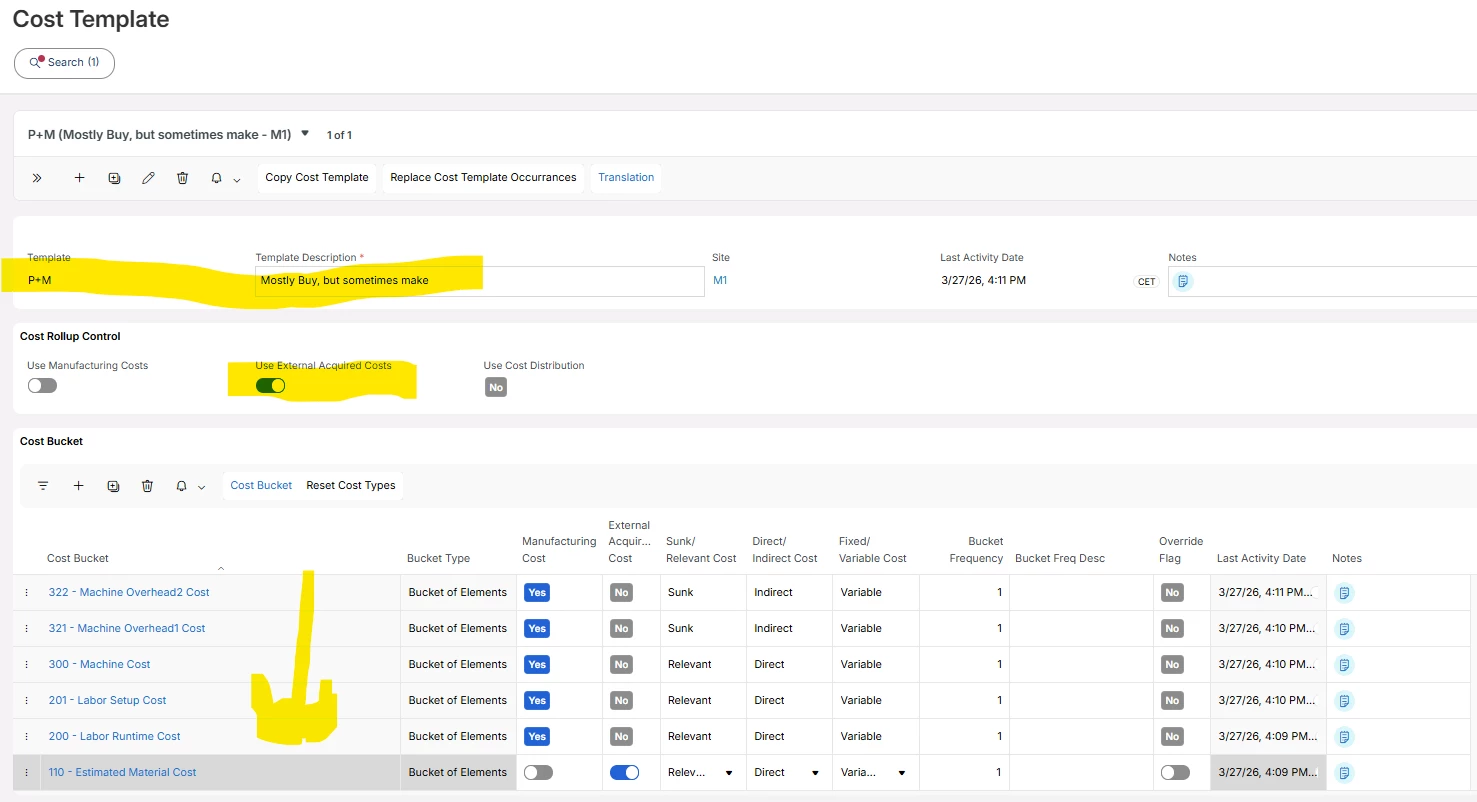
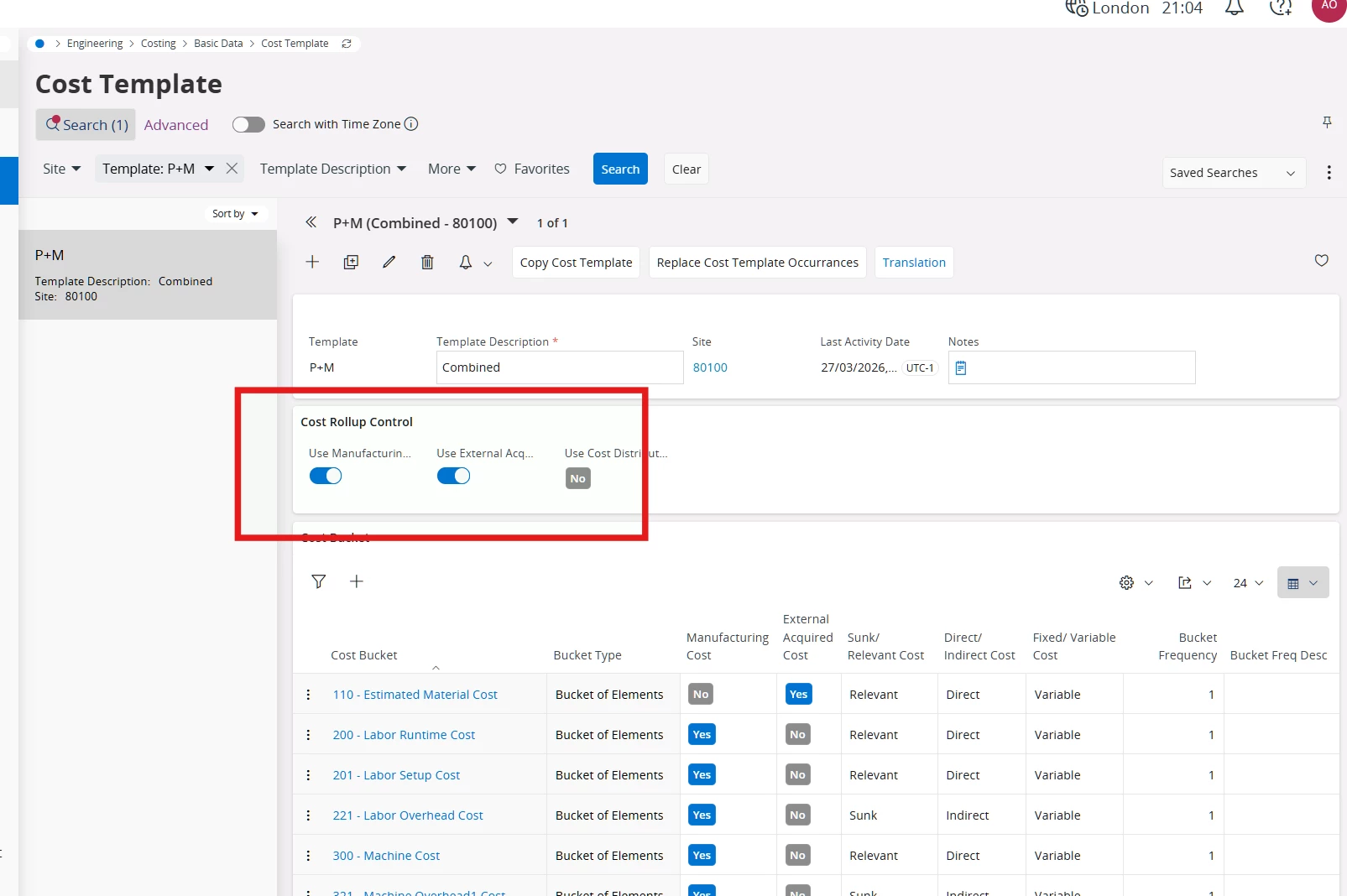
I would go for a setup like this:


This works excellent in a standard cost environment, but it should work good for WA-cost controlled parts as well.

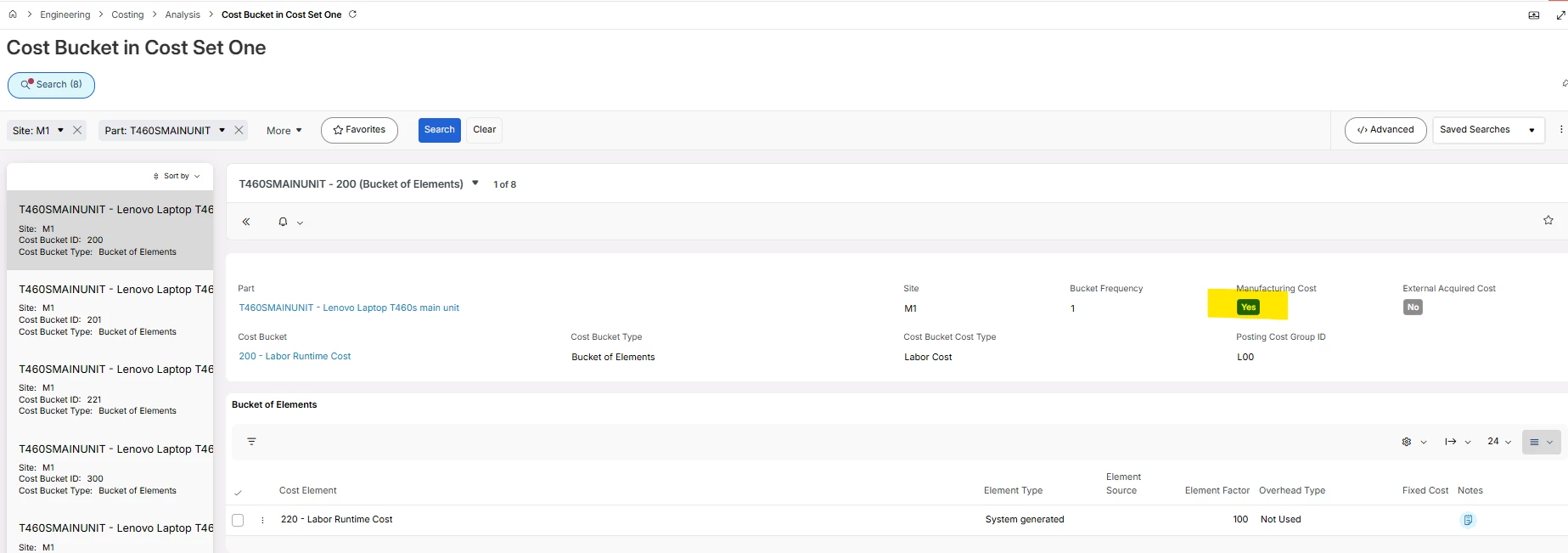
When you do a change like this, depending on your setup, you might have to do a cost roll in Costing followed by a Copy Costs to Cost Set One, coz it is very important for Shop Order Costing that there are correct data in below page for your parts in question

Hope it helps

-Mats


Forum|alt.badge.img+4
  • Do Gooder (Partner)
  • March 27, 2026

I would be careful. To me it looks like the cost will be doubled if you follow this example.

Estimated material cost in this case is not an addition - it is the full cost of the product. If you add 110 and MFG cost buckets together the cost will be doubled.

I have never seen a reason to add external costs to MFG template and would be happy to learn any.

From finance consultant point of view with STD cost you need to pick one method which is most frequent.

If you use the weighted average valuation method IFS will pick the cost either from the PO receipt or SO receipt and cost set 1 becomes irrelevant for the posting perspective.

Bear in mind this is a UNIT cost, so why would you expect both to be shown here? which one? Average?


Forum|alt.badge.img+14
  • Hero (Employee)
  • March 27, 2026

Then, let us do some Friday evening training.

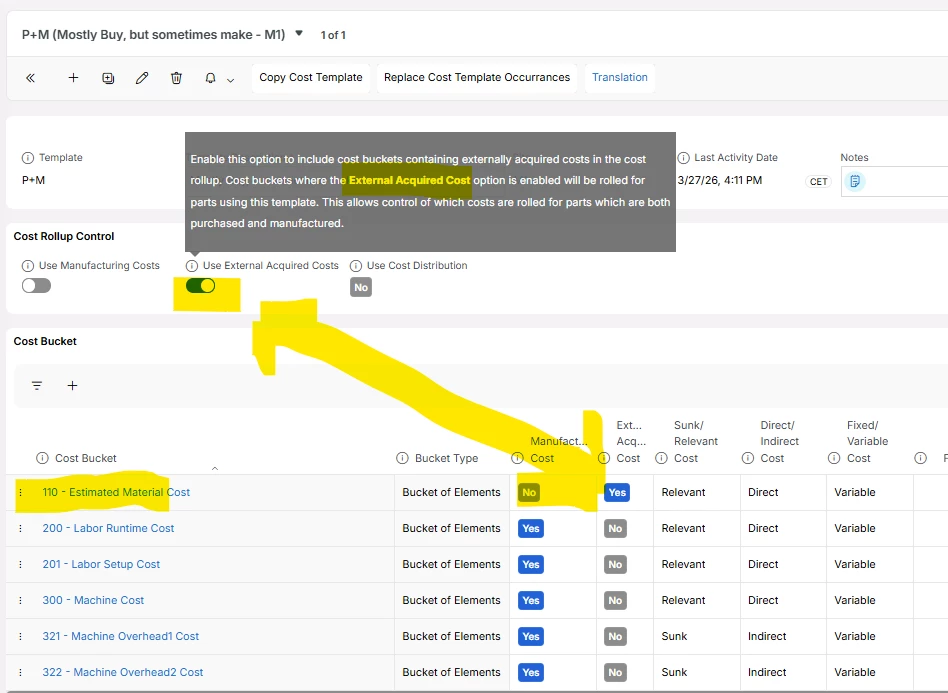
2007 we started to recommend below setting, for parts that you typically buy, but sometimes make. (A few customers actually buy sub-components which they repair - and then use similar setup as below, to capture the machine and labor cost for repair operations) So the trick is to carefully work with the Cost Rollup Control flags and the settings of Manufacturing Cost toggle and External Acquired Cost toggle.


I should almost never ever check in both Cost Rollup flag in the middle portion above. The only exception is if I am using a make/buy split setup with %-share.

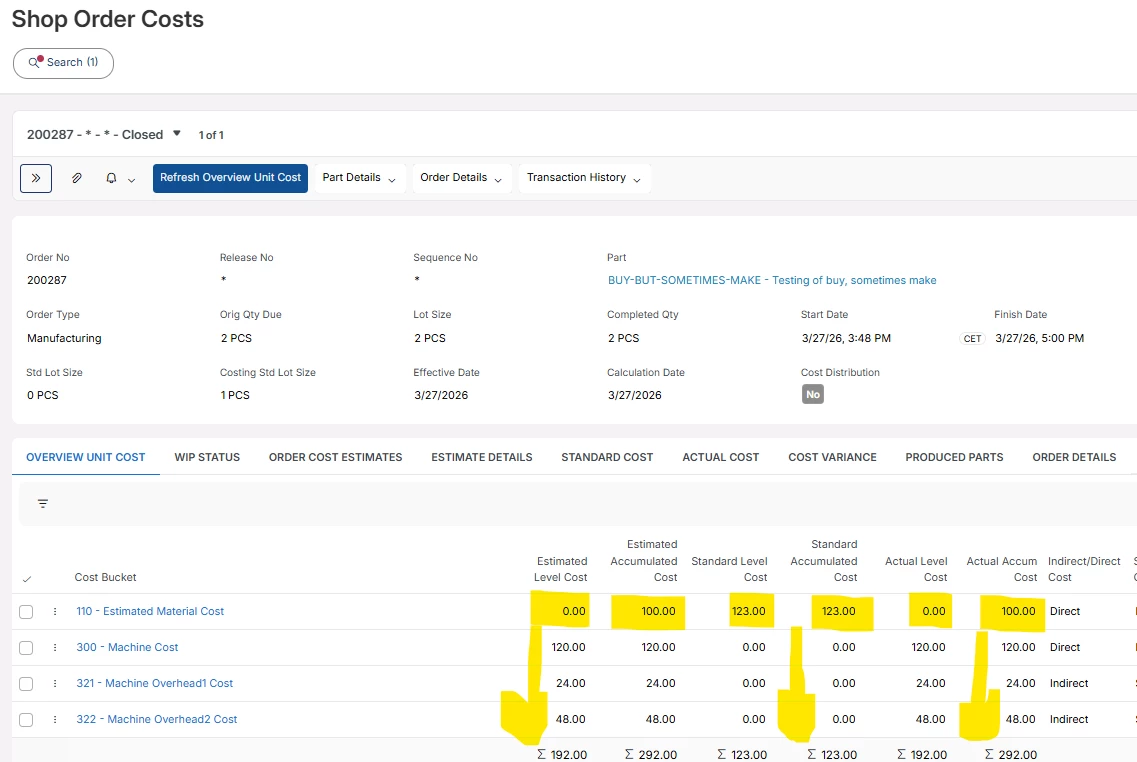
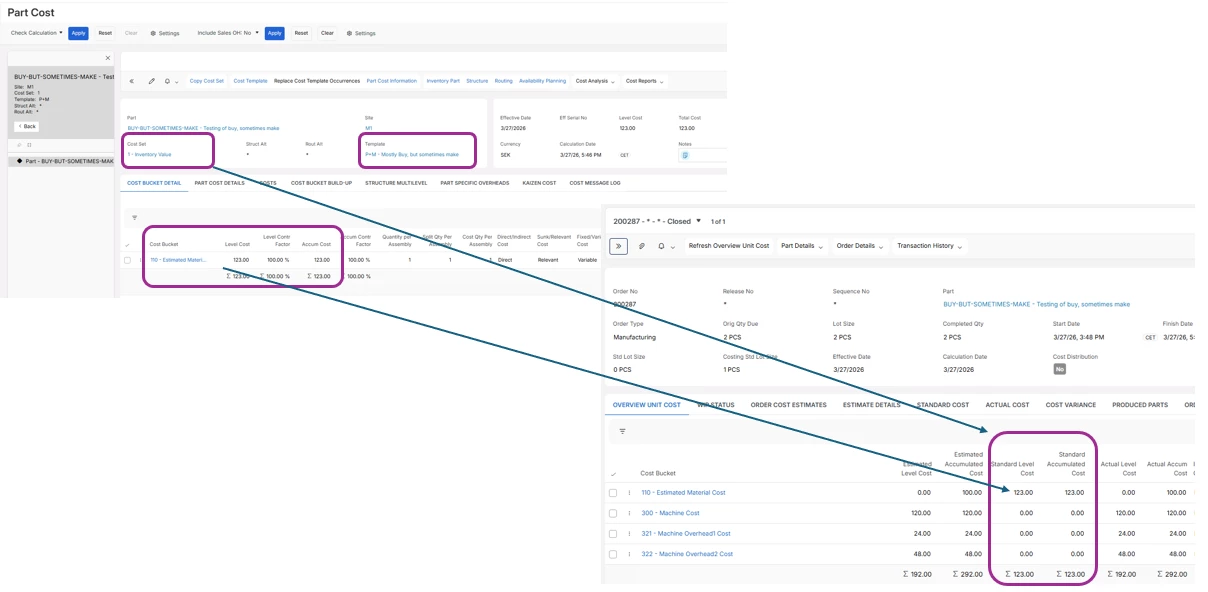
My shop order estimate- and shop order actual cost shows up nicely as below. In the example below, my purchase part that I now manufacture, has a component with cost $100, that is why it shows up in the accumulated columns only. And I don’t “double” my cost even though I have an estimated material cost of the BUY-BUT-SOMETIMES-MAKE part no, coz in my cost template P+M that is connected to the BUY-BUT-SOMETIMES-MAKE part, I have said do not use cost bucket 110 as manufacturing cost.

***

If above part was standard cost controlled they my inventory part unit cost would be 123. 

And of course I will get cost variance transactions when I produce this part, and that is how it should be.

***

Training session is over for this time.

Have a pleasant evening

-Mats at Rnd 


Forum|alt.badge.img+4
  • Do Gooder (Partner)
  • March 27, 2026

It’s interesting, thanks. I’ll double check that myself. 


Forum|alt.badge.img+4
  • Do Gooder (Partner)
  • March 27, 2026

Mats, would you mind sharing your comment on my thoughts when you have a moment?

  1. I can understand this approach under the condition that variances are posted on arrival which not always is the case. They will be delayed to the period of the supplier invoice matching in the second case. Stock value is inflated around significantly for that part.
  2. When booked on arrival, they will be posted to the current period and not follow the COGS. That is OK in case of real STD cost variances, but these are artificial variances.
  3. The most important issue that I see is that the unit cost of following shipments inventory transactions (and other issues from inventory) is too high, much too high.
  4. What about pricing based on the cost? Product margin analysis per period? Sales price below the inventory unit cost? Intercompany transfer prices based on cost?

For me it would be a bit less of a problem if this part was usually manufactured, as manufacturing variances are always posted on shop order closure.

However, the fact that shipments (and other) inventory transaction unit cost is almost doubled means that I still would not recommend it.


Forum|alt.badge.img+4
  • Do Gooder (Partner)
  • March 27, 2026

These are the setting on my cost template. I don’t really understand how you achieved both purchase and manufacturing cost buckets in your cost calculation without activating both (you have only one selected on your screenshot):


Forum|alt.badge.img+14
  • Hero (Employee)
  • March 28, 2026

Hi,

As I said earlier, you should not activate both cost rollup control flags. Basically it is only when you have make buy split percentage setup in Inventory Part planning, otherwise you can inflate cost.

Here below I show my Part Cost, cost set 1 and the Shop Order Cost page again.

Please bear in mind that for my purchase part, I also have a manufacturing structure with one component that cost 100. The cost of the component falls out in the shop order estimate cost calculation, and in this case as actual cost when I issued that component.

And you know when we typically purchase this part, let say up 90% of the total volume, then of course, in an weighted average cost environment the inventory part unit cost will be close to the cost of the unit price on the PO Line/Supplier Invoice. 

Cheers

-Mats


Forum|alt.badge.img+6
  • Do Gooder (Partner)
  • March 30, 2026

Hi ​@Jezza761-01 ,
   

You don’t need to create a special cost template to combine purchase + manufacturing costs for the same part.

In IFS Apps 9, this is handled automatically if you use Weighted Average valuation.

How it works:

  • When you purchase the part → system takes the PO price

  • When you manufacture the part → system uses the Cost Template (shop order cost)

Both of these update the inventory value, and IFS recalculates the weighted average cost each time.

So effectively:

  • Purchase cost comes from PO

  • Manufacturing cost comes from cost template

  • Weighted average blends both

What you need to check:

  • Inventory Part → Valuation Method = Weighted Average

  • Part can be both purchased and manufactured

  • Cost Template is complete for manufacturing (material, labor, machine, overhead)

That’s it — no need to include purchase price in the cost template.

This setup will automatically reflect both purchasing and manufacturing costs in inventory valuation.


Forum|alt.badge.img
  • Author
  • Do Gooder (Customer)
  • March 30, 2026

Majose, Lingesan and Piswpl

Guys thanks for the info.  I think which everyway we progress we need a template that takes on the manufacturing and Purchasing .  You have given me plenty to think about,

I think we require a new Cost template which can take on  both Purchase and Manufacturing cost.  We need to do some testing and see what we can get out of it.

Again thanks for your input and we will take it away and see what we can make work. 

Jeremy