Question

How to generate a new Customer Sales Invoice after original was cancelled before posted/Auth

  • September 24, 2024
  • 5 replies
  • 72 views

Forum|alt.badge.img+10

Process to create Customer Sales Invoice for materials issued on Work Order.  The materials that have been issued on Work task are “Invoiceable”.  Followed the steps below:

  • Generate Invoice preview
  • Did ‘Approve-Online’ of Invoice Preview
  • Customer Order was created and released
  • Customer Sales Invoice was created
  • Invoice was Cancelled Invoice before printing 
  • Customer Order now shows status of Delivered
  • Work Task Sales line status = Transferred


Problem is my Customer Sales Invoice is now cancelled and the status of the Customer Order is Delivered.  How to I generate another invoice for the Work Task Sales lines?

Any help would be greatly appreciated.

Thanks

Shelley



5 replies

Forum|alt.badge.img+10
  • Author
  • Sidekick (Customer)
  • September 24, 2024

Disregard.  I figured it out


Marcel.Ausan
Ultimate Hero (Partner)
Forum|alt.badge.img+22
  • Ultimate Hero (Partner)
  • September 25, 2024

@smelanson would be nice to list the steps you did and mark your answer as solution. It might be helful for other users in the future.


Forum|alt.badge.img+1
  • Do Gooder (Customer)
  • March 23, 2026

Disregard.  I figured it out


Would be possible to share a list of the steps you performed in IFS? Thanks.


Forum|alt.badge.img+10
  • Author
  • Sidekick (Customer)
  • March 23, 2026

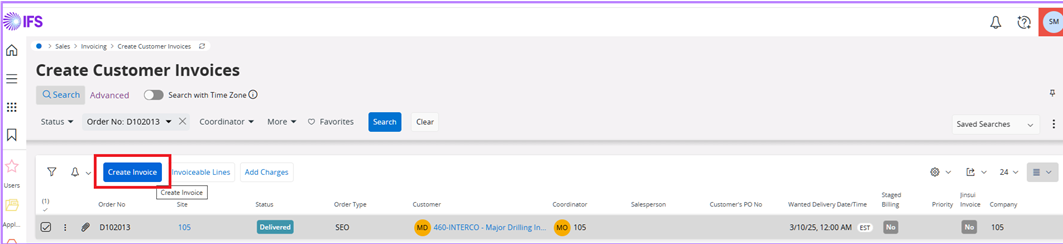
Open the Create Customer Invoice screen

  • Search for the Customer Order number
  • Select the line you want to invoice
  • select Create Invoice button
    • Click Ok to "Create invoice for selected customer order(s)


A screenshot of a computerAI-generated content may be incorrect.


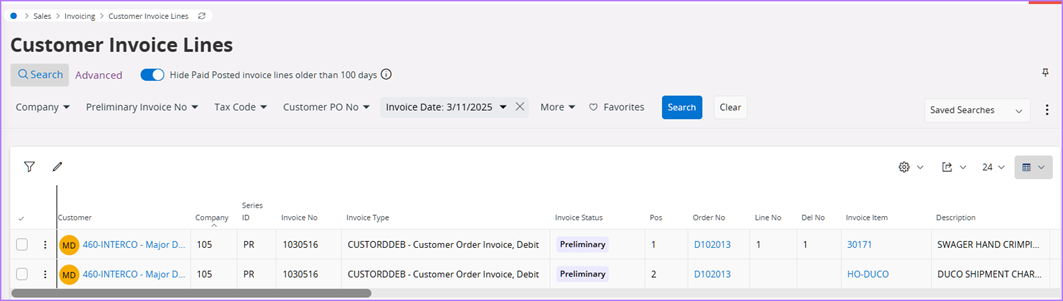
Customer Invoice Lines 

  • search for the Preliminary Invoice No or the Invoice Date 

The Customer Order lines that were delivered are now Preliminary Customer Invoice Lines.  


A screenshot of a computerAI-generated content may be incorrect.


  • select the "Preliminary" Customer Invoice lines
  • click on the Customer Invoice button


On the Customer Invoice screen

  • click the Share button
  • select 'Print Invoice'

Forum|alt.badge.img+1
  • Do Gooder (Customer)
  • March 24, 2026

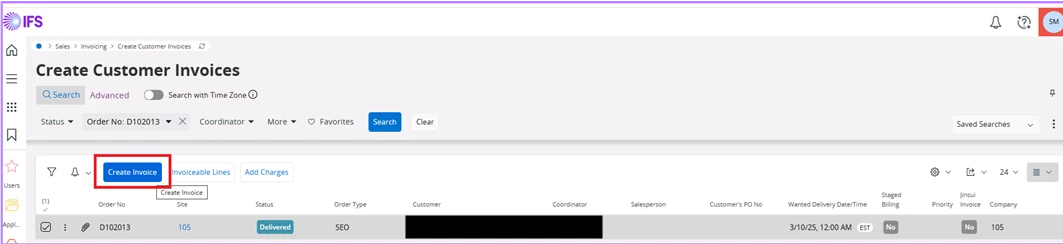
Open the Create Customer Invoice screen

  • Search for the Customer Order number
  • Select the line you want to invoice
  • select Create Invoice button
    • Click Ok to "Create invoice for selected customer order(s)


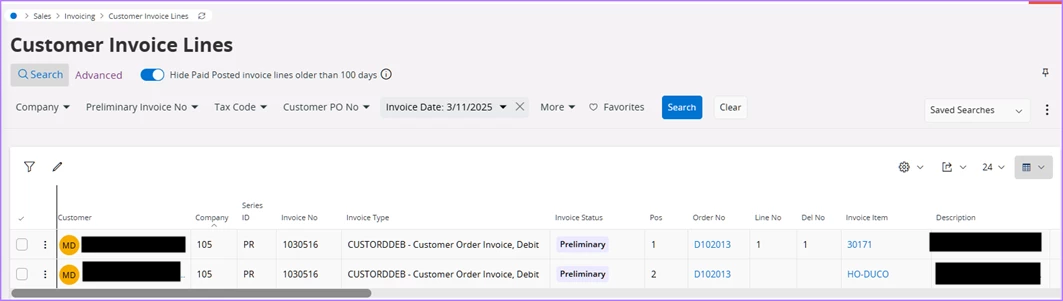
Customer Invoice Lines 

  • search for the Preliminary Invoice No or the Invoice Date 

The Customer Order lines that were delivered are now Preliminary Customer Invoice Lines.  


  • select the "Preliminary" Customer Invoice lines
  • click on the Customer Invoice button


On the Customer Invoice screen

  • click the Share button
  • select 'Print Invoice'

Thank you for your reply. I have now realized that your invoice which you cancelled was still in preliminary status and it was not the cancellation of the regular invoice, but the preliminary one. I thought you found a way how to reopen the line after it has been already invoiced and cancelled with the credit note.