Question

Are there logic settings for Operations on Advanced Planning Board since shop orders are not scheduling on after another

  • January 15, 2026
  • 3 replies
  • 31 views

Forum|alt.badge.img

(Cloud) Is there a function where there is routing operations logic?


What we are seeing is when we run the Advanced Planning Board (ABP), is that our operations are not scheduling directly after each other once the previous operation is completed.


For example,

We have Tool T1473 that has 2 instances (1733 and 1744)

Our Routing is setup 

10 (Prep)- Uses Tool T1473

20 (Mix) - Uses Tool T1473

30 (Cure) - Uses Tool T1473

40 (Remove supports)- Uses Tool T1473

50 (Test) - No Tool used

Work Center is all the same (expect 50) with 1 Resource

 

And what I’m seeing is that during scheduling, the tool jumps from one tool instance to another tool instance instead of keeping with the same instance. And then also it starts Op 40 days later after Op 30 is done.


Is there a way to fix this? In other systems I’ve used, I’m used to seeing something like “Absolute Start after previous operation”, or “Delay start after operation”  


Or do we need to look at setting up the router differently? I was exploring the WC’s resources as an option and putting the tool name under the resources. I  thought about condensing but with our operations we have equipment that look for those Operation Steps.  

3 replies

Yathartha Karunananda
Hero (Employee)
Forum|alt.badge.img+11

Hi ​@wlink2010,

You can define these set of operations as an operation block and then schedule it with compress operations on. This will clear the gap between your operation sequence. 

On having the same tool instance, I am not sure there is a specific setting for this to use the same tool instance automatically. 

The objective of APB is to optimize the capacity, so your behavior is expected.


Forum|alt.badge.img
  • Author
  • Do Gooder (Customer)
  • January 21, 2026

@Yathartha Karunananda , thanks for the answer. I do have a few follow up questions:

  1. When I was running with the operation blocks, it doesn’t seem likes it looking at those blocks. For the most part, there is still the gaps between each operations. And then on top of that there are some that are start running on the weekend. The machine calendars run  24x7 but the labor calendars only run 24x5. 
  1. For the set of operations, when I try to sequence it, I noticed that I can’t connect, a different work  center. 

On another example:

Op 30 WC1

Op 40 WC2

I can’t say Foreward/Backward schedule OP40 wth the succeeding block being Op50

 . Do the schedule settings on the blocks transfer over to ABP?


Tharindu Illangasinghe
Superhero (Partner)
Forum|alt.badge.img+16

Hi ​@wlink2010,

I’m just looking at your original question. 


And what I’m seeing is that during scheduling, the tool jumps from one tool instance to another tool instance instead of keeping with the same instance. And then also it starts Op 40 days later after Op 30 is done.


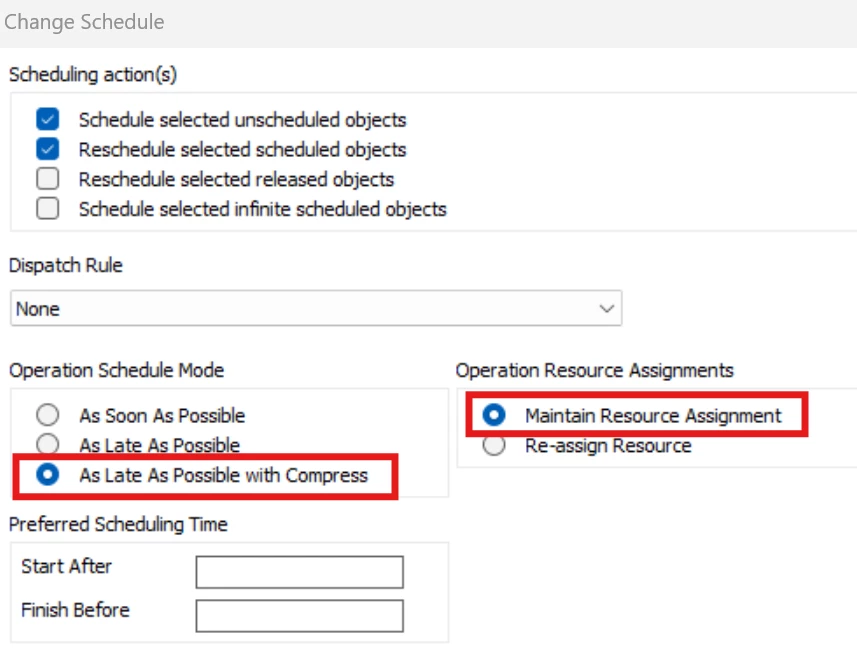
Did you try the “Compress” option below during the scheduling ? This option is there to reduce the WIP, so ideally your operations in your SO should sequence one after the other, as immediate as possible (i.e., Op 40 to Start as soon as Op 30 finishes)


Secondly, to maintain the same instance without allowing APB to select instances as it wishes, you may use the “Maintain Resource Assignment” option. 


Could you try these options if you have not tried already ?