Answer

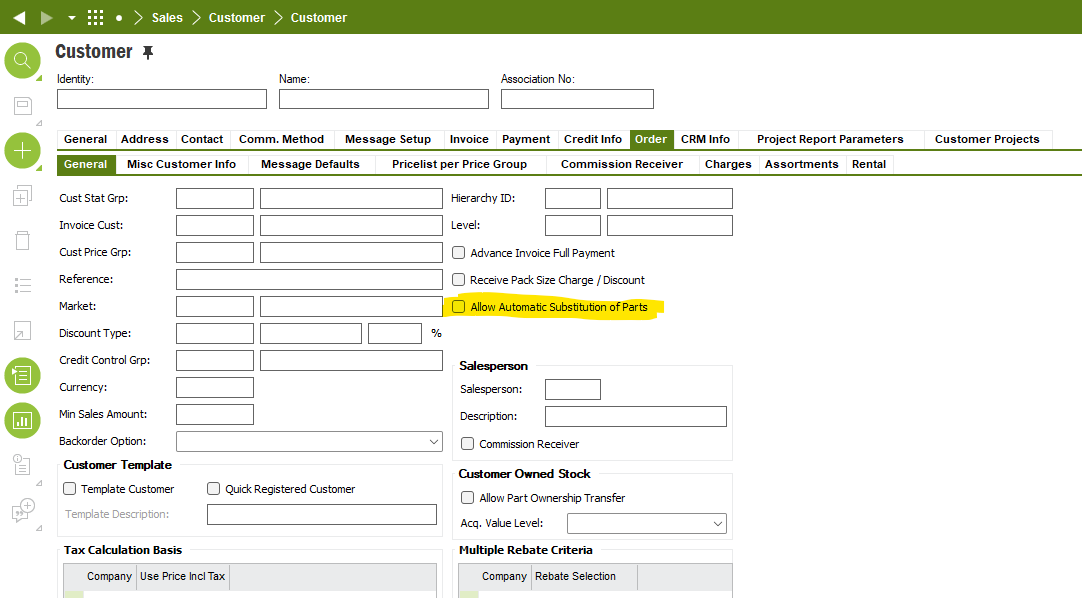
Allow Automatic Substitution of Parts

  • February 24, 2025
  • 6 replies
  • 156 views

Forum|alt.badge.img+16

Community,


anyone has experience on below parameter “Allow Automatic Substitution of Parts” on below Customer window. If so, how to use it, what will be the scenario then? thank you.
 

Best answer by matt.watters

@ronhu I have this working in my Apps10 UPD15 environment. As an example, I want P2 to automatically substitute for P1 when P1 is not available, so the result of an Availability Check is used.

Setup required:

  • Set the flag for Allow Automatic Substitution of Parts on the Site and the Customer.
  • On the Part page, set P2 as an alternate for P1.
  • For Inventory Parts P1 and P2, set Availability Check = YES.
  • In the Alternate Sales Parts Base Data, set P2 as the Substitute Sales Part No for Sales Part No P1. If multiple substitute parts were required you could establish a substitution Priority here.

Test:

  • Set Expected LT of P1 and P2 = 5. Recall the Availability Check uses the Expected LT in its calculation.
  • Remove all on-hand inventory of P1.
  • Adjust available inventory of P2 = 20.
  • Enter a customer order line for (5) of P1 with a Wanted Delivery Date = TOMORROW and save.
  • If a Complementary Parts dialog appears, ignore it.
  • Sales Part automatically changes from P1 to P2.

6 replies

Chamath Kuruppuarachchi
Hero (Partner)
Forum|alt.badge.img+12

Hi ​@ronhu You found how this works, tried the help but it still not automatically replacing the substitute part.

Thanks,

Chamath


Forum|alt.badge.img+16
  • Author
  • Hero (Customer)
  • May 9, 2025

@Chamath Kuruppuarachchi Thank you for reaching out.

We are still not sure how to use this option. Thank you.


Yathartha Karunananda
Hero (Employee)
Forum|alt.badge.img+11

Hi ​@ronhu,

I do not think this functionality is working. 

In General, substituted part cannot be automatically selected due to below reasons.

· There can be lot of substituted parts for a one part and there’s no way to prioritize one from others

· The required qty of the Substitute part can be different from the original part required qty.

There was a discussion to find a technical solution for this, but it is not working in 24R2 as well. 


matt.watters
Ultimate Hero (Partner)
Forum|alt.badge.img+26
  • Ultimate Hero (Partner)
  • Answer
  • May 14, 2025

@ronhu I have this working in my Apps10 UPD15 environment. As an example, I want P2 to automatically substitute for P1 when P1 is not available, so the result of an Availability Check is used.

Setup required:

  • Set the flag for Allow Automatic Substitution of Parts on the Site and the Customer.
  • On the Part page, set P2 as an alternate for P1.
  • For Inventory Parts P1 and P2, set Availability Check = YES.
  • In the Alternate Sales Parts Base Data, set P2 as the Substitute Sales Part No for Sales Part No P1. If multiple substitute parts were required you could establish a substitution Priority here.

Test:

  • Set Expected LT of P1 and P2 = 5. Recall the Availability Check uses the Expected LT in its calculation.
  • Remove all on-hand inventory of P1.
  • Adjust available inventory of P2 = 20.
  • Enter a customer order line for (5) of P1 with a Wanted Delivery Date = TOMORROW and save.
  • If a Complementary Parts dialog appears, ignore it.
  • Sales Part automatically changes from P1 to P2.

Forum|alt.badge.img+16
  • Author
  • Hero (Customer)
  • May 14, 2025

@matt.watters appreciated your feedback. 

we will check it out.


Forum|alt.badge.img+16
  • Author
  • Hero (Customer)
  • May 14, 2025

@Yathartha Karunananda Thank you for your reply.