Question

Query Designer - Date Filter

  • December 4, 2025
  • 1 reply
  • 47 views

Forum|alt.badge.img+3

Hello!

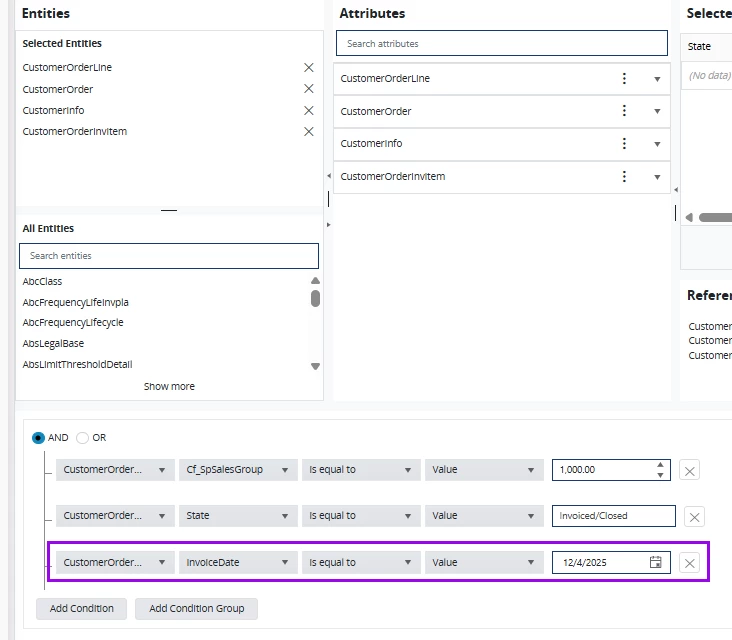
I am trying to create a new query with Cloud Query Designer to show orders for a certain sales group that were invoiced “Today”. I added a filter the the Customer Order Invoice date - but I can’t figure out how to set it as a dynamic value for “TODAY”. I’ve tried setting it as a Parameter as well, but then the query prompts me to enter a date to preview the data. This won’t work for us as the intent is to schedule the report to be emailed to a group of users on a daily basis. Is this possible to set the invoice date as a dynamic value of “TODAY” with Query Builder? I’m a novice at query building so any tips someone may have a greatly appreciated. 
 

1 reply

Forum|alt.badge.img+2
  • Do Gooder (Partner)
  • January 8, 2026

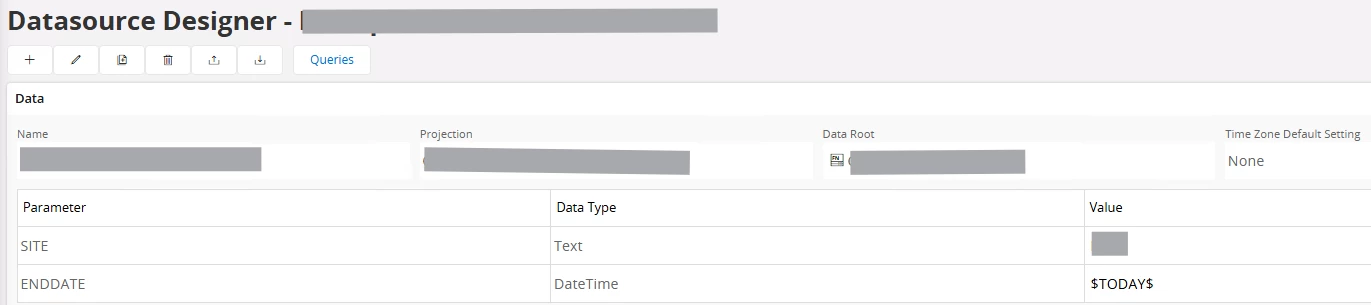
@Mhughes, I have a date-related filter requirement with a query as well. In my query, I created the filter as a Parameter, and in the datasource (projection) using that query, I set the parameter value to $TODAY$, which appears to be working correctly. This allows the data source to be used in a lobby element without prompting the user to manually enter today’s date.


However, for my requirement, I need to evaluate Today + 10 days (i.e., 10 days into the future). Using $TODAY$+10 does not seem to work in the data source designer, and an error is thrown when previewing. It is perhaps because the field being queried against is of DATETIME type. Not quite sure.


Malformed Request.
Error details: [{"code":"SYNTAX","message":"The URI is malformed."}]

Request Id: 9f1a7f4d-6a06-40c7-a06e-f4aa86a32e84
Url: https://ifscloud.xxxx.com/main/ifsapplications/projection/v1/QueryProjectionOpenCustomerOrders.svc/GetOpenCustomerOrders(SITE='XXX',ENDDATE=2026-01-07T00:00:00Z+10)?


If anyone has suggestions or has encountered a similar scenario, I would greatly appreciate your input.