Answer

IFS Report Designer

  • May 2, 2025
  • 6 replies
  • 151 views

Forum|alt.badge.img+4

how to add a view to Modules_rep in an existing RDL file in Report Designer? Have to add a new field from a new view than the existing view (barcode_lines) in the rdl file (report to register arrivals )

 

Best answer by Tracy Norwillo

@nithya To work with the .rdf, you need to do that work in IFS Developer Studio.  It’s not something you can do in IFS Report Designer.

However, I looked at the definition of the Inventory Part Barcode Report and it has built in functionality that supports adding custom fields from the InventoryPartBarcode LU (Entity).  This means that you could add your custom field to that Entity using an Entity Configuration in IFS Cloud (Sol Mgr/Configuration/Entity Configurations/Entity Configurations), or a custom attribute in IFS IEE (RMB/Custom Objects).

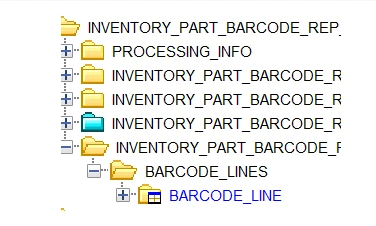
Once the field is added and published, you should be able to see it in the Barcode Line folder in IFS Report Designer when connected to IFS.

6 replies

asanka1055
Hero (Partner)
Forum|alt.badge.img+9
  • Hero (Partner)
  • May 5, 2025

Hi ​@nithya 

To introduce new view you must introduce the related Entity to the .report file and make the relationship to the other entities and there you can add whatever the fields you need to display in your layout.

To add a field to a existing view you should add it to the .report file and it will create the change in .rdf file automatically, you can change your spacific logic to fetch value there using a cursor or a API call.


Forum|alt.badge.img+4
  • Author
  • Sidekick (Customer)
  • May 6, 2025

hi asanka , Thank you for your reply . how to do i introduce View RECEIPT_INFO_ALT to this Inventory part barcode and connect it to BARCODE_LINES?


asanka1055
Hero (Partner)
Forum|alt.badge.img+9
  • Hero (Partner)
  • May 6, 2025

hi ​@nithya 


You can write a cursor in .rdf file to get values of view RECEIPT_INFO_ALT and assigned whatever the values you need to bind in fields of BARCODE_LINES.


Thanks & Regards,
Asanka.


Forum|alt.badge.img+4
  • Author
  • Sidekick (Customer)
  • May 6, 2025

​@Asanka do we have any documentation on IFS report Designer than the standard document we find on IFS page?


asanka1055
Hero (Partner)
Forum|alt.badge.img+9
  • Hero (Partner)
  • May 6, 2025

@nithya  Sorry, I don’t have any other reference document.


Forum|alt.badge.img+14
  • Superhero (Partner)
  • Answer
  • May 22, 2025

@nithya To work with the .rdf, you need to do that work in IFS Developer Studio.  It’s not something you can do in IFS Report Designer.

However, I looked at the definition of the Inventory Part Barcode Report and it has built in functionality that supports adding custom fields from the InventoryPartBarcode LU (Entity).  This means that you could add your custom field to that Entity using an Entity Configuration in IFS Cloud (Sol Mgr/Configuration/Entity Configurations/Entity Configurations), or a custom attribute in IFS IEE (RMB/Custom Objects).

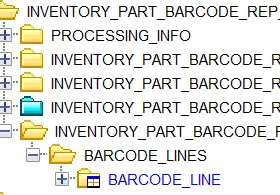
Once the field is added and published, you should be able to see it in the Barcode Line folder in IFS Report Designer when connected to IFS.