Question

Error in Step 3 of Script-Based Infrastructure Setup

  • December 2, 2025
  • 1 reply
  • 16 views

Hi everyone,

We are currently running the setup script for the Script-Based Infrastructure setup in Azure for Self-Hosted BI. Everything worked smoothly until Step 3, where the general function tried to locate the params.json file in the following path:

C:\Windows\system32\templates\…
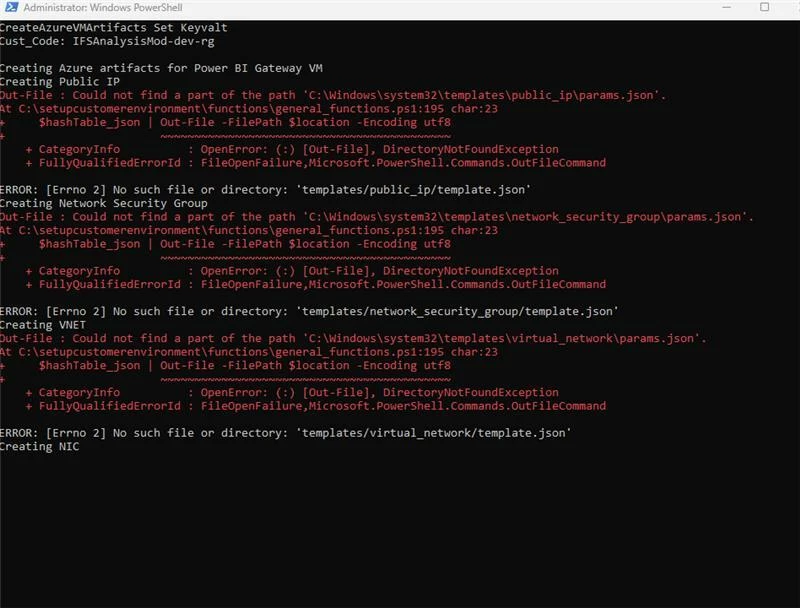


Has anyone encountered this issue before or knows how to get params.json file?

Any guidance would be greatly appreciated.

Thanks!

1 reply

  • Do Gooder (Employee)
  • December 11, 2025

Hello! When the script is run, the params.json file for each Azure artefact gets created in this location: “templates/{filePath}” where filePath is the corresponding folder name of the relevant Azure artefact. There are a set of folders inside the templates folder for each Azure artefact. Can you check if the params.json file has gotten created in those folders for the Public IP address, Network Security Group (NSG), Virtual Network, etc.? If yes, it’s a matter of locating the correct file path. 


Additionally, in your case, looks like the script is searching for the file in the “C:/Windows/System32” not the “setupcustomerenvironment” folder where the templates folder actually is. You could try running PowerShell as a normal user instead of as an Administrator.