Solved

What's the use of Generate Time Reporting Links

  • November 29, 2021
  • 3 replies
  • 147 views

eqbstal
Superhero (Partner)
Forum|alt.badge.img+21

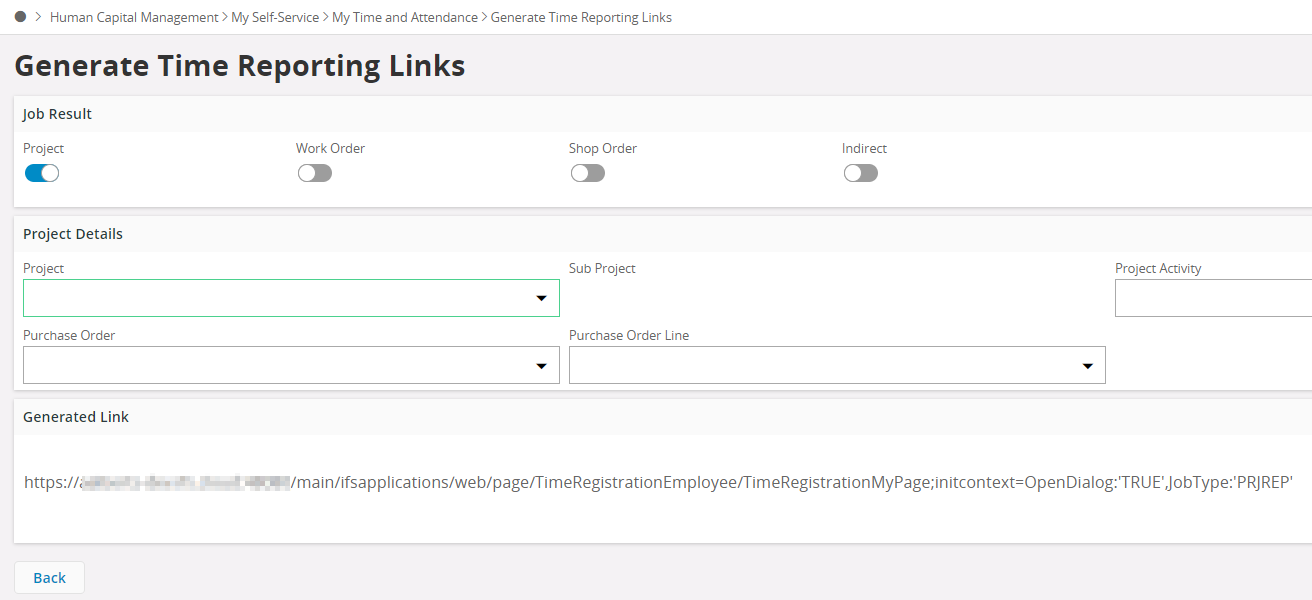
I noticed that there is the functionality in Aurena called 'Generate Time Reporting Links’. It opens the following screen:

I turned on flag Project,

What is the usage of this assistant?

There is no page help found on our server for this page.

W're on IFS10 Upd 11

Best answer by Thejaka Niroshan

Hi @eqbstal ,

I’ll start with a use case :relaxed: .

Let’s say you are a manager of group of employees and you created a new Project Activity or Work Task for a new Project / Work Order and you want to pass the information to your employees so that they can report time.
One option is of course to send details about the Project/Sub Project/Activity/Report code etc.. 

But with this you can Generate the Link for the exact combination that the employees should use (fill) when reporting time and send it to the employee (email or using any other medium). So when the employees click this link (they can also save the links as browser bookmarks), the Time Registration Page will open with the Report Time Dialog by filling all the fields in the Report Time Dialog. So employees has only to add the hours and Save.

Also you can create a Custom Lobby Element with the Generated Links and Publish the Lobby Element in a Lobby page common for Employees (Roles).

Regards,
Thejaka 

This topic has been closed for replies.

3 replies

Thejaka Niroshan
Hero (Employee)
Forum|alt.badge.img+5

Hi @eqbstal ,

I’ll start with a use case :relaxed: .

Let’s say you are a manager of group of employees and you created a new Project Activity or Work Task for a new Project / Work Order and you want to pass the information to your employees so that they can report time.
One option is of course to send details about the Project/Sub Project/Activity/Report code etc.. 

But with this you can Generate the Link for the exact combination that the employees should use (fill) when reporting time and send it to the employee (email or using any other medium). So when the employees click this link (they can also save the links as browser bookmarks), the Time Registration Page will open with the Report Time Dialog by filling all the fields in the Report Time Dialog. So employees has only to add the hours and Save.

Also you can create a Custom Lobby Element with the Generated Links and Publish the Lobby Element in a Lobby page common for Employees (Roles).

Regards,
Thejaka 


eqbstal
Superhero (Partner)
Forum|alt.badge.img+21
  • Author
  • Superhero (Partner)
  • November 29, 2021

Thejaka,


Thanks for the quick response.

Ok, that makes sense to copy the link and send it over to fellow employees.

How would I recommend a change to this assistant to make the generated link an easy to copy link. So the one only has to hit a command or right mouse to copy the hyperlink?

Regards,

Steve


Thejaka Niroshan
Hero (Employee)
Forum|alt.badge.img+5

Hi @eqbstal ,

At the moment users has to copy the link manually because we don’t have the support to provide a command button like “Copy to Clipboard”.

Also the Link is automatically changing when ever the user changes the fields above. So that’s why there isn’t an extra ‘Generate’ command.

Regards,

Thejaka