Question

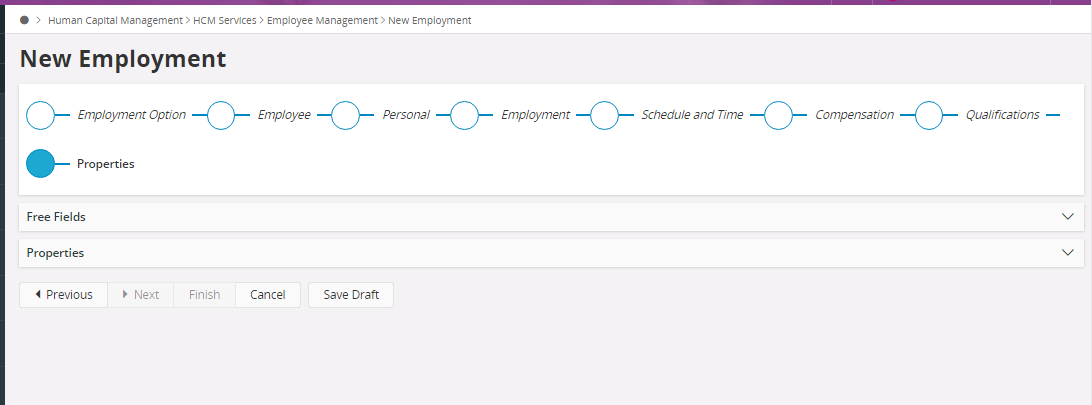
Finish button not visible in Employment Assistance in Aurena

  • July 24, 2024
  • 6 replies
  • 85 views

Forum|alt.badge.img+1

We have filled all the information in each of the tabs in ‘New Employment Assistance’ window. However, Finish button is greyed out. Any idea to fix this?



6 replies

Forum|alt.badge.img+4
  • Do Gooder (Employee)
  • July 25, 2024

Hi Binushi,

This could be an access issue - does your user have the correct HR access and permissions to setup a new employee?


Forum|alt.badge.img+11
  • Hero (Partner)
  • July 25, 2024

@Binushi : Please check ‘New Employment Configuration’ , if any step or any field is mandatory which is not entered during employee creation.

You can use ‘Save Draft’ option such that information need not to enter again.

Thanks

Vikas Jain


ADDMARIAE
Superhero (Partner)
Forum|alt.badge.img+14
  • Superhero (Partner)
  • July 26, 2024

Hi,

We have a case at IFS support right now regarding this. We have problems when starting the assistant with an own configuraiton IF we choose the re employment option.

@Binushi - do you get this problem all the time or just when using your own configuration? New employments also?

Have you tried using the light or extended system configured assistant?


Regartds,

Maria


Forum|alt.badge.img+1
  • Author
  • Do Gooder (Partner)
  • July 29, 2024

Hi @ADDMARIAE,

Thank you for the feedback

Yes, we are using a customized configuration.

As you mentioned we tried using the light or extended system configured assistant. it’s working without any issues. but we need to use our configuration template.


Forum|alt.badge.img+1
  • Author
  • Do Gooder (Partner)
  • July 29, 2024

Hi @Felenka ,

Yes, I have the correct HR access and permissions to set up a new employee.


Forum|alt.badge.img+1
  • Do Gooder (Customer)
  • December 3, 2024

We have the same issue since updating from update 16 to update 24 and are using EE, has this been resolved does anyone know?

Thanks Rohais