Solved

What's granted where?

  • March 29, 2021
  • 2 replies
  • 99 views

Forum|alt.badge.img+8

Is their a screen in IFS where you can search by “View” and find out what permission sets this view has been granted to

Best answer by Tomas Ruderfelt

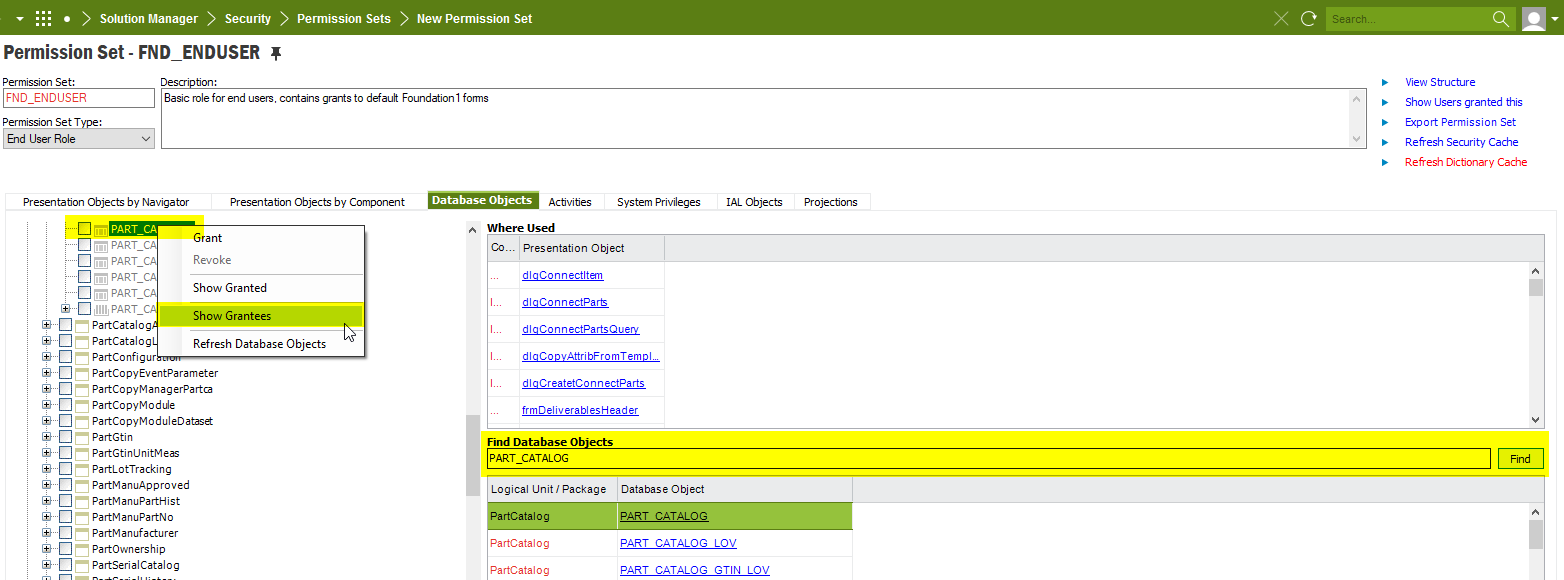
  1. Open a permission set. Any will do.
  2. Go to tab “Database objects”
  3. Search for the view.
  4. Click on the view name. (Green marked in window below.)
  5. The view is then shown in the tree structure to the left.
  6. RMB on the view in the tree structure and use menu “Show Grantees” and there you have the list of the permission sets.



2 replies

cbelardo
Sidekick (Former Employee)
Forum|alt.badge.img+5
  • Sidekick (Former Employee)
  • March 29, 2021

Hi Sandra - when you say ‘IFS’ which type of application are you using?  Apps, HR, finance?  If you could provide more detail and additionally a screenshot I can find a better forum here where you can get an answer.


Forum|alt.badge.img+21
  • Superhero (Employee)
  • Answer
  • March 30, 2021
  1. Open a permission set. Any will do.
  2. Go to tab “Database objects”
  3. Search for the view.
  4. Click on the view name. (Green marked in window below.)
  5. The view is then shown in the tree structure to the left.
  6. RMB on the view in the tree structure and use menu “Show Grantees” and there you have the list of the permission sets.