Question

Quick Report search multiple Values

  • February 11, 2021
  • 9 replies
  • 2895 views

Forum|alt.badge.img+1

Hi,

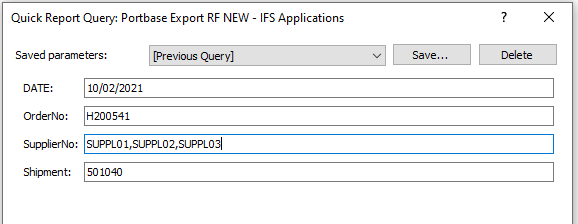
When I want to run my quick report. I want it to provide me with the data of all the 3 suppliers, but it only gives back the results of the first supplier.

So what is the input to look for multiple values and report those multiple values back into the report?

Help is appreciated!
Kind Regards

This topic has been closed for replies.

9 replies

Forum|alt.badge.img+28
  • Superhero (Customer)
  • February 12, 2021

We would typically do simple reports like this if you want multiple values.

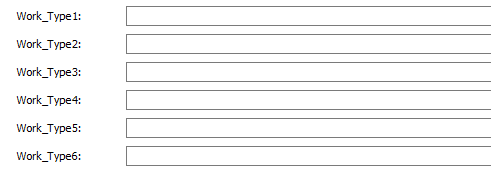
Set the quick report parameters for the number of variables you would like to add as search parameters.

Quick Report Parameter dialog

Then construct your query to handle one or all populated or when they are blank like this:

 and (nvl(HSO.Work_Type_Id,ASO.Work_Type_Id) like nvl( '&[-C-BL]Work_Type1','%') 
      or nvl(HSO.Work_Type_Id,ASO.Work_Type_Id) like nvl( '&[-C-BL]Work_Type2','') 
      or nvl(HSO.Work_Type_Id,ASO.Work_Type_Id) like nvl( '&[-C-BL]Work_Type3','') 
      or nvl(HSO.Work_Type_Id,ASO.Work_Type_Id) like nvl( '&[-C-BL]Work_Type4','') 
      or nvl(HSO.Work_Type_Id,ASO.Work_Type_Id) like nvl( '&[-C-BL]Work_Type5','') 
      or nvl(HSO.Work_Type_Id,ASO.Work_Type_Id) like nvl( '&[-C-BL]Work_Type6','') )


There are several other ways to accomplish this, but I think this is the simplest to understand and implement.


EntNadeeL
Hero (Partner)
Forum|alt.badge.img+10
  • Hero (Partner)
  • February 12, 2021

Hi @LucasFlamingo ,

Change where clause in your quick report as below.

select  *
from customer_order t
where t.order_no in
  (select regexp_substr('*1096,*1097,*1149','[^,]+', 1, level) 
   from dual 
   connect BY regexp_substr('*1096,*1097,*1149', '[^,]+', 1, level) 
   is not null);


In this scenario order_no input is given as *1096,*1097,*1149 and I have delimited it using a comma.

same way you can give Supplier01,Supplier02,Supplier03 and do the same.


Thanks,

Kind Regards,


durette
Superhero (Customer)
Forum|alt.badge.img+19
  • Superhero (Customer)
  • February 12, 2021

Hi @LucasFlamingo ,

Change where clause in your quick report as below.

select  *
from customer_order t
where t.order_no in
  (select regexp_substr('*1096,*1097,*1149','[^,]+', 1, level) 
   from dual 
   connect BY regexp_substr('*1096,*1097,*1149', '[^,]+', 1, level) 
   is not null);


In this scenario order_no input is given as *1096,*1097,*1149 and I have delimited it using a comma.

same way you can give Supplier01,Supplier02,Supplier03 and do the same.


Thanks,

Kind Regards,

This method uses any database indexes you might have, too.


dhlelk
Superhero
Forum|alt.badge.img+15
  • Superhero
  • February 13, 2021

Hi @LucasFlamingo,

The solution given by @EntNadeeL is a faster way to fulfil your original requirement.

However, if you need extended functionality for quick report parameters similar to the functionality in Query Dialogs, you could you the following method.

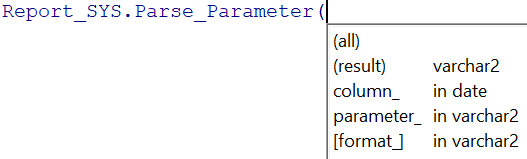
WHERE &AO.Report_SYS.Parse_Parameter(<SUPPLIER_NO_COLUMN_HERE>, '&[MC-BL]SupplierNo') = 'TRUE'

I have used Query Flags to control the end user input to allow or disallow certain combinations and the Report_SYS.Parse_Parameter function to handle the following advance search options present in the Query Dialog,
1. Ranges with '>,<,>=,<=,=,!=' operators.
2. Multiple separated by ';' in the input.
3. Between '..' operator.
4. Wildcards characters '%' and '_' allowed.

The Report_SYS.Parse_Parameter function is able to handle all of the above options at once, but please note that having a function call on the where clause is not performance friendly. Hence I would recommend you to use the Report_SYS.Parse_Parameter function in a scenario where you want to handle 2 or more options given above at once.

Further, you will have to change your delimiter to ';' character if you are planning to use the Report_SYS.Parse_Parameter function.

You might need to check the below article on how to convert the above link to your customer specific f1doc URL,

Cheers !
Dhananjaya.


Forum|alt.badge.img+6
  • Do Gooder (Customer)
  • February 26, 2021

Does this also support date columns?


dhlelk
Superhero
Forum|alt.badge.img+15
  • Superhero
  • February 27, 2021

Does this also support date columns?

Hi @NSRJMITCHELL,

Yes, it supports date columns.

Cheers !
Dhananjaya.


Forum|alt.badge.img+4

Hello,


Does this also work with a Crystal Report (.rpt -file) as a report.

I have to set the date between to values.


EntNadeeL
Hero (Partner)
Forum|alt.badge.img+10
  • Hero (Partner)
  • April 8, 2021

Hello,


Does this also work with a Crystal Report (.rpt -file) as a report.

I have to set the date between to values.


I am not sure if Report_SYS.Parse_Parameter option works with the crystal report. But you can do the same way I have explained in the Crystal report side. There are methods to break input parameter strings and then check conditions in record selection formula.


Forum|alt.badge.img+4

Problem solved by using different parameter.

Turns out the problem was a logdate and not a normal date.