Solved

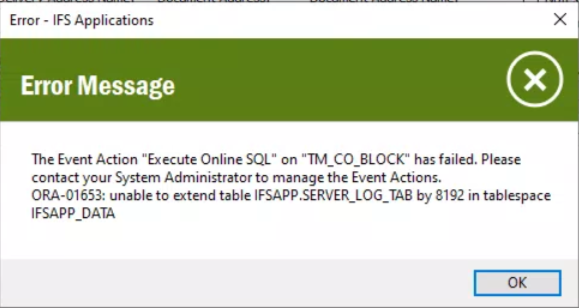
ORA-01653: unable to extend table IFSAPP.SERVER_LOG_TAB by 8192 in tablespace IFSAPP_DATA

  • May 5, 2021
  • 4 replies
  • 1566 views

Forum|alt.badge.img+18

The Event Action CO_LINE_BLOCKED has failed.  Please contact your system administrator to manage the Event Actions.

ORA-01653: unable to extend table IFSAPP.SERVER_LOG_TAB by 8192 in tablespace IFSAPP_DATA

Best answer by Himasha Abeywickrama

Hi @johnw66 ,


Have you tried adding a new datafile for the existing tablespace?

ALTER TABLESPACE IFSAPP_DATA ADD DATAFILE '/u01/oradata/userdata03.dbf' SIZE 200M;

To find out the location and size of your data files:

SELECT FILE_NAME, BYTES FROM DBA_DATA_FILES WHERE TABLESPACE_NAME = 'IFSAPP_DATA';


Hope this helps! 

This topic has been closed for replies.

4 replies

Himasha Abeywickrama
Superhero (Customer)
Forum|alt.badge.img+18

Hi @johnw66 ,


Have you tried adding a new datafile for the existing tablespace?

ALTER TABLESPACE IFSAPP_DATA ADD DATAFILE '/u01/oradata/userdata03.dbf' SIZE 200M;

To find out the location and size of your data files:

SELECT FILE_NAME, BYTES FROM DBA_DATA_FILES WHERE TABLESPACE_NAME = 'IFSAPP_DATA';


Hope this helps! 


RanukaSerasinghe
Hero (Partner)
Forum|alt.badge.img+7

@johnw66 Please note that It would be better to fix this as soon as possible as it could eventually lead to a System Down situation. Pls refer to Alter Tablespace Add Datafile:http://www.dba-oracle.com/t_alter_tablespace_add_datafile.htm


Forum|alt.badge.img+18
  • Author
  • Superhero (Partner)
  • May 5, 2021

@Himasha Kapugeekiyanage Thank you very much, that resolved the issue.

@RanukaSerasinghe  Thank you for your input as well.


Have a nice day.


Forum|alt.badge.img+18
  • Author
  • Superhero (Partner)
  • May 5, 2021

I have had the same error relating to a separate custom event.  


I have added another datafile, but am wondering why this is happening now?

ALTER TABLESPACE IFSAPP_DATA ADD DATAFILE ‘F:\oradata\IFSLCDB\IFSLPDB\IFSAPP_DATA04.dbf' SIZE 200M;


I am having a look at the SERVER_LOG_TAB to see what is eating the space.


Thanks  John