
Answer

Navigation url for notifications in cloud

  • December 1, 2025
  • 7 replies
  • 58 views

RakeshChangeshpur
Sidekick (Partner)
Forum|alt.badge.img+10

Hi Team,

There is a custom event in Apps10 to generate streams message and how can we apply the same in cloud 24R2?


Can anyone let me know on the url to use as i tried in multiple ways it is not working as expected. Any leads on this would be much appreciated. Thank you 

When the custom field is modified the notification generates for certain users and when clicked it should redirect to the specific record which isnt filtering in cloud like it works in apps10
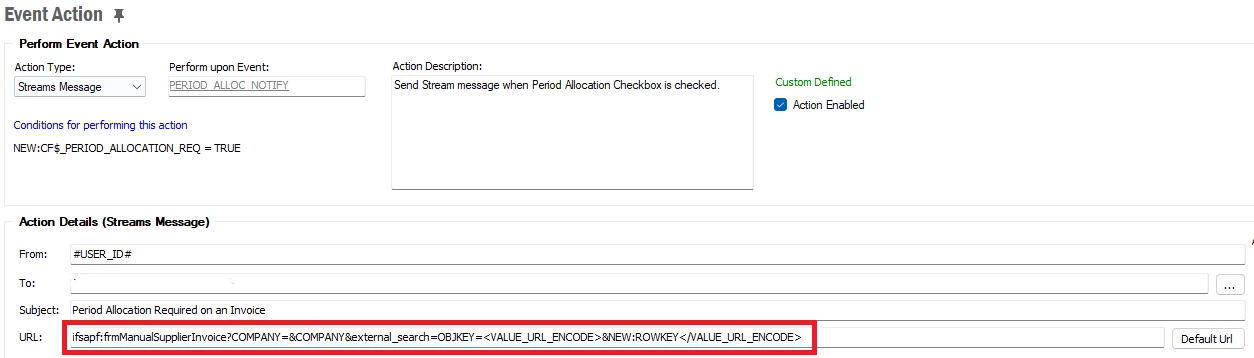
 

Apps10 URL:

ifsapf:frmManualSupplierInvoice?COMPANY=&COMPANY&external_search=OBJKEY=<VALUE_URL_ENCODE>&NEW:ROWKEY</VALUE_URL_ENCODE>


Options tried in cloud:

page/ManualSupplierInvoice/Form?$filter=external_search=OBJKEY=<VALUE_URL_ENCODE>&NEW:ROWKEY</VALUE_URL_ENCODE>

This redirects to the Manual Supplier invoice page but doesnt filter the record


Regards,

Rakesh

Best answer by TheoB

Did you use this URL? :

page/ManualSupplierInvoice/Form;$filter=InvoiceId eq &INVOICE_ID_ and Company eq '&COMPANY_'


7 replies

Forum|alt.badge.img+14
  • Hero (Partner)
  • December 1, 2025

Hi ​@RakeshChangeshpur,

I'm not sure that redirecting to the Objkey will work because I don't think this key is included in the REST API used to display supplier invoice information.
However, you can filter directly on a key like this:

page/ManualSupplierInvoice/Form;$filter=InvoiceId eq 123


Best Regards

Théo


RakeshChangeshpur
Sidekick (Partner)
Forum|alt.badge.img+10

Hi ​@TheoB ,


Thanks for the response.

I tried this way but it isn’t picking the invoice dynamically

page/ManualSupplierInvoice/Form;$filter=InvoiceId eq $[INVOICE_ID]


Forum|alt.badge.img+14
  • Hero (Partner)
  • December 1, 2025

Hi ​@RakeshChangeshpur,

This syntax should be used in the lobby settings: $[INVOICE_ID]

Here, in EVENTS, you must prefix the attribute name (active in the EVENT) with “&NEW:” or “&OLD:”.

If the InvoiceId appears in your EVENT, you will have something like this:

page/ManualSupplierInvoice/Form;$filter=InvoiceId eq &NEW:INVOICE_ID

Best Regards.


RakeshChangeshpur
Sidekick (Partner)
Forum|alt.badge.img+10

Hi ​@TheoB 

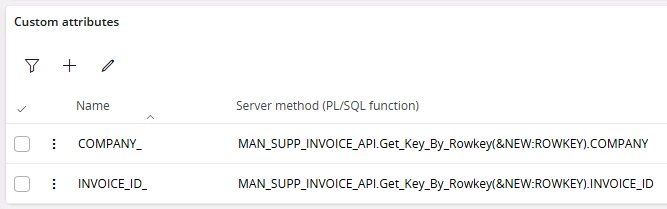
As this is a CFT i dont see any columns apart from cf$_XXX  and the ROWKEY and i am having a custom attribute called company 


so while redirecting i need the filter to apply for company and the rowkey as you mentioned rowkey is not possible whats the alternate way now?


Forum|alt.badge.img+14
  • Hero (Partner)
  • December 1, 2025

Hi ​@RakeshChangeshpur,

You can try using these two custom attributes:


Best Regards,

Théo


RakeshChangeshpur
Sidekick (Partner)
Forum|alt.badge.img+10

i already tried this and it didt work in url


Forum|alt.badge.img+14
  • Hero (Partner)
  • Answer
  • December 1, 2025

Did you use this URL? :

page/ManualSupplierInvoice/Form;$filter=InvoiceId eq &INVOICE_ID_ and Company eq '&COMPANY_'