Answer

Login Information requested when trying to run a Quick Report

  • January 14, 2020
  • 4 replies
  • 792 views

Forum|alt.badge.img+18

I have set up a Quick Report to run a Crystal Report and this works fine except that I am being prompted for Login Information each time it is run.


e.g. if the Crystal Report is accessing the CUSTOMER_ORDER_TAB I receive the following:


Login Information for CUSTOMER_ORDER_TAB is requested prompting me to enter:

Login:

Password:

DB Instance: 

Schema Owner:


Can anyone please advise what I am missing.
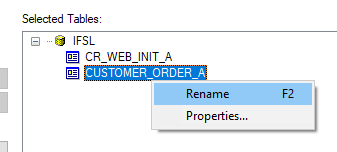
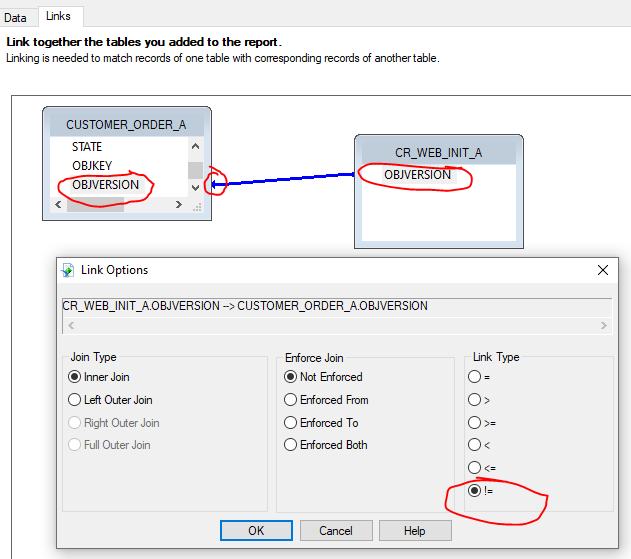
Best answer by CallumW

Few things....

  1. Use the CUSTOMER_ORDER view in IFSAPP → Views instead of accessing the table directly
  2.  Add in the CR_WEB_INIT (IFSAPP → Qualifiers → CRYSTAL_WEB_UTIL_API)
  3. Rename your tables appending either \ or _A 
  4.  Change the linking 
  5. Add the OBJVERSION to the Report Header and suppress 


4 replies

Banu Liyanapathirana
Hero (Employee)
Forum|alt.badge.img+13

@johnw66,

What ifs version are you using?

Have you added \ or \\ to the end of alias for IFS Applications data sources when designing the quick report?


Please refer the document attached


CallumW
Superhero (Partner)
Forum|alt.badge.img+16
  • Superhero (Partner)
  • Answer
  • January 14, 2020

Few things....

  1. Use the CUSTOMER_ORDER view in IFSAPP → Views instead of accessing the table directly
  2.  Add in the CR_WEB_INIT (IFSAPP → Qualifiers → CRYSTAL_WEB_UTIL_API)
  3. Rename your tables appending either \ or _A 
  4.  Change the linking 
  5. Add the OBJVERSION to the Report Header and suppress 


NickPorter
Superhero (Customer)
Forum|alt.badge.img+18
  • Superhero (Customer)
  • January 14, 2020

2 things:

  1. You need to add CR_WEB_INIT to your report layout (as mentioned by @CallumW)
  1. Ensure that the System Parameter named “Specify if web database access security check is required” is set to “NO”.  This should be the default value but double check it

Nick


Forum|alt.badge.img+18
  • Author
  • Superhero (Partner)
  • January 14, 2020

Thank you very much to everyone for your assistance.

@Banu Liyanapathirana We are using IFS Applications 10.

@CallumW@NickPorter Thank you very much for your advise.  By adding the suffix _A the problem has been resolved.

Also the system parameter named “Specify if web database access security check is required” is set to “No”.

Your help has been much appreciated.

John