Question

Lobby Element Designer- List Element- Formatting $$$

  • July 14, 2020
  • 7 replies
  • 992 views

Forum|alt.badge.img+10

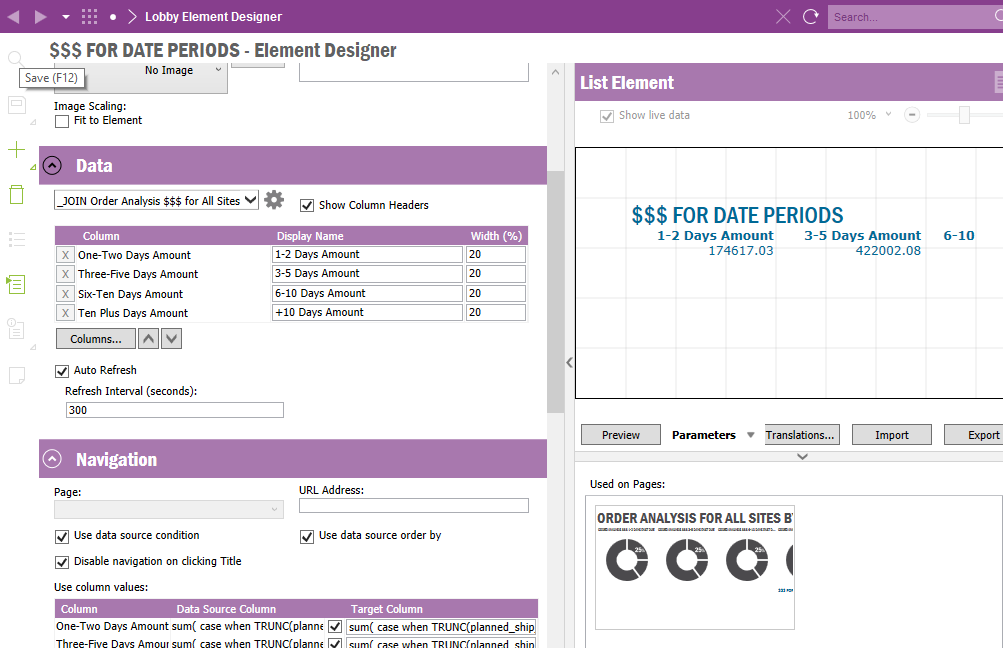
I have a List Element and was wondering how do I format the numbers as currency?

You’re able to do it for Lists and Pie Charts numbers but not Lists.
 

7 replies

Forum|alt.badge.img+12
  • Hero (Employee)
  • July 14, 2020

This is handled in the datasource of the lobby element, you can mark the formatting for the specific column. (Text, Number, Currency etc)

Down in the column section.


Forum|alt.badge.img+10
  • Author
  • Sidekick (Customer)
  • July 14, 2020

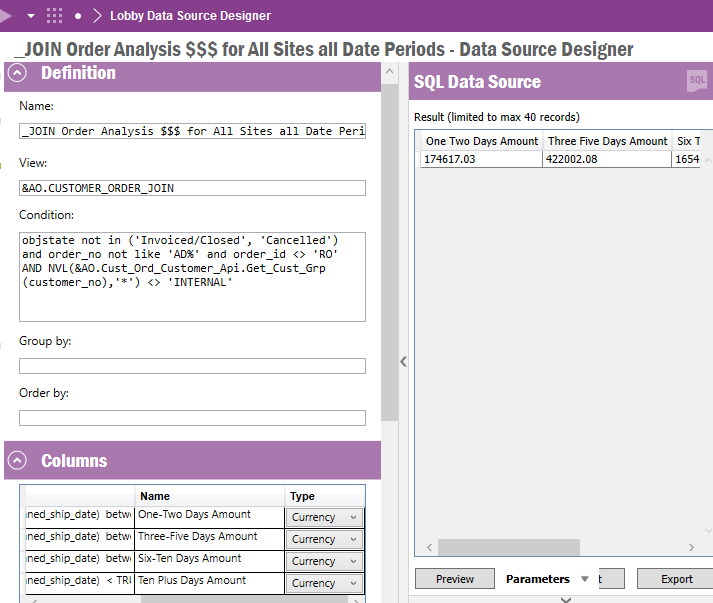
thx. Hmm, I have those 4 columns set to Currency:


Forum|alt.badge.img+12
  • Hero (Employee)
  • July 14, 2020

How would you like to have it formatted? With the currency sign in front or…?

Otherwiase a to_char might work, this sometimes scrambles the List-Lobby-Item though in term of outlining.


Forum|alt.badge.img+10
  • Author
  • Sidekick (Customer)
  • July 14, 2020

I set the Type column to Currency. That work on Line and Pie Chart elements but apparently not in Lists?

I then shouldn’t have to put a to_char in the SQL, correct?


Forum|alt.badge.img+12
  • Hero (Employee)
  • July 16, 2020

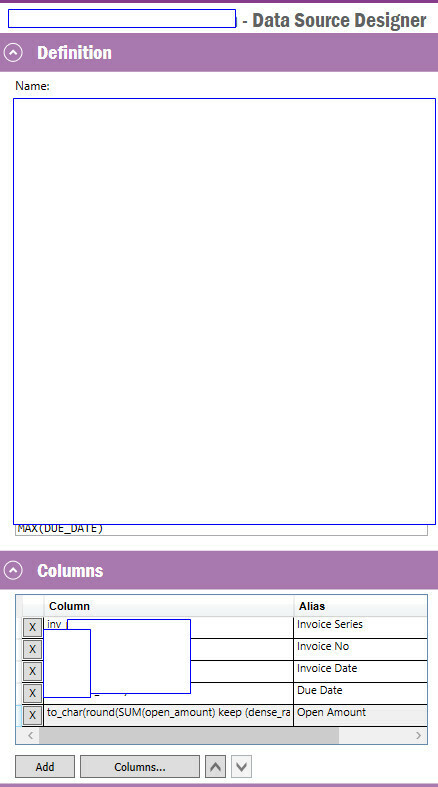
This is the I've used for showing the open amount.

to_char(round(SUM(open_amount), '9G999G999','NLS_NUMERIC_CHARACTERS = '',.''')

what also, just for inspiration, could be a good idea is to add the possibility to divide the number and make it possible to show it as THOUSANDS.

then it would look like this;

to_char(round(SUM(open_amount) keep (dense_rank last order by balance_date)/$DIVIDE_BY$, 0), '9G999G999','NLS_NUMERIC_CHARACTERS = '',.''')


Forum|alt.badge.img+10
  • Author
  • Sidekick (Customer)
  • July 16, 2020

looks great- however I get an syntax err when testing it in SQL Query Tool- where is the 3rd right parentheses?


my code:

to_char( round( SUM (
case when TRUNC(wanted_delivery_date) <= TRUNC(sysdate - INTERVAL '1' DAY) then
( SELECT
SUM( (buy_qty_due + (qty_shipdiff / DECODE(conv_factor,0,1, conv_factor*inverted_conv_factor)) - qty_invoiced) * sale_unit_price )

FROM rega1app.CUSTOMER_ORDER_LINE col

WHERE col.order_no = co.order_no

and ( BUY_QTY_DUE + (QTY_SHIPDIFF / decode(CONV_FACTOR,0,1, CONV_FACTOR*INVERTED_CONV_FACTOR)) - QTY_INVOICED) > 0
and LINE_ITEM_NO <= 0
and OBJSTATE in ('Delivered', 'PartiallyDelivered', 'Picked', 'Released', 'Reserved')
)
else 0 end
), '9G999G999','NLS_NUMERIC_CHARACTERS = '',.''')) "Past Due Order Gross Amount"


your example:

to_char(round(SUM(open_amount), '9G999G999','NLS_NUMERIC_CHARACTERS = '',.''')


Forum|alt.badge.img+10
  • Author
  • Sidekick (Customer)
  • July 16, 2020

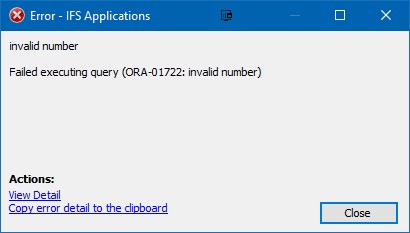
I was able to format it w/o a syntax err but then get this when i run it:


to_char( ROUND( SUM (
case when TRUNC(wanted_delivery_date) <= TRUNC(sysdate - INTERVAL '1' DAY) then
( SELECT
SUM( (buy_qty_due + (qty_shipdiff / DECODE(conv_factor,0,1, conv_factor*inverted_conv_factor)) - qty_invoiced) * sale_unit_price )

FROM rega1app.CUSTOMER_ORDER_LINE col

WHERE col.order_no = co.order_no

and ( BUY_QTY_DUE + (QTY_SHIPDIFF / decode(CONV_FACTOR,0,1, CONV_FACTOR*INVERTED_CONV_FACTOR)) - QTY_INVOICED) > 0
and LINE_ITEM_NO <= 0
and OBJSTATE in ('Delivered', 'PartiallyDelivered', 'Picked', 'Released', 'Reserved')
)
else 0 end
) , '99G999G999'),'NLS_NUMERIC_CHARACTERS = '',.''') "Past Due Order Gross Amount"