Question

Inventory Part Usage Tracing Not Loading

  • April 1, 2024
  • 14 replies
  • 171 views

Forum|alt.badge.img+8
  • Sidekick (Customer)

We are currently on apps 10 upd 18 Aurena and in the middle of a cloud upgrade. We’ve noticed in apps 10 that the Inventory Part Usage Tracing page doesn’t load when you click it from the navigator. It’s like there’s no URL under the page.

I can RMB on Inventory Transaction History and see “Open link in new tab”
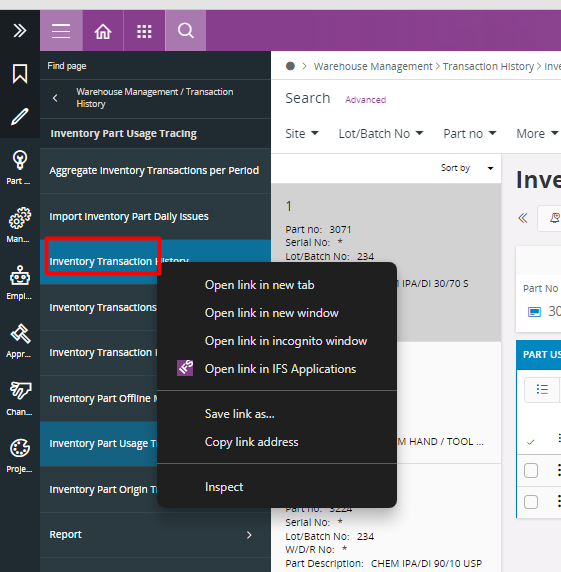

When I RMB on Inventory Part Usage Tracing in the navigator it shows me the menu that looks like I’m not clicked on a link. Does anyone else have this issue?

​​​​


Eventually after clicking it (~10 mins of waiting) it will load but there is no indication on the screen that it’s loading.


14 replies

Forum|alt.badge.img+14
  • Superhero (Partner)
  • April 2, 2024

@Anna I checked in an internal instance on Update 15 and can confirm that the RMB behavior is the same.  For the two tracing pages, Open Link is not available.  If I look at what’s happening when I open the Inventory Part Usage Tracing, I can see that the Tree for the first part appearing on the Selector is being generated.  For me it’s fast, but that may be for a variety of reasons, including the Update version difference.

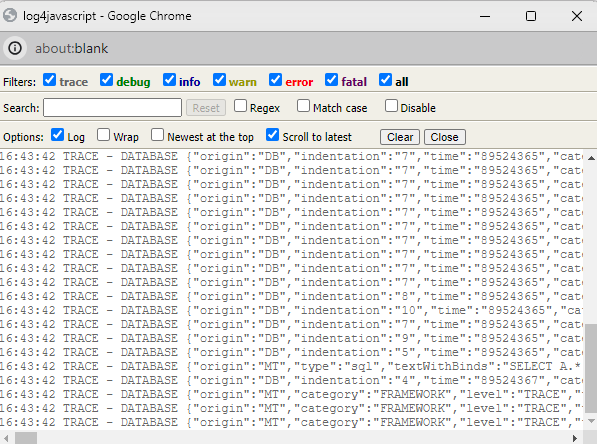
To trouble-shoot, I would enable the Debug Log Window, then click on the Inventory Part Usage Tracing link in the Navigator.  That should shed some light on what’s happening and how long it’s actually taking.  This should also help to identify if the issue is more of a web page rendering thing than an actual “generate the data” thing.


Forum|alt.badge.img+8
  • Author
  • Sidekick (Customer)
  • April 2, 2024

Hi @Tracy Norwillo, That was a very good suggestion. When I click it with the debug open nothing is logging in the debug console. Maybe this is an IFS ticket.


Forum|alt.badge.img+14
  • Superhero (Partner)
  • April 2, 2024

@Anna  Is it completely blank for everywhere in IFS or only the Inventory Part Usage Tracing? 

If your Debug Console is completely blank everywhere, ensure that you are working under a permission set with the DEBUGGER system privilege and have clicked all of the Filters in the console so they are checked.  


Forum|alt.badge.img+8
  • Author
  • Sidekick (Customer)
  • April 2, 2024

Hi @Tracy Norwillo, it is not blank everywhere. I have debugger enabled on my permission set. This is just me clicking on Inventory Transactions History but it’s blank when I click on Inventory Part Usage Tracing.


Forum|alt.badge.img+14
  • Superhero (Partner)
  • April 2, 2024

I suppose it may be ticket time, but if you’re in the middle of a Cloud upgrade, how long do you need to live with an Apps 10 Aurena issue?


Forum|alt.badge.img+8
  • Author
  • Sidekick (Customer)
  • April 3, 2024

Hi Tracy,
We are planning a cloud go live this year so at the moment, we’re investigating the Aurena apps 10 agent to make sure that everything we do in IEE will be doable in Aurena. I’m gonna throw a ticket to see if they have any insight into this issue. Hopefully you’re right that it’s a version difference.


Forum|alt.badge.img+4
  • Do Gooder (Employee)
  • October 16, 2024

Hi @Anna ,

Would you please be kind enough to share the case ID for the ticket you have raised for this issue?

I have received a similar case.


Thanks in advance!

Regards,
Niluminda


Forum|alt.badge.img+8
  • Author
  • Sidekick (Customer)
  • October 16, 2024

Hi @NilumindaP the case number is CS0299809


Forum|alt.badge.img
  • Do Gooder (Customer)
  • October 24, 2025
The same issue occurs in Cloud 24.2. The "Inventory part usage tracing" and "Inventory part origin tracing" screens load too slowly to be usable. Has anyone found a solution?

OllieByrne
Do Gooder (Customer)
Forum|alt.badge.img+1
  • Do Gooder (Customer)
  • February 9, 2026

We have updated to Cloud 25R1 (from an earlier Cloud version).

‘Inventory Part Origin Tracing’ is not returning any data at all - going to error.  Have raised a ticket but did anyone have a issue and how was it resolved - if at all?


Forum|alt.badge.img
  • Do Gooder (Customer)
  • February 9, 2026

We have updated to Cloud 25R1 (from an earlier Cloud version).

‘Inventory Part Origin Tracing’ is not returning any data at all - going to error.  Have raised a ticket but did anyone have a issue and how was it resolved - if at all?

Hi Ollie,

We've tried everything but the problem remains unresolved. We used to use IFS-8 and it worked perfectly there. It's very strange that everything is broken in a current version.

We created a quick report to access the data, and we'll manage like this until the problem is completely solved.


Forum|alt.badge.img+4
  • Sidekick (Customer)
  • February 19, 2026

We are facing the same issue with this window. I already created a Case for investigation and fixing.

The page is not working properly:

  • loading takes too long or timeout,
  • results are not consistent,
  • first result that is clicked is selected, but when attempting to select another result, no action occurs and the selection does not change.

Furthermore, after this issue occurs, it is no longer possible to navigate to another screen:

  • Navigation via Bookmarks does not work
  • Navigation via Recently Used Windows does not work
  • Performing a refresh does not resolve the issue

The only way to recover is to fully restart IFS.


Forum|alt.badge.img
  • Do Gooder (Customer)
  • February 19, 2026

We are facing the same issue with this window. I already created a Case for investigation and fixing.

The page is not working properly:

  • loading takes too long or timeout,
  • results are not consistent,
  • first result that is clicked is selected, but when attempting to select another result, no action occurs and the selection does not change.

Furthermore, after this issue occurs, it is no longer possible to navigate to another screen:

  • Navigation via Bookmarks does not work
  • Navigation via Recently Used Windows does not work
  • Performing a refresh does not resolve the issue

The only way to recover is to fully restart IFS.


We are experiencing the exact same problems as you in IFS Cloud version 24.2. The situation is the same in other versions as well. Something is going wrong, and the headquarters is very slow to resolve it. No one is listening to us.


OllieByrne
Do Gooder (Customer)
Forum|alt.badge.img+1
  • Do Gooder (Customer)
  • February 19, 2026

We are facing the same issue with this window. I already created a Case for investigation and fixing.

The page is not working properly:

  • loading takes too long or timeout,
  • results are not consistent,
  • first result that is clicked is selected, but when attempting to select another result, no action occurs and the selection does not change.

Furthermore, after this issue occurs, it is no longer possible to navigate to another screen:

  • Navigation via Bookmarks does not work
  • Navigation via Recently Used Windows does not work
  • Performing a refresh does not resolve the issue

The only way to recover is to fully restart IFS.


We are experiencing the exact same problems as you in IFS Cloud version 24.2. The situation is the same in other versions as well. Something is going wrong, and the headquarters is very slow to resolve it. No one is listening to us.

FYI, previously we were on Cloud 22R2 and it worked there. I am talking about the Origin Tracing query. Note, if I select a very small trace, it does work in 25R1, i.e. a trace where I know there is only one or two lower level sources - so at least we know it works.  The issue relates to size of calculations and resulting timeout.  Ours issue pops up an error window after 10 minutes, however, the error window says that the timeout happened after 300 seconds - so even that doesn’t work properly ;) 

Thanks all for comments :)