



Question

IFS Developer Studio ERROR: Cannot find model file

  • April 14, 2026
  • 1 reply
  • 14 views

SayuruBopitiya
Do Gooder (Partner)
Forum|alt.badge.img

Hi All,


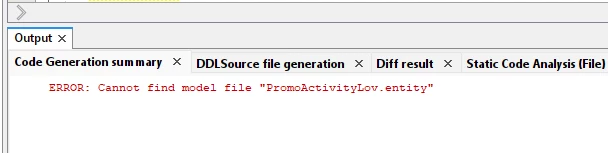
I get this error “Cannot find model file” when deploying a fragment file with dependents:
 

Here’s what i tried:

I did a codebase search of “PromoActivityLov” but there were no hits in the workspace or the build folder.

I looked at the projection svc, client cpi and the metadata docs to see if there were any occurrences there but I couldn't find any.

I deleted the entire cache folder of developer studio (AppData\Roaming\DeveloperStudio\18\) and redeployed the fragment but the error is still there.


Any other options left to resolve this? because I’m stumped at this point. Any help is appreciated thanks!

(FYI, the fragment file is in RMCOM)


thanks,

/Sayuru

1 reply

Forum|alt.badge.img+9
  • Hero (Partner)
  • April 15, 2026

Hi All,


I get this error “Cannot find model file” when deploying a fragment file with dependents:


Here’s what i tried:

I did a codebase search of “PromoActivityLov” but there were no hits in the workspace or the build folder.

I looked at the projection svc, client cpi and the metadata docs to see if there were any occurrences there but I couldn't find any.

I deleted the entire cache folder of developer studio (AppData\Roaming\DeveloperStudio\18\) and redeployed the fragment but the error is still there.


Any other options left to resolve this? because I’m stumped at this point. Any help is appreciated thanks!

(FYI, the fragment file is in RMCOM)


thanks,

/Sayuru

Hi ​@SayuruBopitiya ,

This is a classic missing dependency issue in Developer Studio. The error is telling you that the fragment references PromoActivityLov.entity, but that model file isn't present anywhere in your current workspace — which is why the codebase search came up empty too.

A few things worth checking:

1. **Check the fragment XML directly** — Open your .fragment file and search for "PromoActivityLov". This will tell you exactly how it's being referenced (as a LOV source, a navigation entity, etc.) and give you a clearer picture of where it's supposed to come from.

2. **It may belong to a different IFS component** — Since your fragment is in RMCOM, PromoActivityLov could be defined in a related component (e.g., a Pricing or Campaign-related package). Check whether that component is included in your workspace. If not, you'll need to add the relevant package/component so Developer Studio can resolve the model.

3. **Check component dependencies** — In your workspace settings, verify that all components RMCOM depends on are properly loaded. A missing upstream component is a common cause of this exact error.

4. **Search across all IFS source folders** — If you have access to the full IFS source, do a filesystem-level search for "PromoActivityLov.entity" outside your current workspace directory. It may exist in a component folder that simply isn't linked to your workspace yet.

5. **If it doesn't exist anywhere** — It's possible the entity was removed or renamed in your IFS version, and the fragment still holds a stale reference to it. In that case, the reference in the fragment file would need to be updated or removed.

Let us know what you find in the fragment XML — that'll help narrow it down further!